
Data current as of Nov 9, 2026. Next update: February 2027.
You want to know what potential clients ask ChatGPT before they hire a lawyer.
About 4 in 10 US adults now use AI chatbots to search for information, according to Pew Research Center. None of the tools in this post will show you what they actually asked.
Not OpenAI. Not Google. Not your SEO tools, no matter what their dashboards suggest.
What you can get is a set of partial views. Here’s what each source actually gives you, at a glance:
| Source | Type | ✅ What it shows you | ❌ What it doesn’t show you |
|---|---|---|---|
| ChatGPT | AI chatbot | General reports on how people use it | The questions people asked |
| Claude | How people use it, by topic and US state | ||
| Copilot | One report on popular topics | ||
| Gemini, Perplexity | No public usage report | ||
| Search Console | Free Google tool | How often Google’s AI showed your pages | What people searched, or who clicked |
| GA4 | Visitors who came from AI tools | Many visitors from phone apps | |
| Semrush | Paid SEO tool | ⚠️ Estimated questions, from a sample of users | What your own clients asked |
| Ahrefs | ⚠️ Questions based on Google searches | Questions people really asked AI |
The short version: AI platforms show you nothing about your firm. Google shows you visibility and clicks. SEO tools show you estimates.
This post breaks down what each source measures, what it can’t show you, and how to use them together to track signed cases.
What Can Each Tool Tell You About AI Search?
| Tool or source | What it is | How it collects data | What it measures | Shows what people actually typed? | Best use for your firm |
|---|---|---|---|---|---|
| AI company reports (Anthropic, OpenAI, Microsoft) | The companies that run Claude, ChatGPT and Copilot | Automated classification of samples of real conversations | Aggregated topics and tasks | No. Classifications only | Understanding what people use AI for |
| Google Analytics 4 | Google’s free website analytics tool | Tracking code on your own site | Visits to your site from AI tools | No | Tying AI traffic to leads and signed cases |
| Google Search Console | Google’s free tool for site owners | Google’s own search data | Impressions of your pages in AI Overviews and AI Mode | No. No query data in the AI report | Seeing which pages Google’s AI shows |
| Semrush AI Visibility Toolkit | Paid SEO tool | Prompts from its clickstream panel (Datos) plus Google AI Overview keywords, with the AI answers collected | Brand mentions and estimated topic demand | Partly. Panel prompts, simplified | Spotting topics and competitor mentions |
| Ahrefs Brand Radar | Paid SEO tool | Questions built from Google search data, then run through AI platforms | Brand mentions across a topic | No. Modeled from search data | Measuring brand mentions across a topic |
No source shows you real prompts tied to your firm. Each one shows you one slice.
The rest of this post goes through each one.
What Do AI Companies Actually Publish About How People Use Them?
| AI platform | Public usage data | Actual prompts published? | Useful for your research? |
|---|---|---|---|
| Claude (Anthropic) | Task types, request topics, US state and country breakdowns, open dataset | No. Aggregated classifications only | High |
| ChatGPT (OpenAI) | Usage by activity and topic from a 1.5 million conversation study | No | Medium |
| Microsoft Copilot | Topics and intents from 37.5 million consumer conversations | No | Medium |
| Gemini (Google) | Selected statistics | No comprehensive public dataset found | Low |
| Perplexity | Selected platform statistics | No comprehensive public dataset found | Low |
None of them publish raw prompts. Three of them publish useful aggregated data.
This is the core problem with AI search research. Google gives you query data in Search Console. AI companies don’t give you anything close.
Anthropic’s Economic Index (Claude)
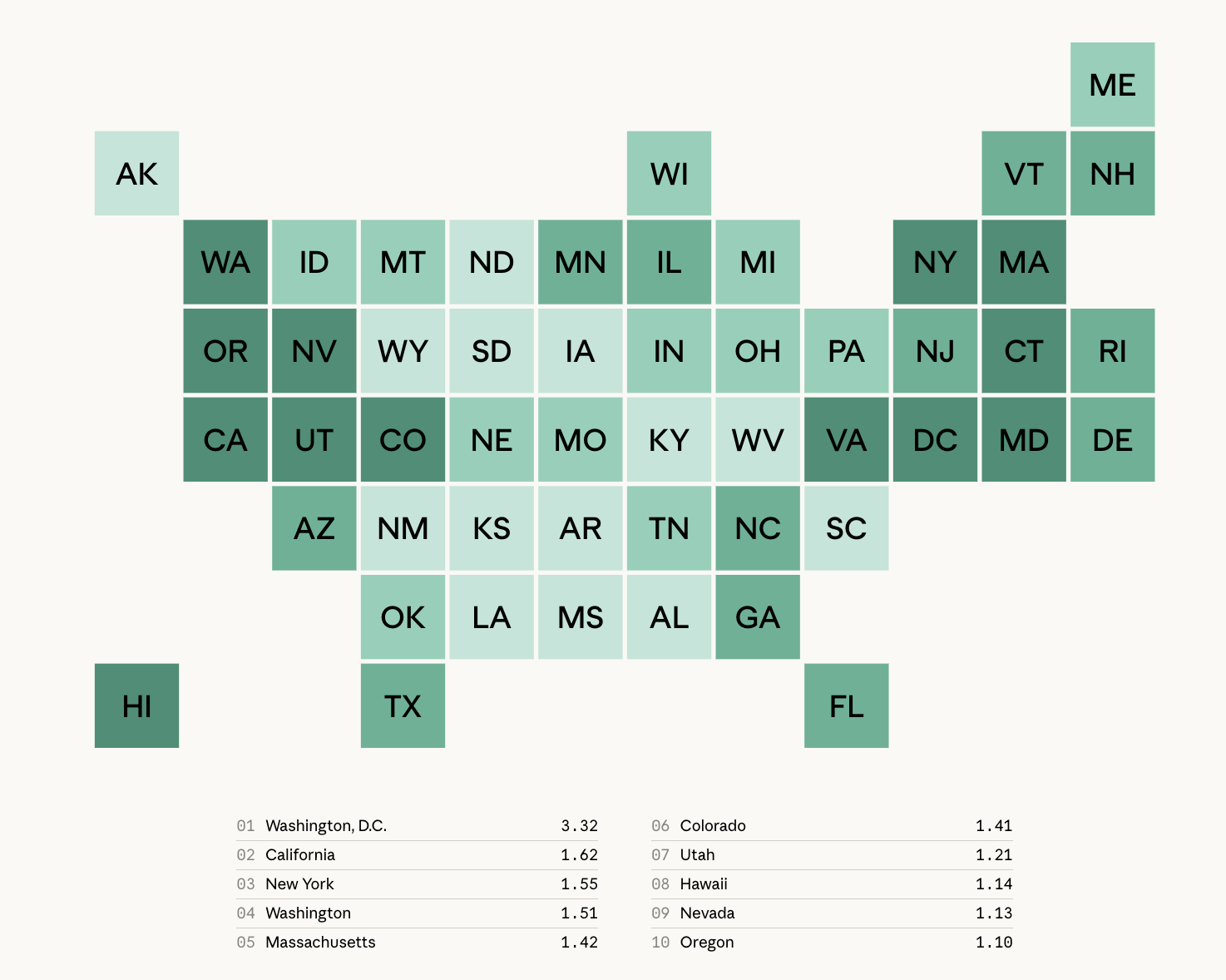
The Anthropic Economic Index is the most detailed public usage dataset we found from any AI company.
Anthropic classifies conversations by task and topic using a privacy-preserving system, then publishes aggregated results. Since September 2025, the data includes breakdowns by country and US state.
The state map shows Claude.ai usage per working-age person, where 1.0 means a state uses Claude in proportion to its working-age population. Washington, D.C. leads at 3.32, followed by California (1.62), New York (1.55) and Washington (1.51).
The March 2026 report studied Claude usage in February 2026. It found usage spreading more evenly across states, with the top 10 states’ share of usage falling from 40% to 38%.
The underlying data is published as an open dataset on Hugging Face.
The limitation for you: Claude is used by 6% of US adults, according to Pew Research Center, and Claude usage leans heavily toward coding and technical work. It tells you a lot about AI and work. It tells you little about how someone picks a car accident lawyer.
OpenAI’s ChatGPT Usage Study
ChatGPT’s own research shows search-like use is growing fast.
OpenAI’s study with the National Bureau of Economic Research analyzed 1.5 million consumer conversations, published September 2025.
The paper classified “Seeking Information” as a close substitute for web search. It grew from 14% of messages in July 2024 to 24% in June 2025.
According to OpenAI, practical guidance, seeking information and writing together made up about three-quarters of conversations.
Two limits:
- Researchers used automated classifiers. Nobody read the messages, and no prompts were released.
- It covers consumer plans only, with data ending mid-2025.
Microsoft’s Copilot Usage Report
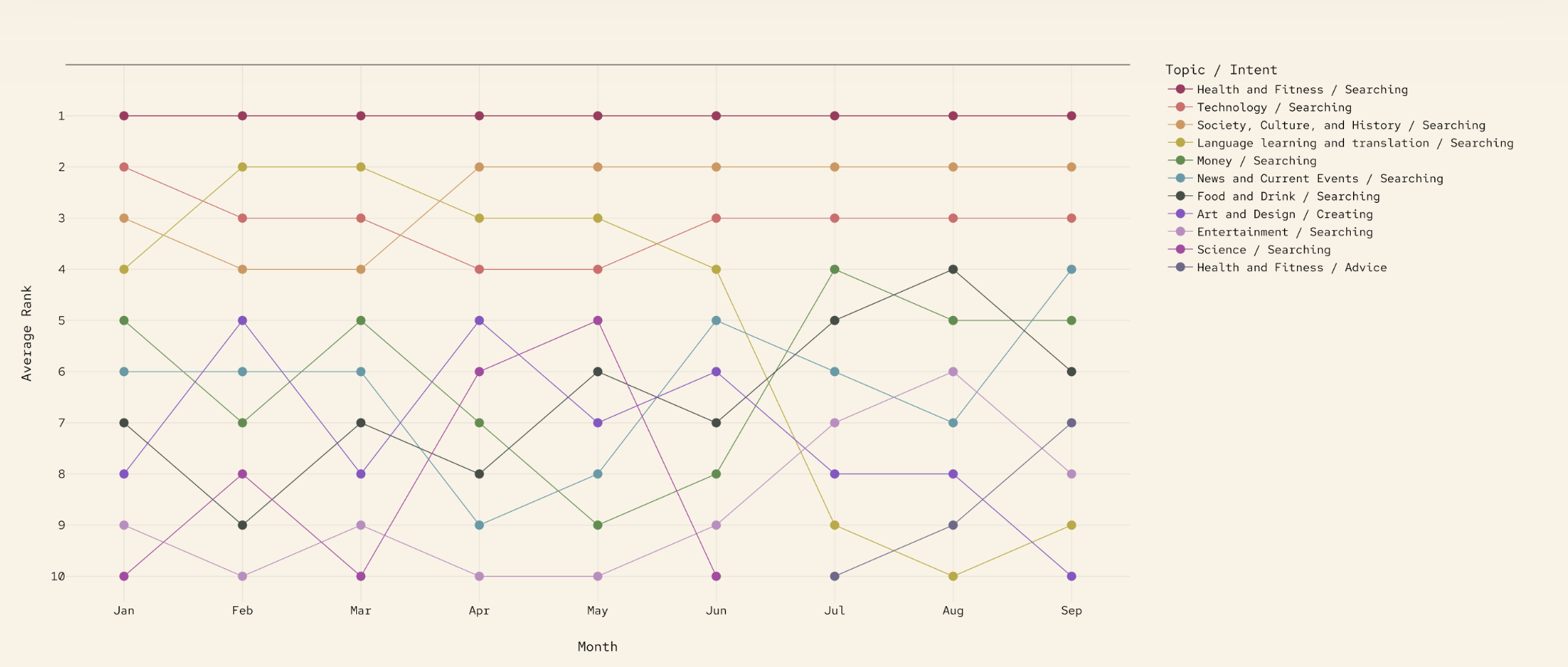
Microsoft published a real consumer usage study, and search is at the center of it.
According to Microsoft AI’s Copilot Usage Report 2025, researchers analyzed 37.5 million de-identified consumer Copilot conversations from January to September 2025. Enterprise and education accounts were excluded.
Microsoft reported that searching for information remained Copilot’s most popular use. Health topics dominated on mobile.
The report’s monthly ranking makes the point. “Health and Fitness / Searching” ranked first every month from January to September 2025, and 9 of the 11 topic and intent pairs in the chart are searches.
Same catch as the others: topics and intents only. No prompts.
Gemini and Perplexity: What’s Missing
Publish usage research
- Anthropic: open dataset with US state data
- OpenAI: NBER working paper
- Microsoft: Copilot Usage Report 2025
No comprehensive public dataset found
- Google Gemini
- Perplexity
We found no comprehensive public usage or query dataset for Gemini or Perplexity.
That’s a big gap. Gemini is the second most used chatbot in the US at 24% of adults, per Pew.
If either company publishes one, we’ll update this post.
What Does Google Analytics 4 Show You About AI Traffic?
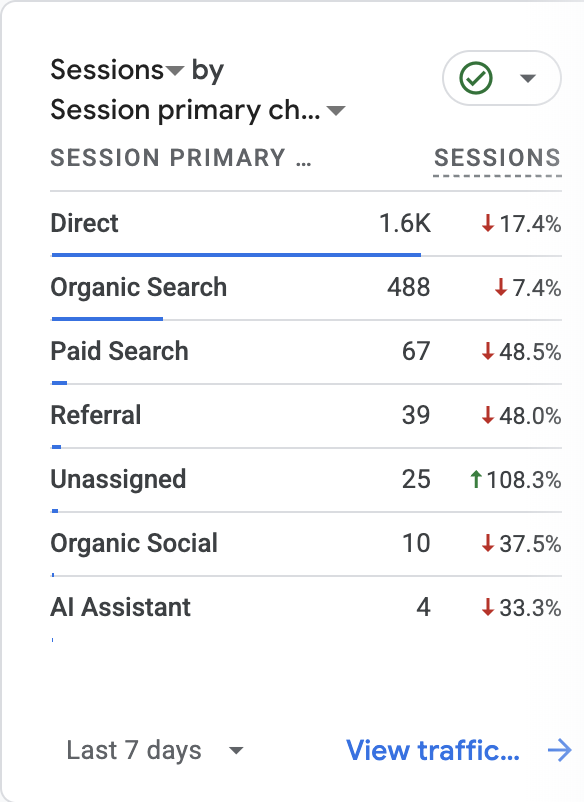
GA4 now has a built-in AI Assistant channel. It shows clicks from AI tools, not visibility in them.
Google added the AI Assistant channel to GA4’s default channel group on May 13, 2026. When GA4 recognizes an AI referrer, it sets the medium to ai-assistant and the campaign to (ai-assistant).
You’ll find it under Reports, then Acquisition, then Traffic acquisition.
In the property above, the AI Assistant channel brought 4 sessions in 7 days. Direct brought 1.6K. That’s one site, not a benchmark.
Don’t be surprised if the row is missing. Some properties show no AI Assistant row at all. Before you conclude your site gets no AI traffic, search Session source / medium for chatgpt.com and perplexity.ai.
This is the closest thing you have to a signed-case connection. A click from ChatGPT that turns into a form fill or a call is the only AI metric that pays your bills.
Why ChatGPT Visits Still Land in Referral and Direct
- ChatGPT click
- →
- Referrer recognized
- →
- AI Assistant
- ChatGPT click
- →
- Session before May 13, 2026
- →
- Referral
- ChatGPT click from a mobile app
- →
- No referrer
- →
- Direct
The AI Assistant channel undercounts your AI traffic. Three reasons:
- It isn’t retroactive. Sessions before May 2026 stay in Referral.
- It depends on the referrer. Many mobile app clicks send no referrer, so they land in Direct.
- The recognized list is limited. Analysis from Search Engine Journal found ChatGPT traffic split across AI Assistant, Referral and Unassigned, with Perplexity left out entirely.
The fix: build a custom channel group that matches on source (chatgpt.com, perplexity.ai, gemini.google.com, claude.ai, copilot.microsoft.com) and ignores medium. Custom channel groups apply to historical data.
Then add “ChatGPT or another AI tool” as an option in your intake “How did you hear about us?” question. Your intake team will catch the AI-driven cases GA4 can’t see.
What Does Search Console’s Generative AI Report Show?
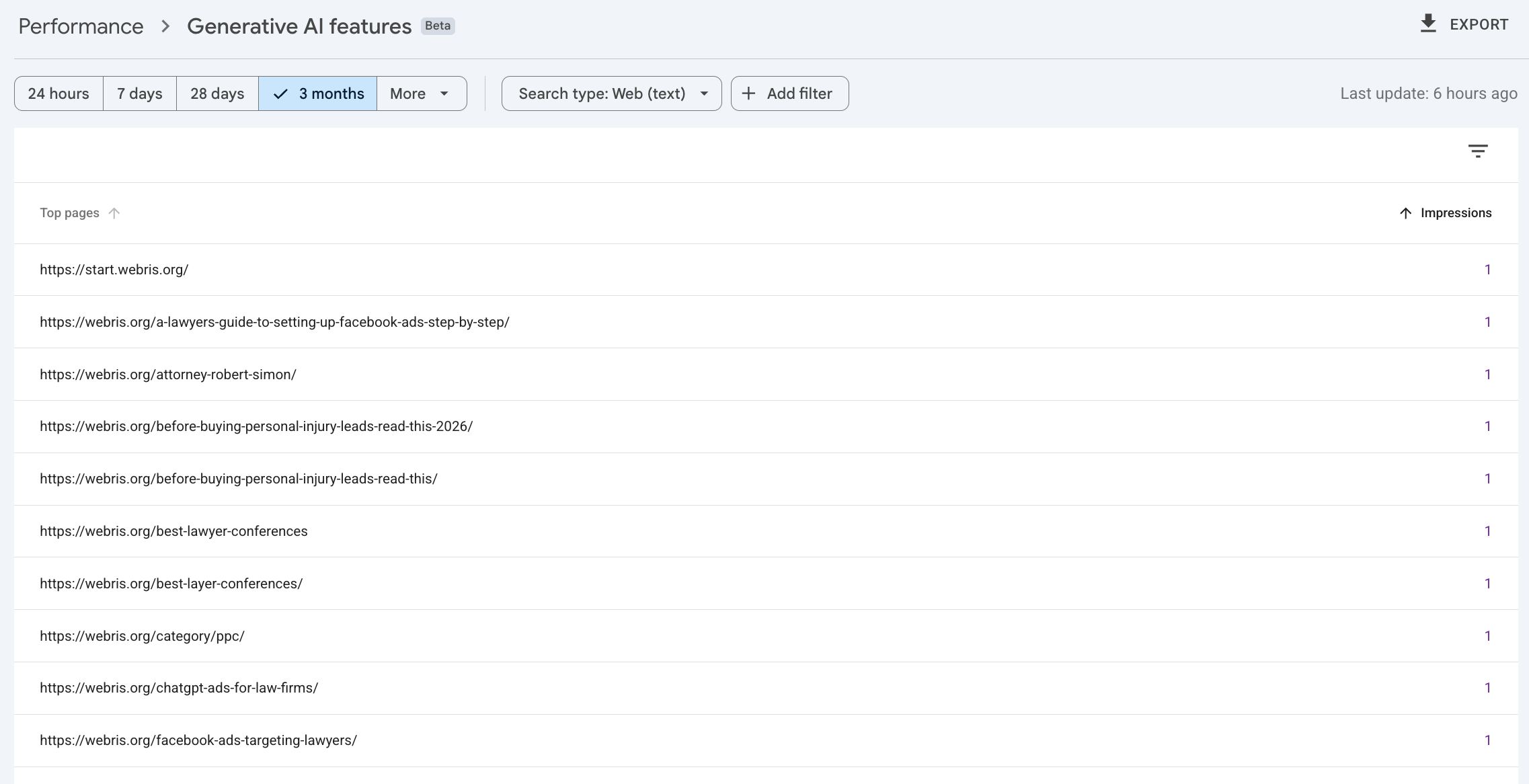
It shows how often your pages appeared inside Google’s AI Overviews and AI Mode. Impressions only.
Google announced the Search Generative AI performance reports on June 3, 2026, with separate reports for Search and Discover. Rollout reached all properties by late summer 2026.
You’ll find it under Performance, then Generative AI features, labeled Beta. You can break impressions down by page, country, device and date.
The screenshot above is from our own webris.org property. You can see which pages appeared in Google’s AI answers and how often. You can’t see the question that triggered them, or whether anyone clicked.
This is Google’s own data on your AI visibility, and it’s free. Use it.
Start by listing your practice area pages with high AI impressions but falling clicks. Those may be pages where Google’s AI is answering the question for you. If that’s your personal injury SEO money pages, you need to know.
What the Report Leaves Out
| The GSC generative AI report shows | The report does not show |
|---|---|
| Impressions in AI Overviews and AI Mode | Clicks from AI features (they’re blended into your regular Web totals) |
| Breakdown by page | The queries that triggered the AI answer |
| Breakdown by country, device, date | AI Overviews vs AI Mode separately |
| Search and Discover views | Data in the Search Console API or BigQuery export (as of Oct 2026) |
The report has real gaps:
No queries means you can’t see which questions your firm answers. You only see which pages got shown.
How Does Semrush Get AI Prompt Data If ChatGPT Doesn’t Share It?
- Panelist opts in to tracking
- →
- Browser activity recorded (Datos)
- →
- Semrush deduplicates and simplifies wording
- →
- Topics with estimated volume
Second input: Google AI Overview keyword data.
Semrush collects prompts from a clickstream panel, not from OpenAI.
Semrush’s own documentation on its AI visibility data says its prompt database holds over 317 million prompts and responses across ChatGPT, Gemini, Google AI Overviews and AI Mode.
Semrush says those prompts are sourced from two places:
- AI search clickstream data. Semrush owns its clickstream supplier, Datos, which it acquired in 2024. Datos collects browsing data from the devices of opted-in panelists via web and mobile browsers.
- Google’s keyword dataset for AI Overviews.
Semrush also says responses are captured from real requests, not through the AI companies’ APIs.
In plain terms: the prompts come from what panelists did in their browsers, not from OpenAI. That’s how Semrush has prompts when OpenAI publishes none.
Three things to know before you trust a Semrush prompt:
- Prompts are edited. Semrush deduplicates them and simplifies the phrasing.
- Volume is reported at the topic level, not per prompt.
- A panel is a sample. The prompts reflect what panelists typed, not what your potential clients typed.
Panel-Captured vs Search-Modeled Prompts
| Semrush AI Visibility Toolkit | Ahrefs Brand Radar | |
|---|---|---|
| Where prompts come from | Clickstream panel (Datos) plus Google AI Overviews keywords | Ahrefs keyword database plus Google People Also Ask |
| Are prompts typed by real people into AI tools? | Partly, from panelists, then simplified | No. Modeled from Google search behavior |
| How volume is estimated | Topic-level, from panel data | From Google search volume |
| Biggest weakness | Panel sample and edited phrasing | Assumes people ask AI what they ask Google |
Semrush and Ahrefs answer the same question with opposite methods.
Neither one is a census of what people ask AI. Use both for direction, never as exact counts.
How Does Ahrefs Brand Radar Build Its Prompts?
- Ahrefs keyword database
- →
- Google People Also Ask questions
- →
- Semantic expansion
- →
- Prompts run through AI platforms
- →
- Answers stored and weighted by Google search volume
Ahrefs doesn’t claim to have real AI prompts. It models them from Google search data.
Ahrefs says it plainly in its own explainer on tracking AI search: AI companies keep prompt logs private, and that data never leaves their servers.
So Ahrefs seeds Brand Radar with questions from its keyword database and Google’s People Also Ask results, paired with search volume. Ahrefs calls these “still synthetic” prompts that reflect real-world demand.
Ahrefs then runs those questions through the AI platforms and stores the answers.
The upside: you can check whether AI tools mention your firm across hundreds of variations of a topic, like “car accident lawyer [city].”
The downside: it assumes people ask ChatGPT the same things they ask Google. Nobody outside the AI companies can check how well that holds.
The Browser Extension Problem in AI Prompt Data
8 browser extensions. 8 million+ users.
Conversations from ChatGPT, Claude, Gemini, Copilot, Perplexity, DeepSeek, Grok and Meta AI were captured and shared with a data broker.
Browser-level capture of AI conversations is real, and users haven’t always known it was happening.
In December 2025, Koi Security reported that Urban VPN Proxy and seven related Chrome and Edge extensions harvested full AI conversations from ChatGPT, Claude, Gemini, Copilot, Perplexity, DeepSeek, Grok and Meta AI.
Koi traced the capture to version 5.5.0 of Urban VPN Proxy, released July 9, 2025. The data went to the publisher’s servers, which Koi linked to the data broker BiScience. The extensions had over 8 million combined users.
To be clear: we found no evidence connecting this case to Semrush, Datos or Ahrefs.
It matters because it shows how prompt-level data can leave a user’s browser. When any tool shows you “real prompts,” ask how they were collected and under what consent.
That question carries extra weight for your firm. People type details about their injuries, their medical treatment and their case into these tools.
How Big Is AI Search in the US?
Lots of people use AI to search. But on desktop, the only place it can be measured, AI gets a small share of search activity compared with Google.
Two research sources size the market. Neither is a marketing tool, but both help you put the tool data above in context.
Pew Research Center is a nonpartisan, nonprofit research organization. It surveys a recruited panel of US adults, and Pew says the results represent the full US adult population.
According to Pew’s Americans and AI 2026 survey, conducted February 17 to 23, 2026, among 5,119 US adults:
| Pew finding (US adults, Feb 2026) | Share |
|---|---|
| Use AI chatbots at all | 49% |
| Use chatbots to search for information | 42% |
| Use chatbots daily | 24% |
| Read the AI summaries at the top of search results | 60% |
Datos is a clickstream data company owned by Semrush. It records the browsing of a panel of people who opted in to tracking, and publishes quarterly State of Search reports with SparkToro.
According to Datos’ State of Search Q2 2026 report, AI tools accounted for 1.83% of US desktop activity in Q2 2026. Traditional search engines accounted for 10.52%.
Counting searches only, SparkToro’s analysis of Datos data found Google handled 73.7% of US desktop searches in Q4 2025, and AI tools 3.2%.
Be careful with claims like “only 2% of people use AI search.” An under-2% figure here is a share of desktop activity, not a share of people.
Desktop vs Mobile: What the Data Covers
Desktop: about one-third of US searches
- This is what the Datos and SparkToro AI share figures measure
- Browser activity from an opted-in panel
Mobile: about two-thirds of US searches
- Not measured in these studies
- Includes the ChatGPT, Gemini and Google apps
The desktop numbers cover the smaller part of search. Nobody publishes AI’s share on mobile.
SparkToro’s 2026 zero-click study assumed two-thirds of US Google searches happen on mobile. And none of the clickstream studies in this post count searches inside the ChatGPT, Gemini or Google apps.
On phones, the best public number we found is about scale, not searches. Sensor Tower estimates reported by CNBC put the ChatGPT app at over 1 billion monthly users worldwide in May 2026.
- ✅ We know about 4 in 10 US adults use AI to search.
- ✅ We know AI’s share of desktop search activity: about 2 to 3%.
- ❌ We don’t know AI’s share of all US searches. Search counts inside mobile apps are only available to the companies that run them, and they don’t publish them.
That’s why your own data matters. Your GA4 and intake records include mobile visitors and callers. No public study does.
Should Your Firm Move Budget From Google to AI Search?
No. Not yet. Shift effort, not budget.
Here’s what the data supports, and where it runs out:
- On desktop, Google handles roughly 74% of US searches. AI tools handle about 3%.
- Desktop is only part of the picture. Most US searches likely happen on mobile, and no public source compares Google to AI apps on phones. So the desktop gap could be smaller on mobile, or larger.
- The device-neutral data points one way: 60% of US adults say they read the AI summaries at the top of search engine results, per Pew. People who search with AI still meet AI on the search results page.
- So, as far as the data shows, the biggest “AI search” surface you can win is Google’s own AI Overviews and AI Mode.
The work that gets you into those answers is mostly the work that already gets you signed cases from Google. Google’s own guidance on its AI features gives the same core advice as for regular Search: useful, original content, and pages Google can crawl and index.
For a law firm, that means strong practice area pages, local SEO, reviews and links. Our law firm SEO guide covers the foundation.
On top of that, add the GEO layer: answer-first pages, clear entity information and citations from sources AI tools trust. That’s covered in GEO for lawyers and how law firms rank in ChatGPT.
What you should not do: cut Google Ads or organic budget to buy an “AI visibility” retainer that reports a score you can’t tie to a signed case.
How to Measure AI Search for Your Firm
- Build a custom AI channel group in GA4
- Export the Search Console generative AI report monthly
- Add AI to your intake question
- Run your own prompts by hand
- Use Semrush and Ahrefs for direction only
Measure AI search the way you measure everything else: by signed cases.
- Build a custom AI channel group in GA4. Match on source, ignore medium, and include ChatGPT, Perplexity, Gemini, Claude and Copilot. This recovers traffic the default channel misses.
- Check the GSC generative AI report monthly. Export it, because it isn’t in the API. Flag practice area pages with rising AI impressions and falling clicks.
- Add AI to your intake question. “ChatGPT or another AI tool” belongs next to Google, referral and TV. Track it to signed cases, not leads.
- Run your own prompts by hand. Ask ChatGPT, Gemini and Google AI Mode the 20 questions a potential client in your city would ask. Note who gets named.
- Use Semrush and Ahrefs for direction only. Compare trends over time. Don’t report their prompt counts as real demand.
Want a planning number? Use this:
AI Assistant sessions × landing page conversion rate × lead-to-signed-case rate = signed cases from AI.
Example: 200 sessions × 25% × 25% = about 12 signed cases. Those 25% rates are our planning assumptions for paid search. AI referral conversion is unproven, so replace them with your own intake data.
If AI traffic produces junk leads, check the page and the intake process before blaming the channel. It’s the same issue we break down in why Google Ads sends junk leads.
What to Do This Week
Three changes this week
- Custom AI channel group in GA4
- Monthly export of the Search Console generative AI report
- “ChatGPT or another AI tool” in your intake question
You don’t need a new tool to start. You need three changes to the ones you already have.
- ✅ Build the custom AI channel group in GA4 so ChatGPT and Perplexity visits stop hiding in Referral and Direct.
- ✅ Export your Search Console generative AI report and save it monthly. It isn’t in the API, so the history is only what you keep.
- ✅ Add “ChatGPT or another AI tool” to your intake question, and report it against signed cases.
In 90 days you’ll have something no SEO tool can sell you: your own data on how many signed cases AI search produces.
