
"Over 45% of our leads are nothing."
That's a direct quote from an immigration firm we sat down with this week. They spend about $30,000 a month on Google Ads and Local Services Ads.
Sharp people. Good intake team. And close to half of what Google sends them is someone who thinks they called USCIS, someone looking for free legal aid, or someone applying for a paralegal job.
I hear a version of this on almost every call with a firm running Google Ads. The number changes. The story doesn't.
Here's the short version. Google is doing exactly what your account told it to do. Somebody told it a phone call equals success. Google found the cheapest phone calls on the internet.
Junk leads are a measurement problem and a match-type problem. They are not a Google problem. Once you see it that way, the fix is obvious.
This post breaks down the six causes we find in law firm accounts, the exact order to fix them in, and how to judge the campaign by the one number that matters: cost per signed case.
What Is A Junk Lead? (And Why It's Not The Same As Spam)
A junk lead is a real person who contacted your firm through an ad and can never become a client. Spam is a bot or an accidental click. They have different causes and different fixes.
Firms lump them together and blame Google for both. That's why the problem never gets solved.
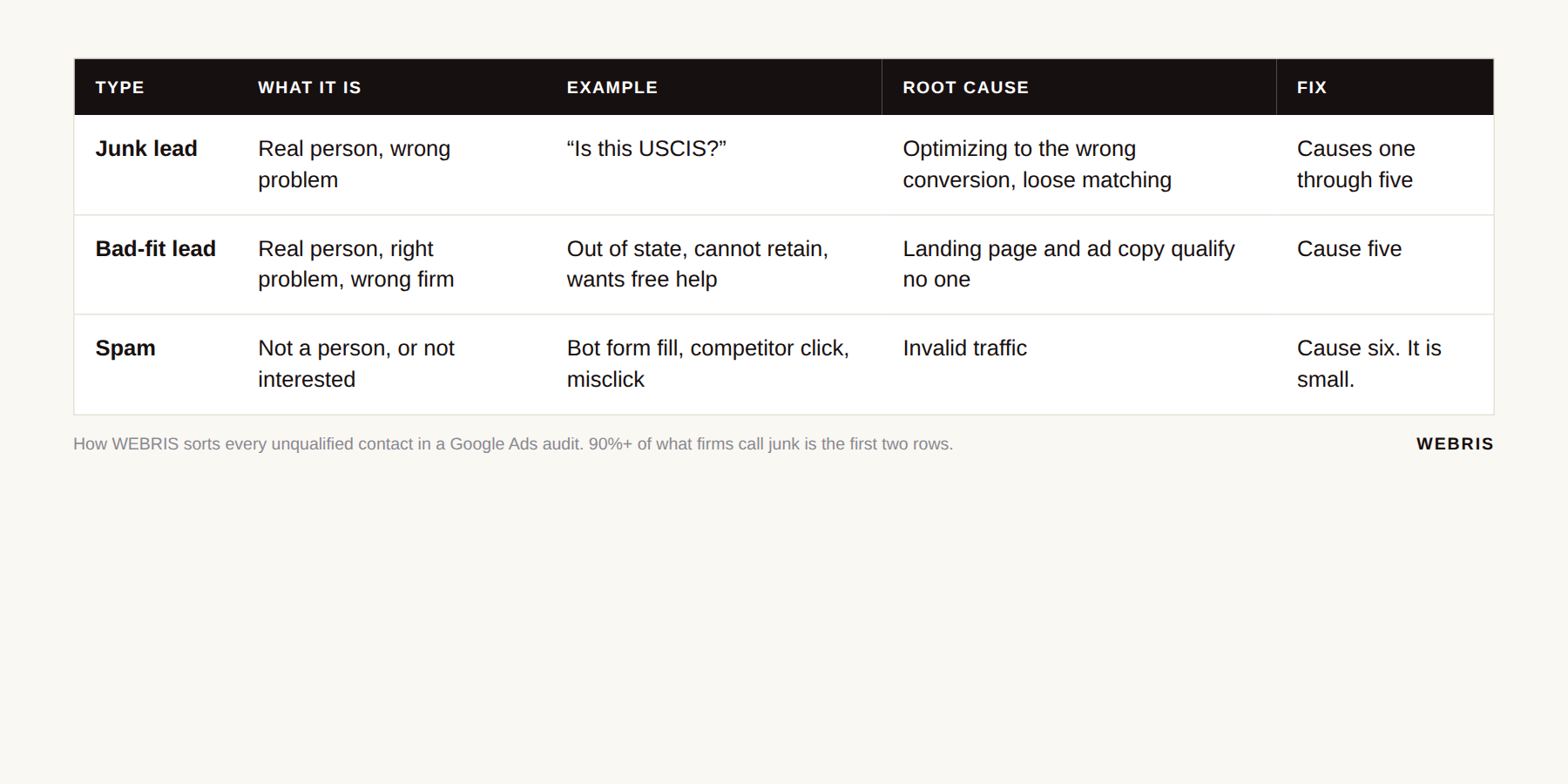
Here's how we sort every unqualified contact when we audit an account:
| Type | What it is | Example | Root cause | Fix |
|---|---|---|---|---|
| Junk lead | Real person, wrong problem | "Is this USCIS?" | Campaign optimizing to the wrong conversion, loose matching | Causes one through five below |
| Bad-fit lead | Real person, right problem, wrong firm | Out of state, cannot afford a retainer, wants free help | Landing page and ad copy that qualify no one | Cause five |
| Spam | Not a person, or not interested | Bot form fill, competitor click, misclick | Invalid traffic | Cause six, and it is small |
In our audits, 90% or more of what a firm calls "junk" is the first two rows. Real people. Delivered by a campaign that was told to find them.
If you want the version of this that covers every channel, not just Google Ads, start with why law firms get bad leads. This post is the Google Ads deep dive.
Cause One: You're Optimizing Toward The Wrong Conversion
Your junk leads start here. Smart Bidding finds more of whatever you marked as a primary conversion. If a raw phone call is primary, a misdial counts the same as a case.
Almost every Google Ads campaign now runs on Smart Bidding. Google describes it as bidding strategies that "use Google AI to optimize for conversions or conversion value in every auction," per Google's Smart Bidding help page.
Read that literally. It optimizes for whatever you defined as a conversion. It has no opinion about whether the conversion was any good.
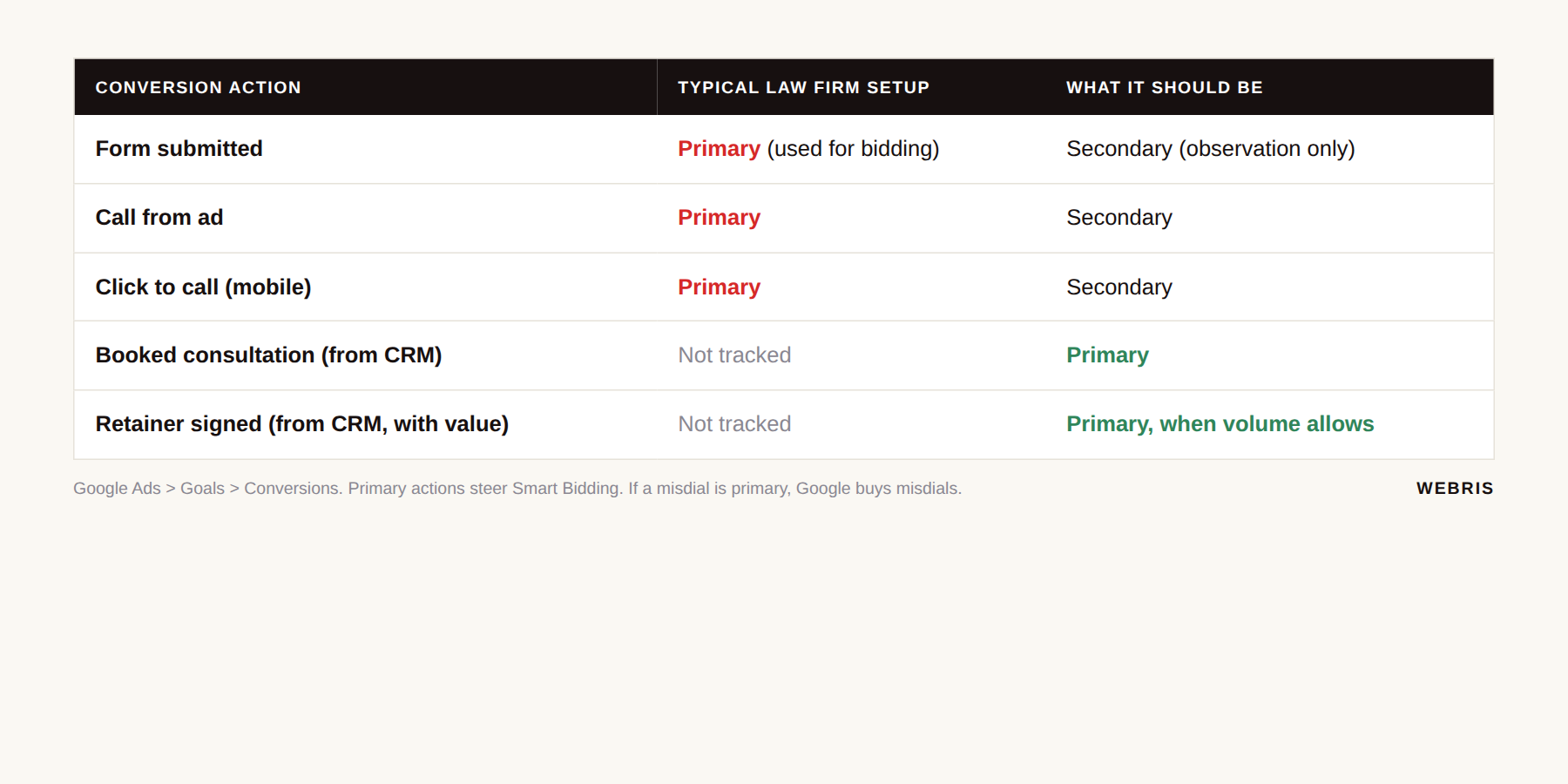
Now look at what most law firms have marked as a conversion:
- ❌ Form submitted
- ❌ Call from ad
- ❌ Sometimes "clicked the phone number" on mobile
Google's documentation on primary and secondary conversion actions spells out the difference. Primary actions are "used for bidding." Secondary actions are "for observation only."
If raw calls and raw forms are your primary actions, you've told the algorithm that a USCIS misdial is a win. It will go find you more of them. Efficiently.
A $130 misdial and a $15,000 case count exactly the same in your account. That's the disease. Everything else in this post is a symptom.
The immigration firm had form fills and calls as primary. No consult booked action, no signed case action.
Google had never once been told what a client looks like. We'll fix that in the attribution section below, and the longer setup lives in our lead tracking guide for law firms.
Cause Two: Broad Match And Loose Query Matching
Every match type in Google Ads has gotten looser since 2021, and most firms never noticed. Your keyword "immigration lawyer" now matches searches that don't contain those words.
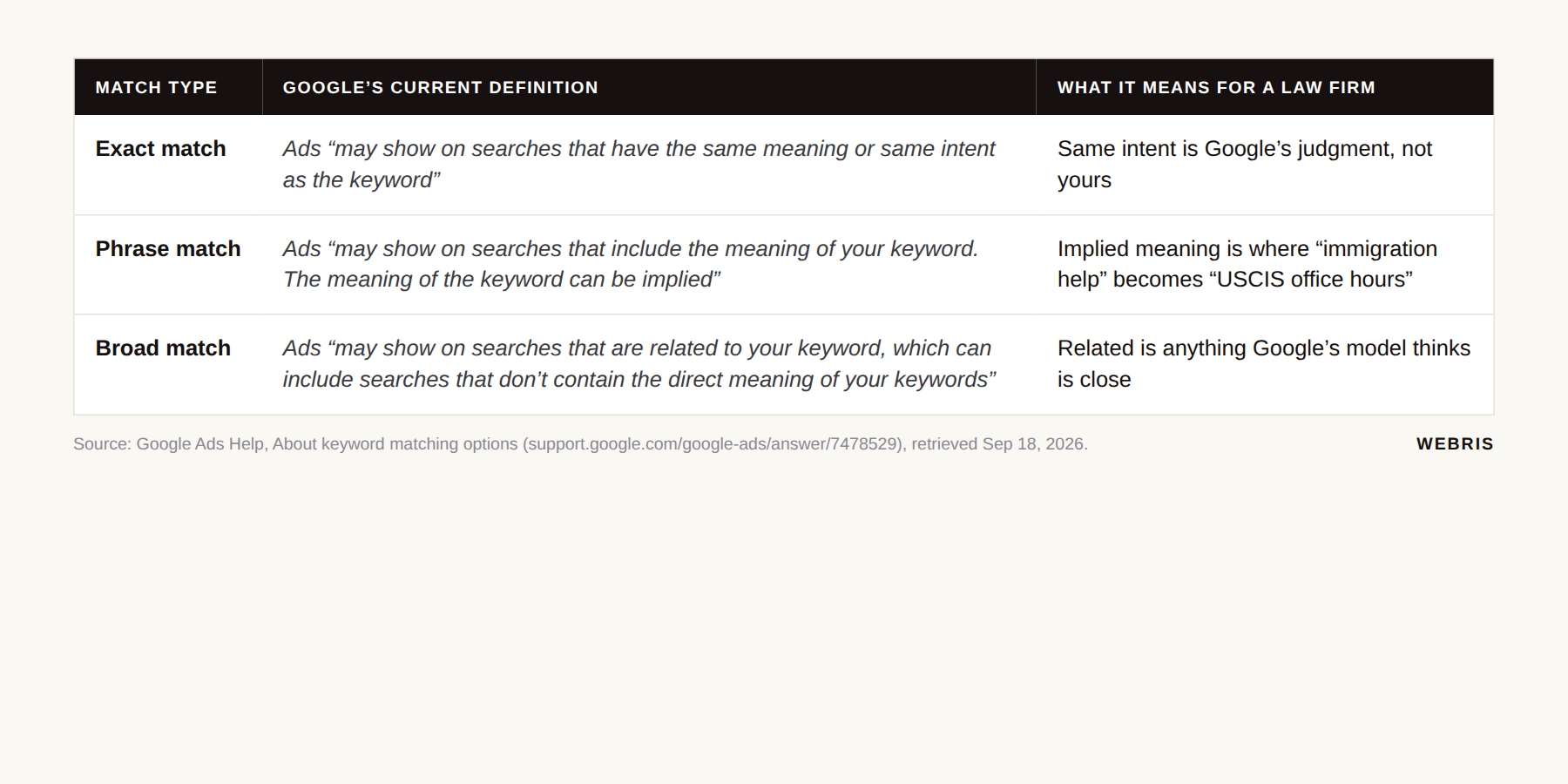
Here is what Google's keyword matching documentation says today, quoted exactly:
| Match type | Google's current definition | What it means for a law firm |
|---|---|---|
| Exact match | Ads "may show on searches that have the same meaning or same intent as the keyword" | Same intent is Google's judgment, not yours |
| Phrase match | Ads "may show on searches that include the meaning of your keyword. The meaning of the keyword can be implied" | Implied meaning is where "immigration help" becomes "USCIS office hours" |
| Broad match | Ads "may show on searches that are related to your keyword, which can include searches that don't contain the direct meaning of your keywords" | Related is anything Google's model thinks is close |
To decide what's "related," broad match looks at "the user's recent search activities," "the content of the landing pages," and "other keywords in an ad group." All three are on that same help page.
So your keyword is "immigration lawyer." Google decides these are related:
- immigration lawyer near me ✅
- uscis phone number ❌
- free immigration help ❌
- green card case status ❌
- immigration paralegal jobs ❌
Google also says it's "critical to use Smart Bidding with broad match," per its broad match guide. Notice the circle.
Broad match relies on Smart Bidding to filter bad searches. Smart Bidding relies on your conversion data to know what a bad search is. If your conversion data says every phone call is good, broad match has zero reason to avoid "immigration office phone number."
Google's 2024 query matching update added brand inclusions and exclusions for broad match, documented on its brand inclusions page. Great for Nike. Useless for a law firm whose prospects search for a problem, not a brand.
In our accounts, broad match is something you earn. Google has to know what a qualified lead looks like first. Before that, broad match buys reach, and reach in legal means a lot of people who will never hire you.
I go deeper on match types and campaign structure in our Google Ads for law firms guide.
Cause Three: Weak Negatives And The Hidden Search Terms Problem
Google matches your keywords loosely and enforces your negatives literally. Then it hides most of the searches you paid for. That combination is where the money leaks.
Google's negative keywords page says it plainly: "Negative keywords don't match to close variants, so your ad might still show on searches or pages that contain close variations of your negative keyword terms."
Your targeting stretches. Your negatives don't.
The same page confirms negatives now "automatically account for casing and misspellings." But "you'll need to add synonyms and singular or plural versions if you want to exclude them." Plurals, synonyms and rephrasings are still your job.
It gets worse. You can't see most of what you're paying for.
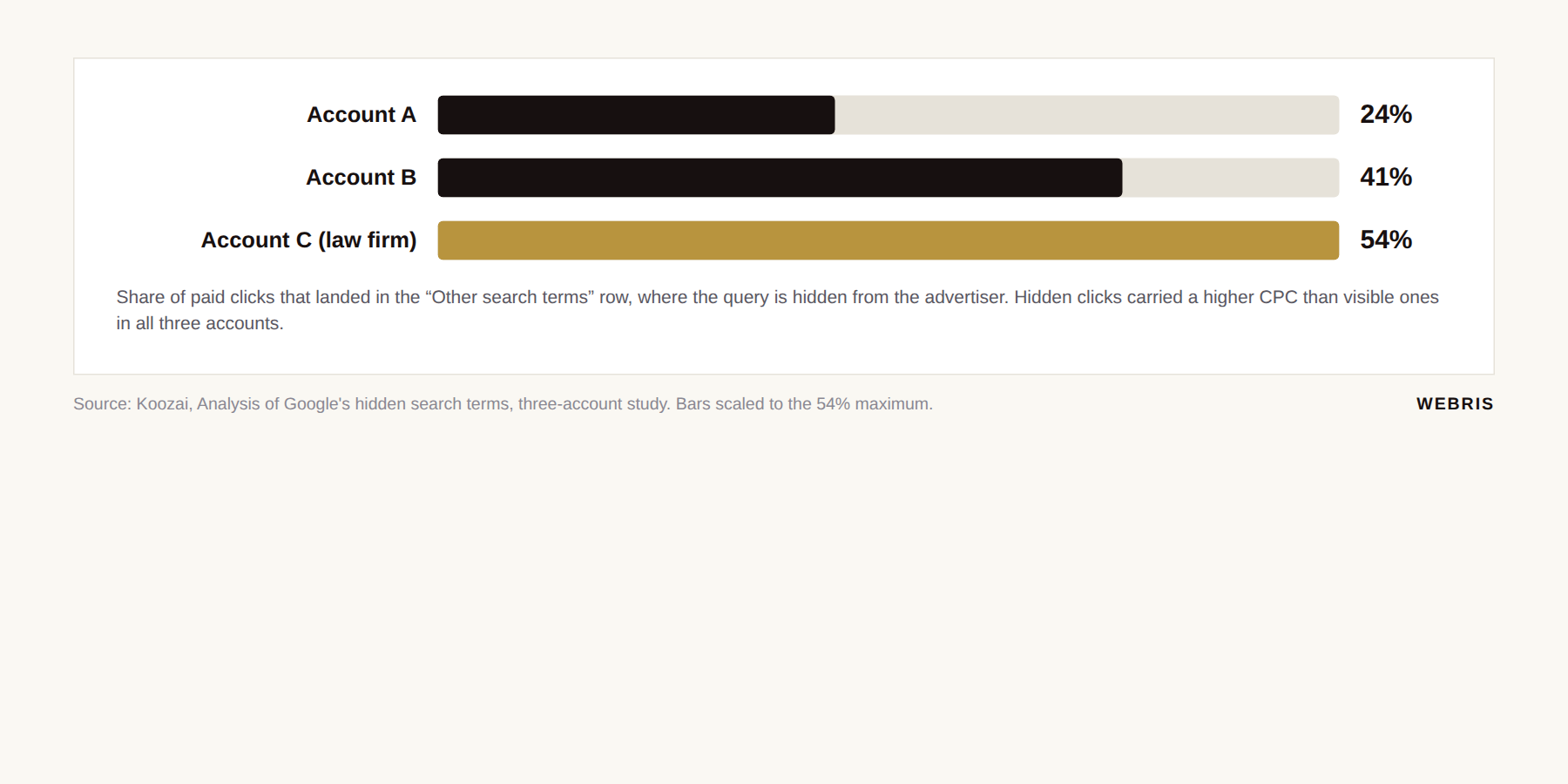
Google's search terms report documentation states the report shows "search terms that a significant number of people have used." Everything else is "omitted from the search terms report in order to keep with our standards on data privacy" and rolled into one row: "Other search terms."
How much sits in that row? A three-account analysis by Koozai, one of them a law firm, found the hidden bucket held 24% to 54% of clicks, at higher CPCs than the visible terms.
| Account in the Koozai study | Clicks hidden in "Other search terms" | Hidden CPC vs visible CPC |
|---|---|---|
| Account A | 24% | Higher |
| Account B | 41% | Higher |
| Account C (law firm) | 54% | Higher |
We've managed legal accounts where we could see 10% or less of the actual searches typed in. [ORIGINAL INSIGHT OPPORTUNITY: pull the "Other search terms" click share across current WEBRIS legal accounts and publish the range.]
Read that again. Half your clicks, and you don't get to know what people searched.
If you can only see a fraction of the queries, you can only build negatives from a fraction of the queries.
The rest has to come from your intake team. They hear the tenth "is this USCIS?" call of the week long before any report shows it.
Negative keywords are a daily job, not a launch task. Two bad days of Google chasing bad searches will burn a week of budget. You won't see it in the report until the money is gone.
Cause Four: Performance Max Without Offline Conversions
Performance Max is the purest expression of cause one. Whatever you defined as a conversion, PMax chases across six channels at once, with no keywords to tighten.
Google describes Performance Max as "a goal-based campaign type that allows you to access all Google Ads inventory, including YouTube, Display, Search, Discover, Gmail, and Maps, from a single campaign," per Google Ads Help.
You give it assets, a budget and a conversion goal. It decides where to serve.
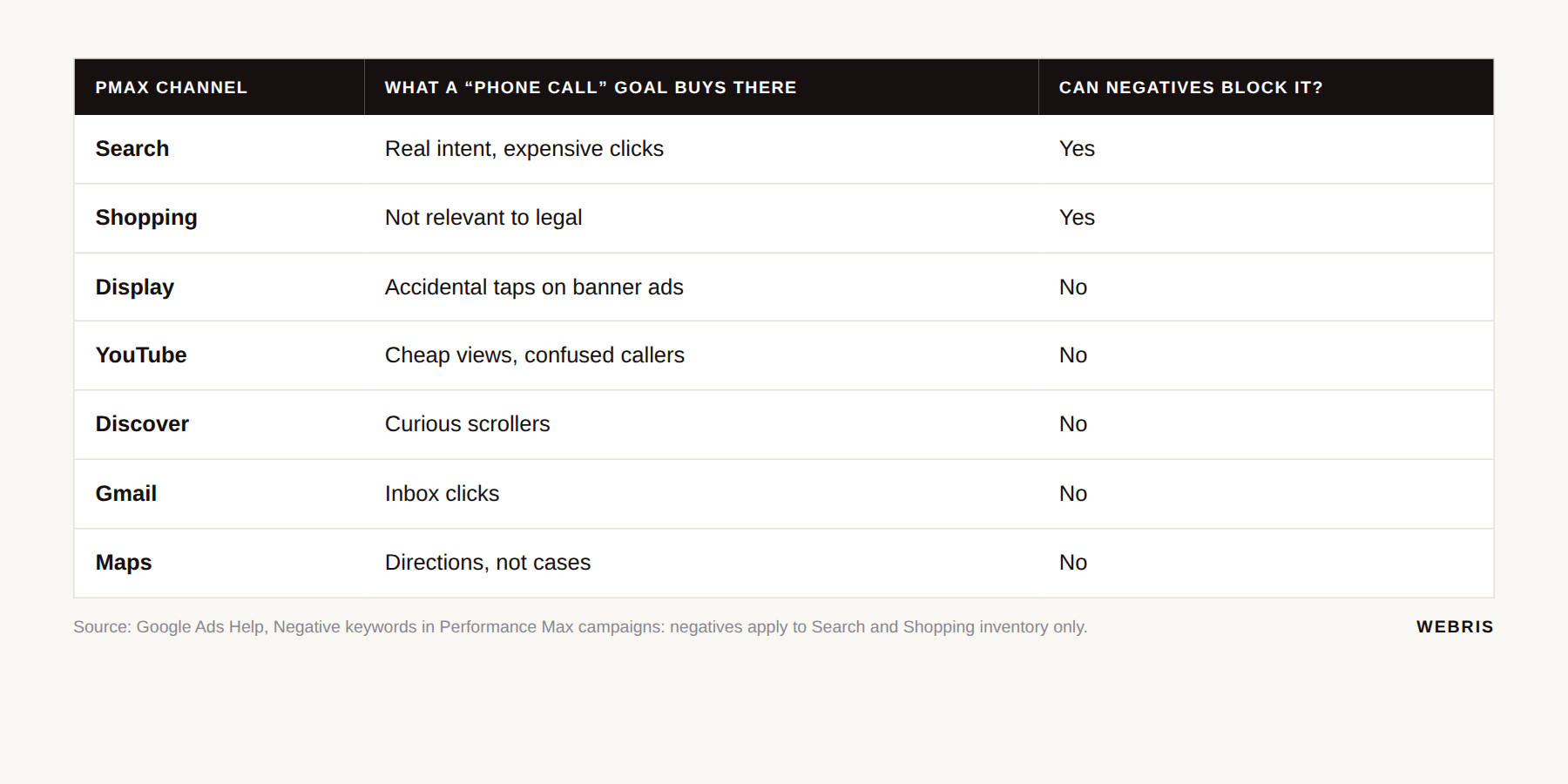
Display and Discover produce very cheap phone calls from very confused people. If your goal is "any phone call," PMax will spend your budget on the placements that produce phone calls cheapest. Those are not the placements where someone is about to hire a lawyer.
PMax does get a cheaper cost per click than Search. That's the pitch, and it's true. The catch is it does anything to hit the goal you gave it.
Google has added guardrails. You can now add campaign-level and account-level negative keywords to PMax, documented on Google's Performance Max negative keywords page. The catch, in Google's words: they are "applicable to Search and Shopping inventory only." Display, YouTube, Gmail and Discover placements are untouched.
Use all of it.
But negatives trim the edges. The only thing that changes what PMax hunts for is the conversion you feed it.
In our accounts, PMax doesn't go live until offline conversions are flowing back with the click ID attached. Before that, it buys spam at a discount. After that, it buys consultations at a discount.
Cause Five: Landing Pages And Ad Copy That Qualify No One
A page built to be relevant to everyone qualifies no one. If anyone can fill out your form in nine seconds, everyone does.
Google grades every keyword on Quality Score: expected clickthrough rate, ad relevance, and landing page experience. Most people care about that for cheaper clicks. I care about it for a different reason.
Look at your landing page right now.
I'll bet it says some version of "Free Consultation. Call Now." above a three-field form.
The person who wants their case status fills it out. So does the person with a $10,000 matter. Your form can't tell the difference, so Google can't either.
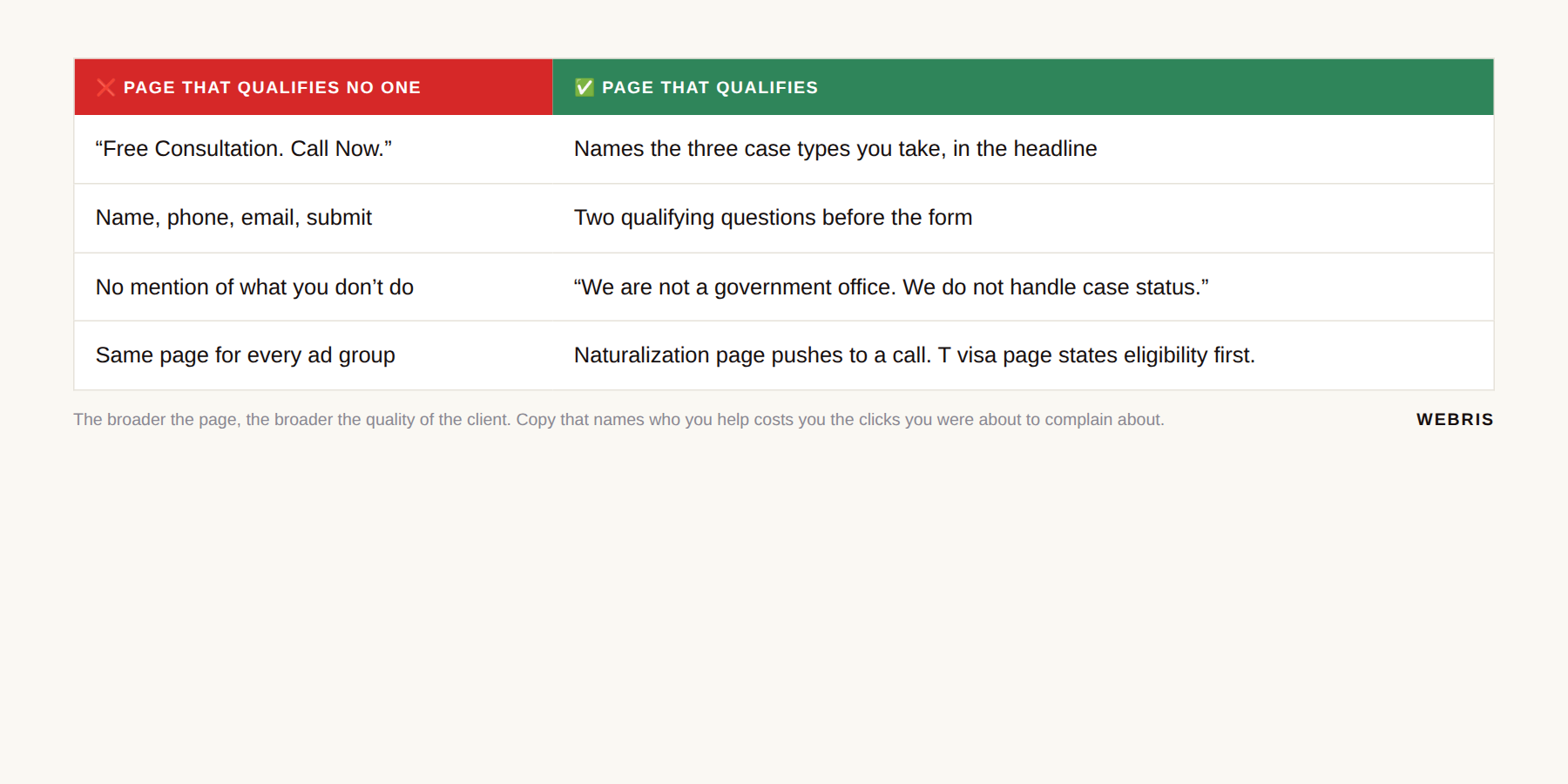
| ❌ Page that qualifies no one | ✅ Page that qualifies |
|---|---|
| "Free Consultation. Call Now." | Names the three case types you take, in the headline |
| Name, phone, email, submit | Two qualifying questions before the form |
| No mention of what you don't do | "We are not a government office. We do not handle case status." |
| Same page for every ad group | Naturalization page pushes to a call, T visa page states eligibility first |
Google has conceded this point with its own product. Its best practices for lead form assets recommend "qualifying responses to filter out low-intent prospects." Its qualifying responses documentation lets you mark multiple-choice answers as qualifying so submissions can be "filtered or segmented" by intent.
If Google is adding screening questions to its own forms, your landing page can ask two.
The same rule we use on Meta campaigns for lawyers applies here. The broader the message, the broader the quality of the client. You do not want it to be too easy to fill out the form.
Copy that names who you help and who you don't will cost you clicks. Those were the clicks you were about to complain about. Our guide to law firm landing pages covers the page structure that does this without killing conversion rate.
Cause Six: Spam And Invalid Traffic
Bots and fake clicks are real, and they are a small fraction of what firms call junk. Google filters most of it before you're billed.
Google defines invalid traffic as "traffic that doesn't represent genuine interest in your business": bots, accidental clicks, competitors clicking your ads on purpose.
The same page says invalid traffic "detected before the end of the month is automatically removed from your billing." Anything caught later comes back as a credit.
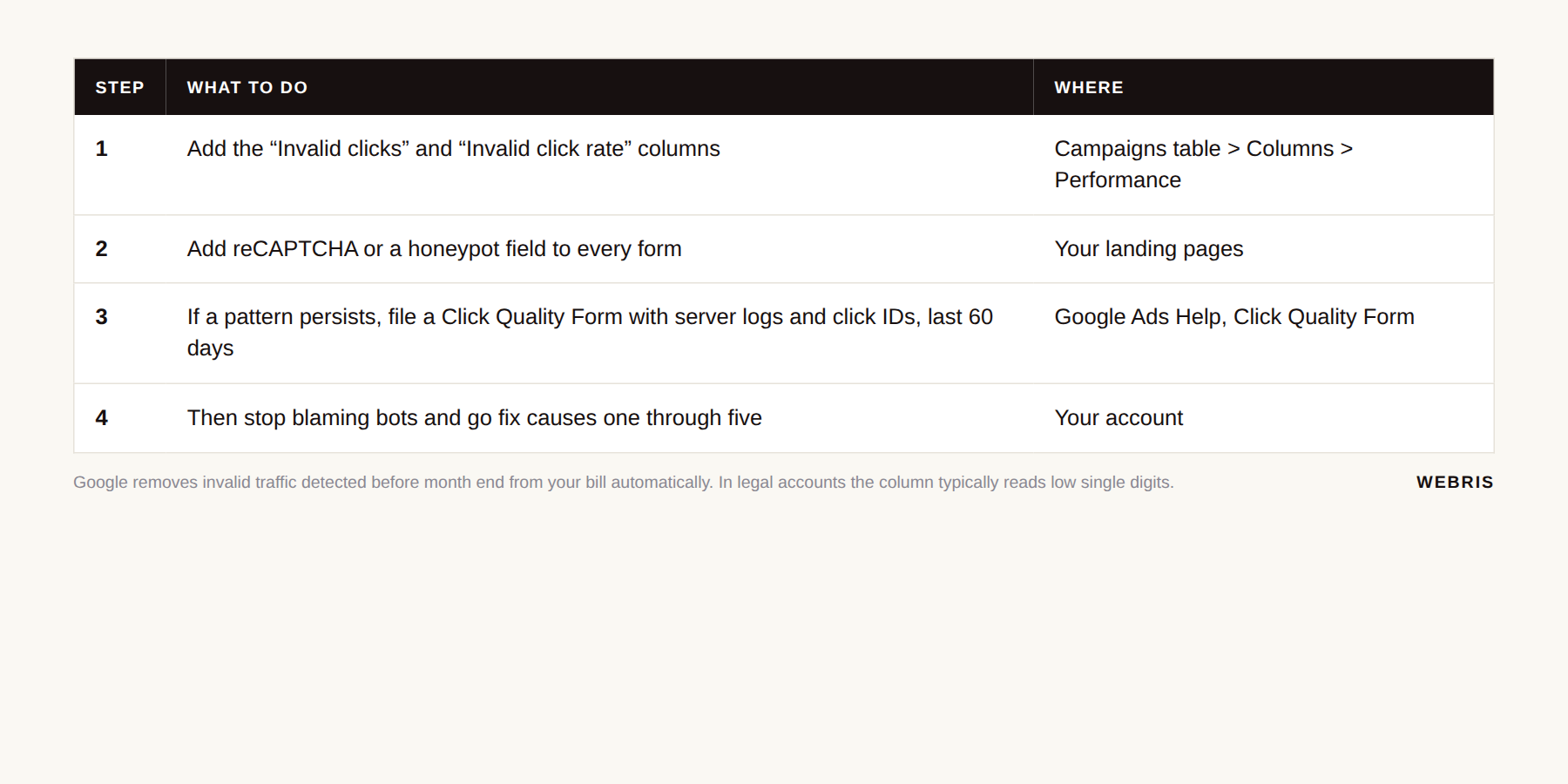
Want to see how much is being filtered? Add the "Invalid clicks" column to your campaigns table. In legal accounts we manage, it typically reads low single digits. [ORIGINAL INSIGHT OPPORTUNITY: average invalid click rate across WEBRIS legal accounts, last 90 days.]
If you suspect a pattern Google missed, file a Click Quality Form covering the past 60 days with your server logs and click IDs, per Google Ads Help.
For form spam, Google's Ad Traffic Quality resources state the fix: "Adding a CAPTCHA to your forms will help validate that the person submitting it is human." reCAPTCHA or a honeypot field kills most bot form fills.
Do those things. Then stop blaming bots.
When a firm tells us half its leads are junk, the junk is almost never bots. It's real people with real problems your firm doesn't solve, delivered by a campaign that was told to find them. That's causes one through five.
The Fix, In Order
Fix attribution first. Everything else comes after. Skip ahead to "loosen targeting" or "let's try PMax" before the data is clean and you just buy junk faster.
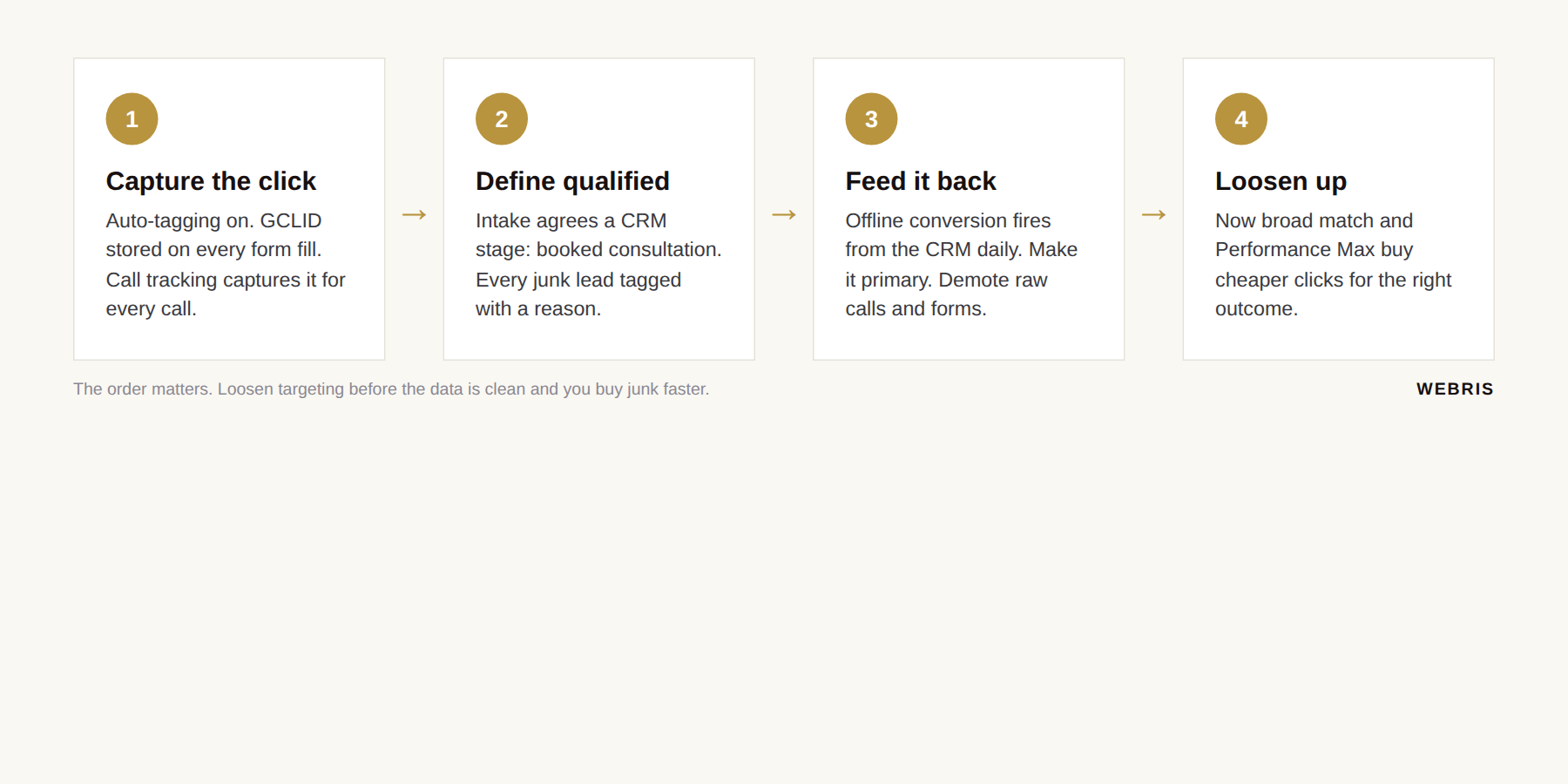
Step One: Fix Attribution
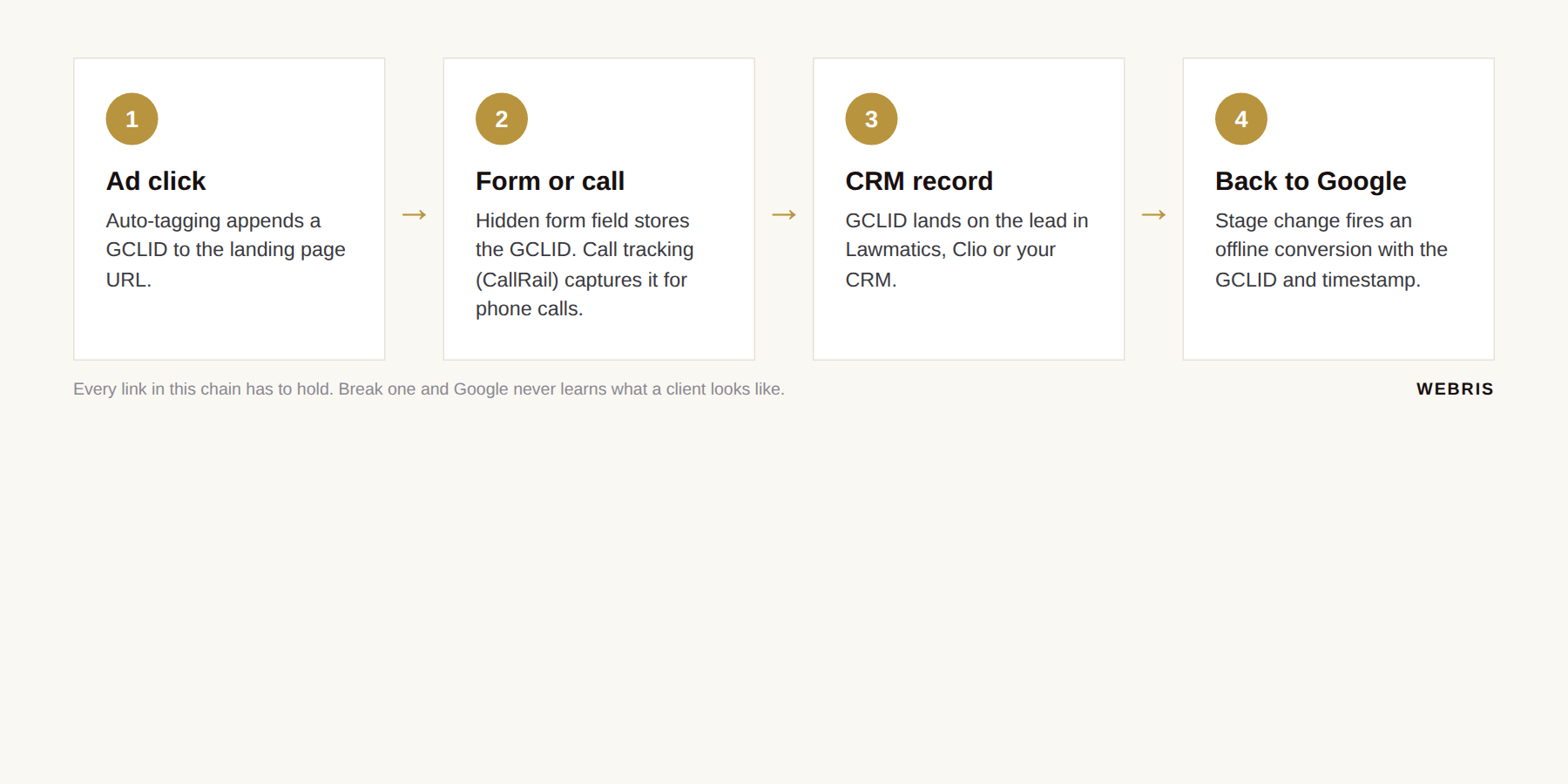
You cannot teach Google anything until every lead carries the click that produced it. That means a GCLID on every form fill and every phone call.
Turn on auto-tagging. Google describes GCLIDs as unique IDs "for every click that comes to your website from an ad" that you save "along with whatever lead information you collect," per Google Ads Help.
Then clean up the online conversions. The immigration firm's setup was a soup: some conversions firing from the site, some imported from GA4, nothing offline.
Pick one source of truth. We use the Google Ads conversion tag directly, not GA4 key events imported into Google Ads.
The tag updates faster and credits the click more aggressively. GA4 imports can take up to 24 hours to reach Google Ads. For a bidding algorithm making decisions every auction, a day is forever.
Forms are easy. A hidden field captures the GCLID.
Phone calls have no URL, so you need call tracking. CallRail's Google Ads integration "posts conversions using Google's click IDs" and requires the CallRail snippet on your pages, visitor tracking turned on, and auto-tagging enabled.
Then the click ID has to land in your CRM. Lawmatics documents both a CallRail integration and sending offline conversions to Google Ads on a status change. Whether a call's GCLID reaches the matter automatically is the piece you test in your own account.
I'll be honest. This step is like pulling teeth. It's also the single highest-value thing in this entire post.
If your CRM is the weak link, our CRM guide for personal injury firms covers which ones handle this cleanly.
Step Two: Define A Qualified Lead With Intake
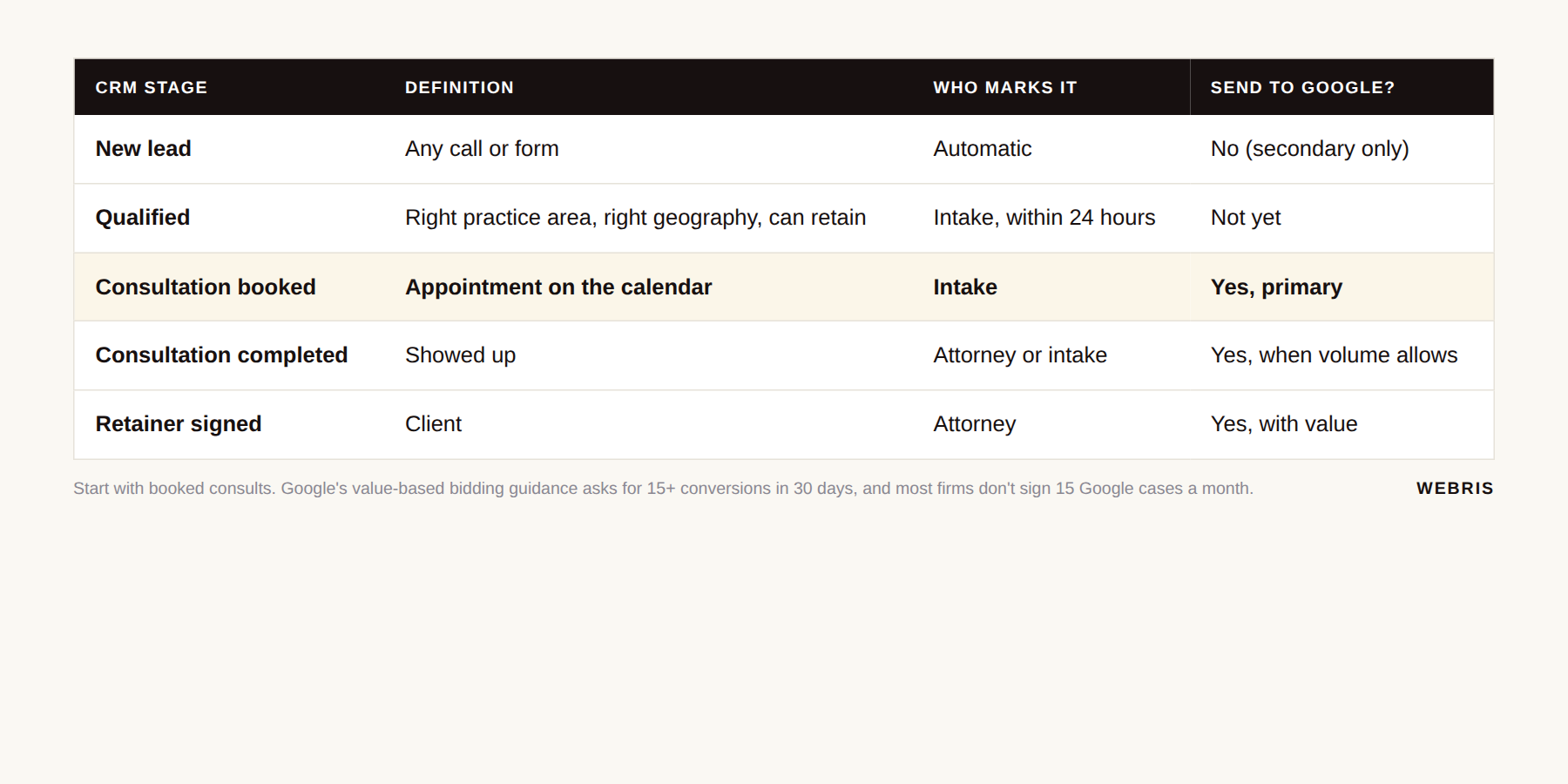
"Good lead" is a feeling. A CRM stage is a definition. Sit down with whoever answers the phone and agree on one.
| CRM stage | Definition | Who marks it | Send to Google? |
|---|---|---|---|
| New lead | Any call or form | Automatic | No (secondary only) |
| Qualified | Right practice area, right geography, can retain | Intake, within 24 hours | Not yet |
| Consultation booked | Appointment on the calendar | Intake | Yes, primary |
| Consultation completed | Showed up | Attorney or intake | Yes, when volume allows |
| Retainer signed | Client | Attorney | Yes, with value |
Then have intake tag every unqualified lead with a reason: wrong practice area, wanted a government office, wanted free help, outside your geography.
Those tags become your negative keyword themes and your landing page copy. [ORIGINAL INSIGHT OPPORTUNITY: distribution of junk-lead reasons tagged by intake across WEBRIS legal accounts.]
Automate the weekly export from the CRM. Nobody spending $30,000 a month wants to maintain a spreadsheet by hand, and nobody will. Our personal injury intake guide has the intake script and the tagging list.
Step Three: Feed It Back To Google
Create an offline conversion action called "Booked Consultation" and make it primary. Demote raw calls and forms to secondary.
Fire it from the CRM on the stage change, with the GCLID, the timestamp and, eventually, a value. Google recommends uploading at least daily.
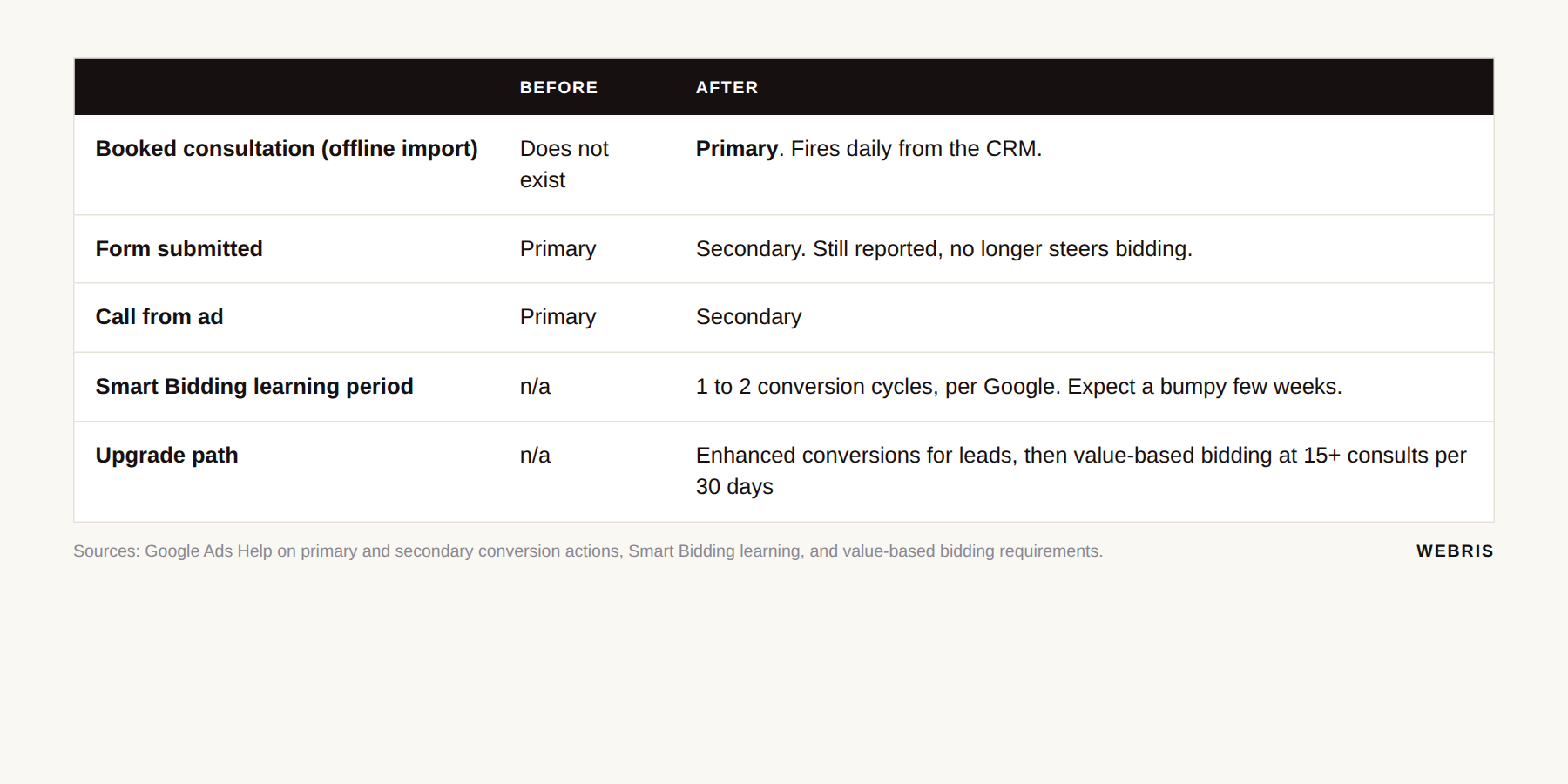
Secondary actions still get reported. They no longer steer bidding.
Google warns that Smart Bidding "will take some time to learn (1-2 conversion cycles in most cases)" after a goal change, per Google Ads Help. Expect a few bumpy weeks.
When you have the volume, upgrade to enhanced conversions for leads. Google calls it "an upgraded version of offline conversion import" that adds hashed email or phone data to improve matching.
Start with booked consults, not signed cases. Google's guidance for value-based bidding asks for at least 15 conversions in the last 30 days.
Most firms don't sign 15 paid cases a month from Google. Consults happen sooner and more often, and they've already filtered out the USCIS callers.
Step Four: Loosen Up, Then Test PMax
Only now do the things your Google rep has been begging you to do. Broad match and Performance Max are safe once Google is optimizing toward the right outcome.
| What to loosen | When | Guardrail |
|---|---|---|
| Move core ad groups to broad match | After 30 days of offline conversions flowing | Keep the negative list, watch cost per consult weekly |
| Ease off aggressive negatives | Once consult volume is stable | Re-add anything that shows up in intake's junk tags |
| Launch Performance Max | Only pointed at the offline consult conversion | Brand exclusions on, account-level negatives on, 10% of budget to start |
| Value-based bidding | 15+ consults per 30 days | Values from your average fee by case type |
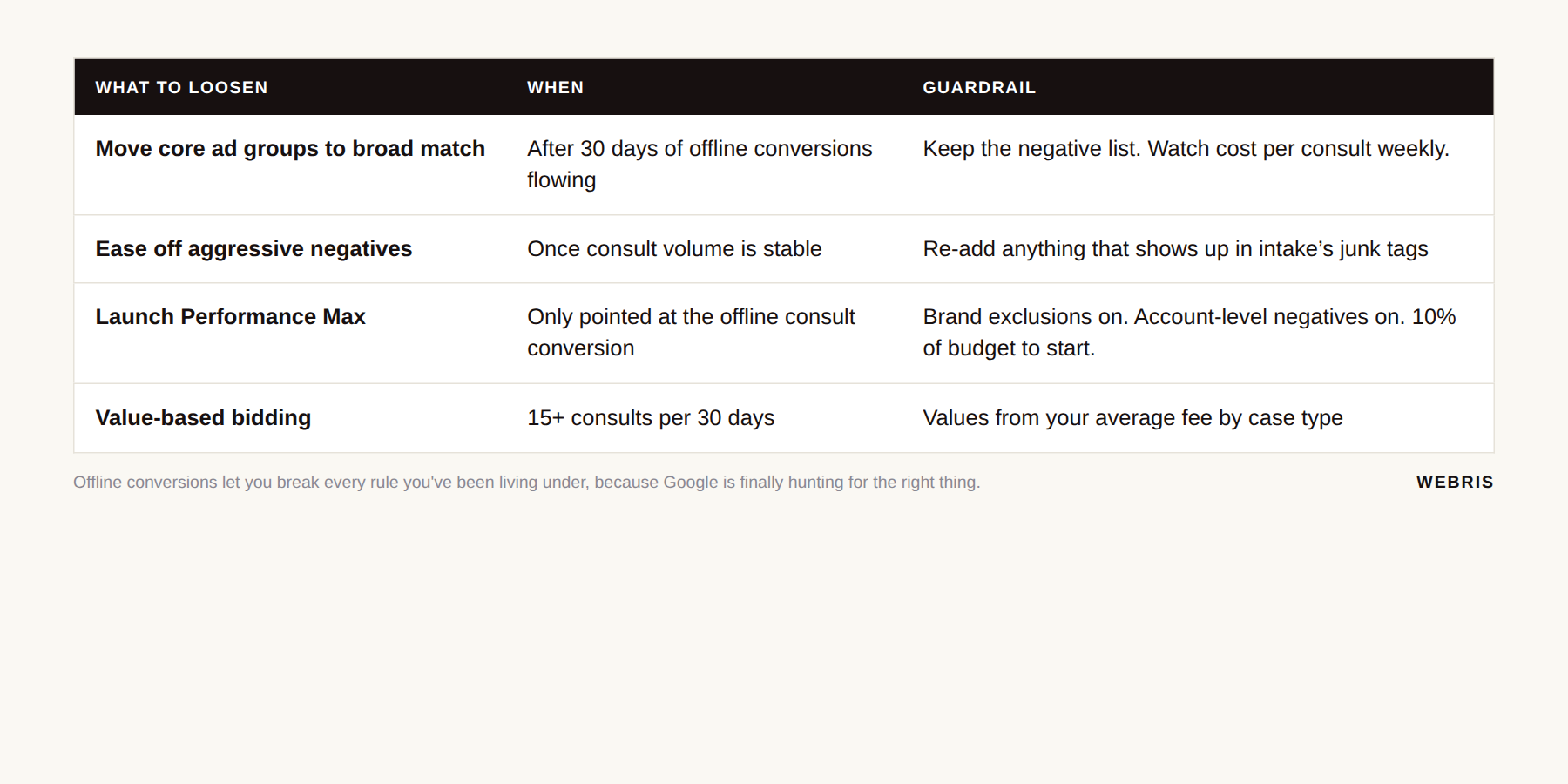
Offline conversions let you break every rule you've been living under. Once Google is optimizing toward the booked consultation instead of the phone call, you can bid more broadly and let PMax hunt across six channels.
Because now it's hunting for the right thing.
How To Measure Whether It Worked
Stop reporting cost per lead. A $130 misdial is $130 wasted. A $400 lead that becomes a $15,000 case is a bargain.
WordStream's 2026 Google Ads benchmarks, an industry survey of advertiser accounts, put the legal category at the numbers below. Useful as context. Meaningless as a target.
| Metric (WordStream 2026, attorneys and legal services) | Value | Why it doesn't matter on its own |
|---|---|---|
| Average cost per click | $9.87 | Position-one PI clicks run $200+ per click |
| Average conversion rate | 5.55% | Counts misdials as conversions |
| Average cost per lead | $131.63 | Highest of 23 industries, and says nothing about cases |
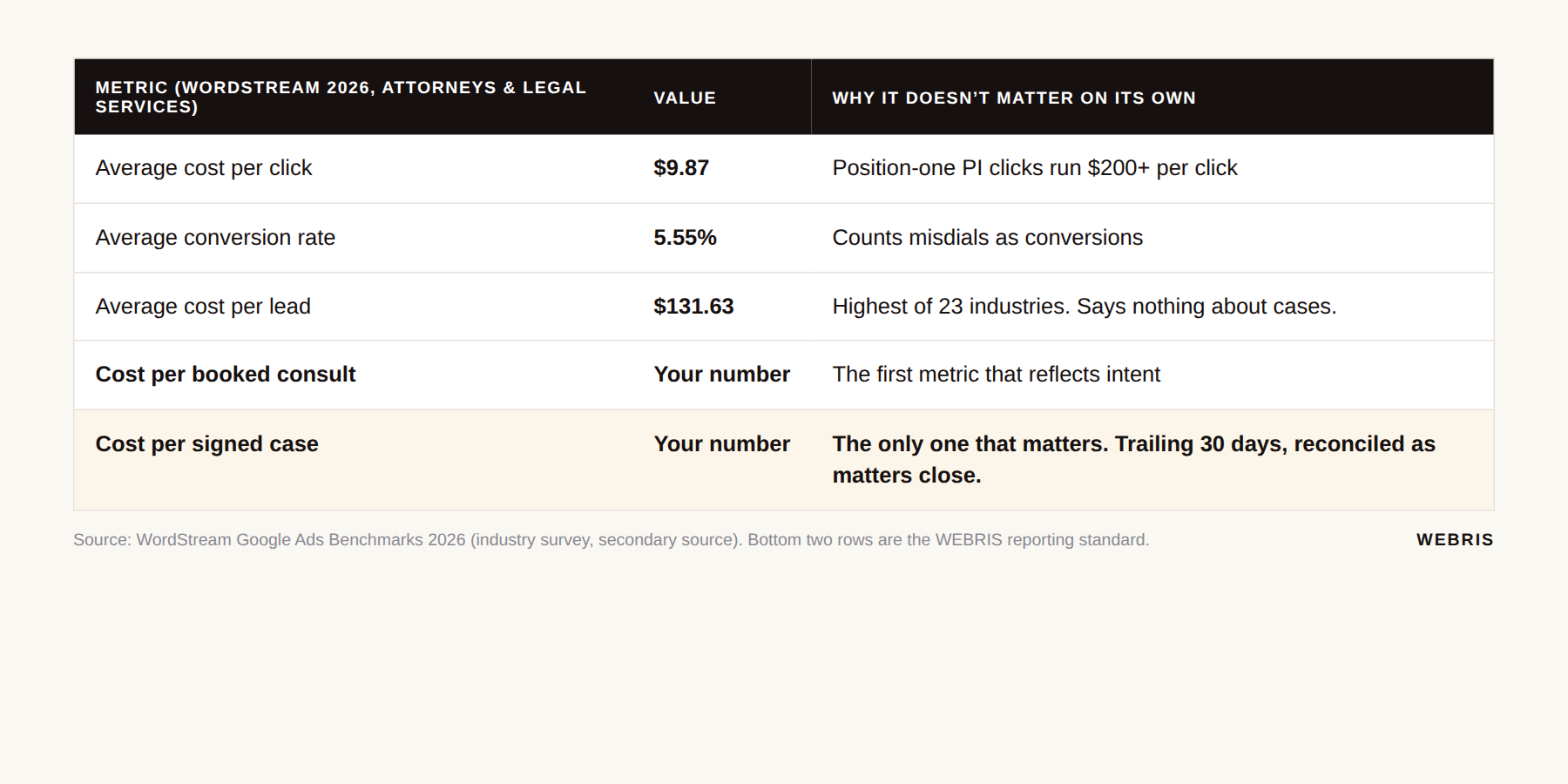
The only metrics that matter:
- Cost per qualified lead (booked consult)
- Cost per signed case
The catch is lag. A click today might become a consult next week and a signed retainer next month. This month's cost per signed case always looks terrible.
We report it on a trailing 30-day basis and reconcile as matters close.
I know what you're thinking. "Ryan, I don't need a spreadsheet, I can feel when the leads are good." No, you can't.
One client was certain he'd signed nothing in two months. His own intake company's reporting said the campaign was fine. Feelings lose to a CRM export every time.
And audit intake itself. Clio's Legal Trends research on client intake found that when researchers contacted firms as prospective clients, about 40% picked up the phone and 33% responded to email.
Some of the "junk" on your lead report is a good prospect who gave up waiting. That's an intake problem, not a Google problem.
Are LSAs Better Than Search Ads For Lead Quality?
Local Services Ads produce fewer junk leads than Search for most consumer practice areas, because you pay per lead and Google screens the business. They are not a replacement for Search. They are the first layer.
Google's Local Services Ads documentation says you "pay only for leads related to your business and the services you offer." Leads you dispute as irrelevant can be credited.
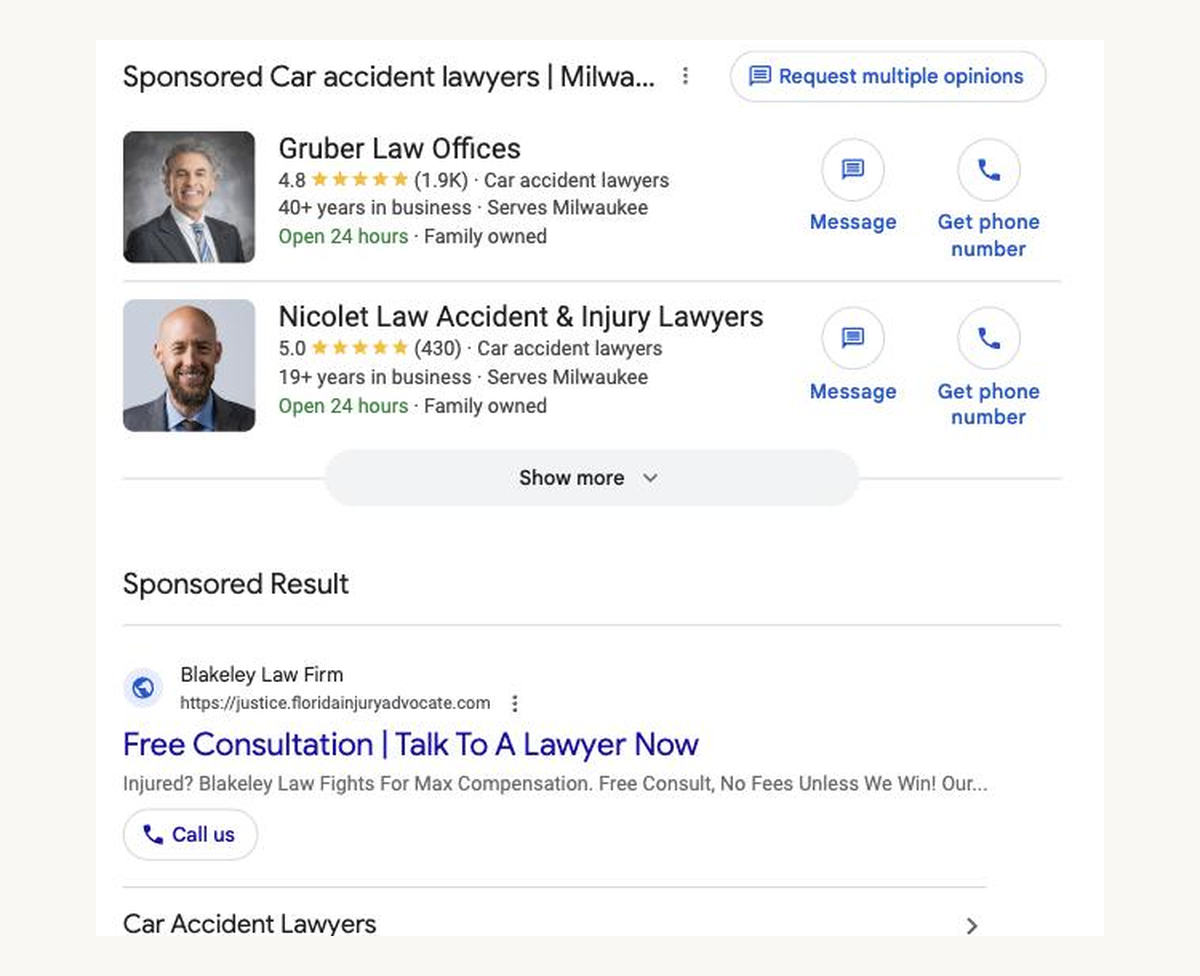
That changes the economics. A junk call on Search cost you a click. A junk call on LSAs can be disputed.
It does not fix intake, and LSAs have their own failure modes. If yours are underperforming, this is usually why. For the full playbook, read our guide to Local Services Ads for law firms.
The stack we run for most firms: LSAs first for high-intent local terms, Search second with offline conversions, PMax last and only once the data is clean. How Search compares to organic on lead quality is covered in SEO vs PPC for lawyers.
When Junk Leads Are Actually Fine
A 30% junk rate on a $60 lead can beat a 5% junk rate on a $300 lead. Not every firm should chase a spotless lead list.
| Volume play | Precision play | |
|---|---|---|
| Cost per lead | $60 | $300 |
| Junk rate | 30% | 5% |
| Cost per real lead | $86 | $316 |
| Intake requirement | Staffed to work through noise fast | Lean intake, fewer conversations |
| Works when | Qualified and curious prospects type the same words | Case value justifies fewer, better conversations |
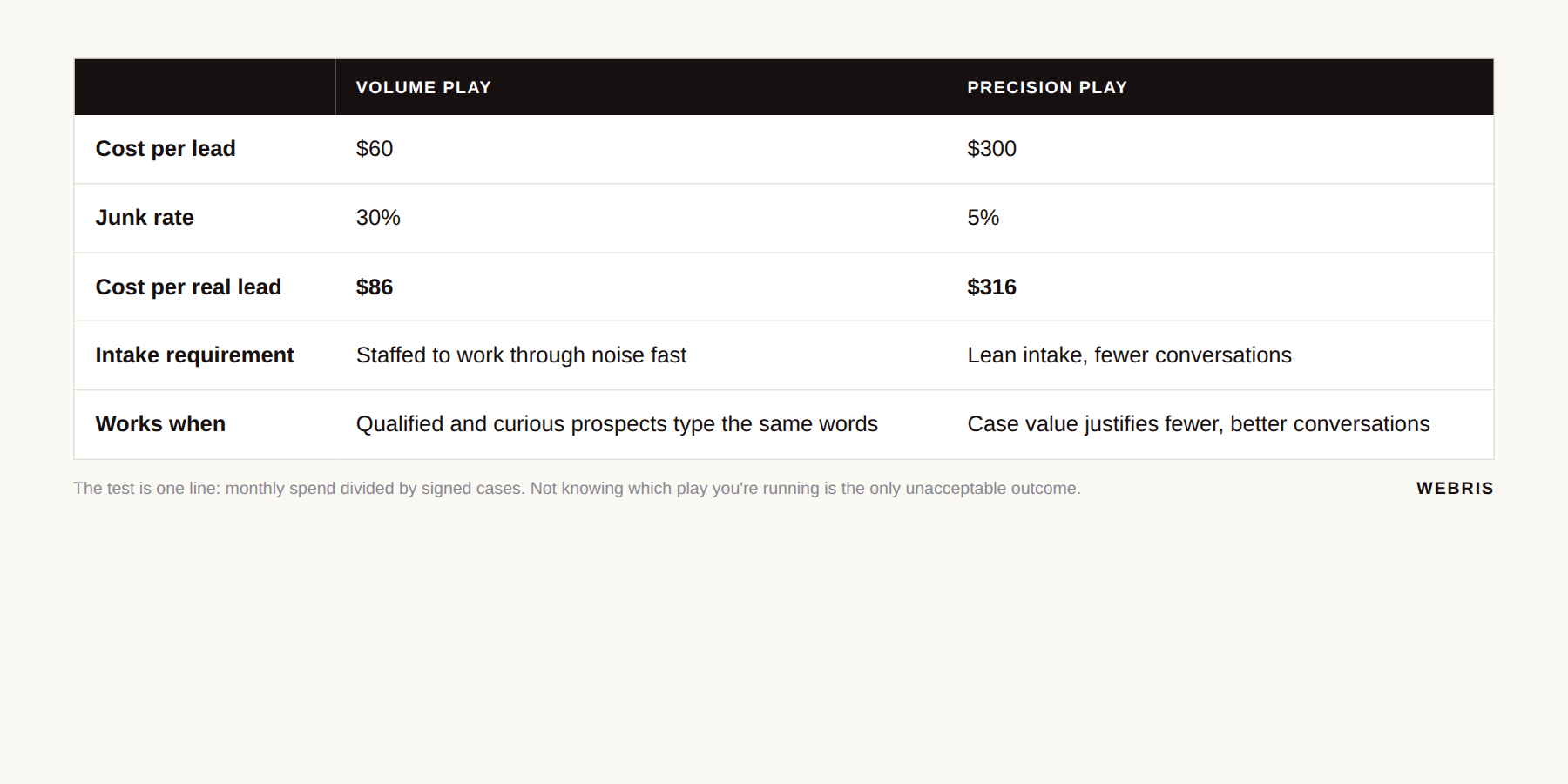
Top-of-funnel volume plays are legitimate, especially where only a phone call separates the qualified prospect from the curious one.
The test is one line of math: monthly spend divided by signed cases. If that number is where you need it and intake isn't drowning, leave the campaign alone.
What's never fine is not knowing which situation you're in. That's a measurement problem again.
Where This Leaves You
If half your Google Ads leads are nothing, the campaign is delivering exactly what it was asked for. Change the ask.
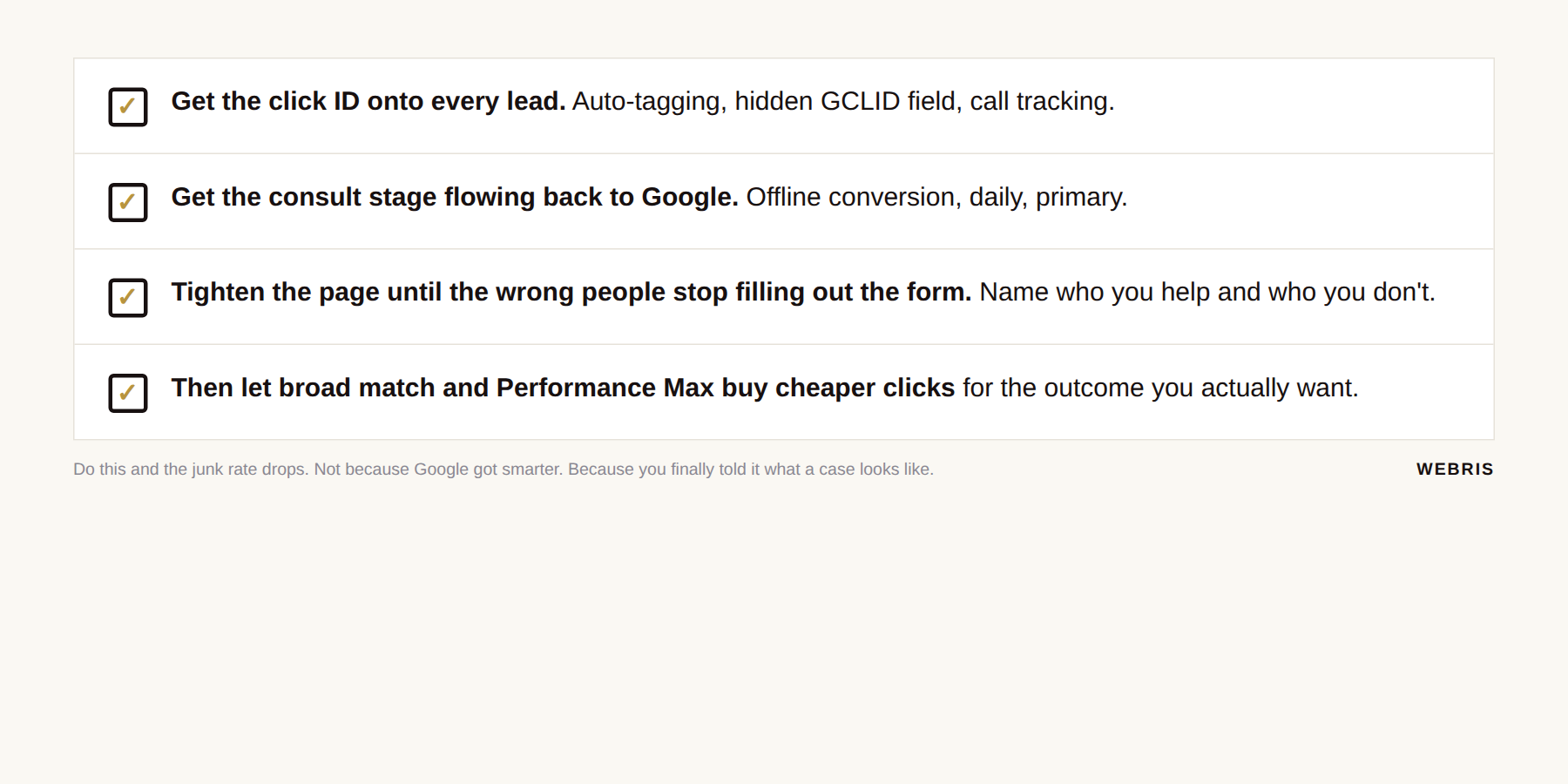
- Get the click ID onto every lead.
- Get the consult stage flowing back to Google.
- Tighten the page until the wrong people stop filling out the form.
- Then, and only then, let broad match and Performance Max buy cheaper clicks for the outcome you actually want.
Do that and the 45% number drops. Not because Google got smarter. Because you finally told it what a case looks like.
This is what we do at WEBRIS. We run Google Ads for law firms every day. The first thing we'll do is show you what your account is actually optimizing toward, what the hidden search terms are costing you, and how far you are from offline conversions.
No pitch deck. Just the numbers. Get your free growth plan here.