
Your Google Ads account has no idea which callers signed.
It sees a click. It sees a call. Then the trail goes dark, and it goes looking for more people exactly like the ones who wasted your intake team's afternoon.
That is the problem this post fixes. And in September, Google made the fix a lot easier.
Why Is Google Ads Optimizing for Calls Instead of Cases?
- A click
- A 60-second call
- A form submit
- A signed retainer
- The case value
- The fee
Google Ads optimizes for whatever you tell it counts as a conversion. For most law firms, that's a phone call over 60 seconds or a form fill.
Smart Bidding then does its job perfectly. It finds more people who call and fill out forms.
The trouble is who those people are:
- ❌ Wrong practice area
- ❌ Already represented
- ❌ Outside your jurisdiction
- ❌ Solicitors and spam
- ❌ Soft-tissue cases you'd never take
Every one of them counts as a "conversion" to Google. So the algorithm learns to buy more of them.
If you've ever looked at a Google Ads report showing cost per lead going down while signed cases stayed flat, this is why.
Here's the short version: Google can only optimize toward what it can see. Right now it can't see your signed cases.
What Did Google Change in September 2026?
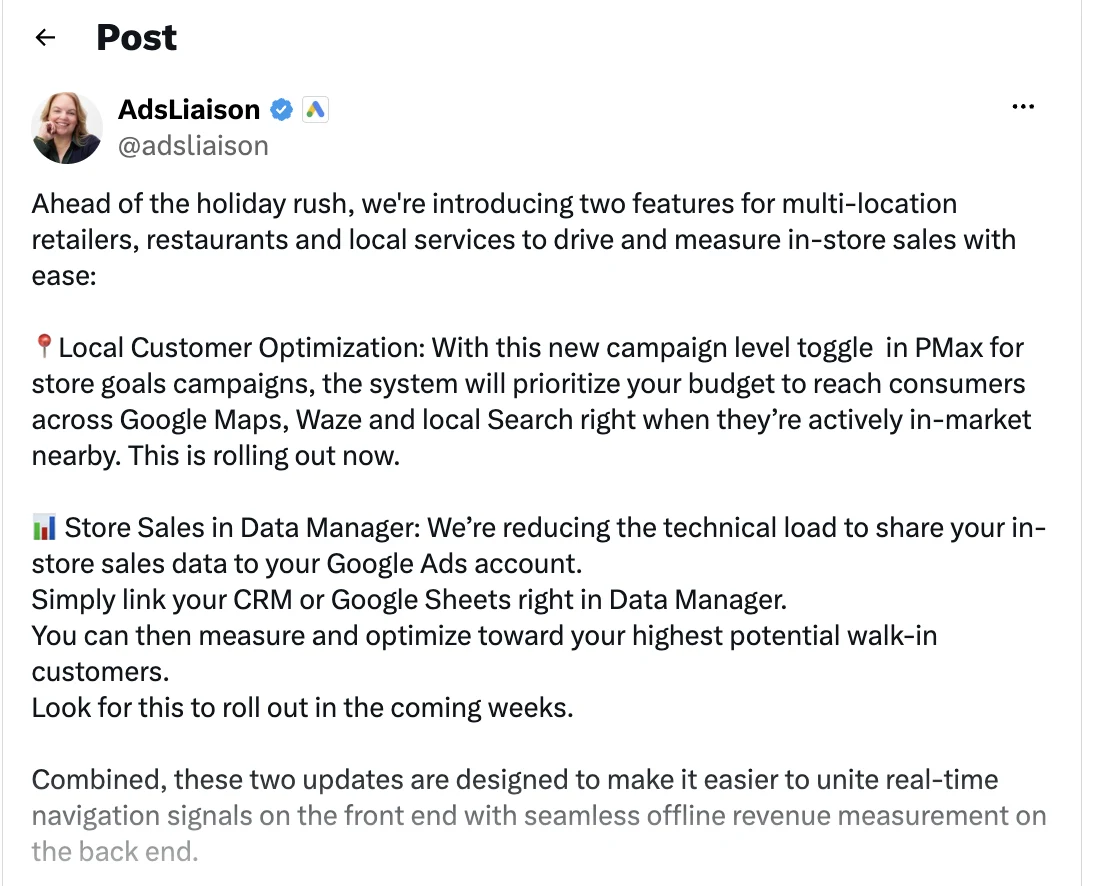
On September 8, 2026, Google announced two updates aimed at local businesses. The one that matters to you is Store Sales in Data Manager.
According to Search Engine Land's report on the announcement, advertisers will be able to connect a CRM or Google Sheets directly inside Data Manager, instead of relying on more technical ways of sharing offline data.
Google said the feature would roll out in the weeks following the announcement.
Notice who the announcement from Google's Ads Liaison is addressed to: multi-location retailers, restaurants and local services. A law firm is a local service.
Why a Retail Feature Matters to a Law Firm
A retailer
- Ad click
- In-store sale
- CRM
- Data Manager
- Google Ads
Your firm
- Ad click
- Signed retainer
- CRM
- Data Manager
- Google Ads
The feature is pitched at stores and restaurants. The mechanism is the same one you need.
A store sale happens offline, after the ad click. So does a signed retainer.
Both are the real outcome. Both live in a system Google can't see. Data Manager is Google's answer to getting that offline outcome back into the ad account without a developer.
It also fits a broader push. Google already recommends advertisers upgrade offline conversion imports to enhanced conversions for leads using Google Ads Data Manager.
The June 15, 2026 Cutoff You May Have Missed
- Before June 15, 2026Offline conversions upload through the Google Ads API.
- June 15, 2026Uploads move to the Data Manager API. The old Google Ads API route is blocked.
- September 2026CRM and Google Sheets connections arrive inside Data Manager.
This part is urgent if you already had something set up.
According to Google Ads Help, starting June 15, 2026, offline conversion imports and enhanced conversions for leads uploads moved to the Data Manager API and were blocked in the Google Ads API.
Read that again. If a developer built you a custom upload years ago, it may have stopped working in June. Nobody tells you. The conversions just quietly stop arriving.
Check your offline conversion actions in Google Ads today. If the last upload date is around mid-June, you have your answer.
How Does the CRM-to-Google Ads Loop Work?
- Ad click creates a GCLID
- Call tracking or form captures it
- Intake logs the lead in the CRM
- Case moves to "signed"
- Data Manager sends it to Google
- Smart Bidding adjusts
The loop has five links, and the sixth step is the payoff. Break any link and the payoff never comes.
- Someone clicks your ad. Google attaches a click ID to that visit.
- They call or fill out a form. Your call tracking or form captures the click ID and contact details.
- Intake logs them in the CRM. The click ID travels with the lead record.
- The case moves through your stages. Qualified, consult booked, retainer signed.
- The CRM sends the outcome back to Google. Google matches it to the original click.
Now Google knows which click became a case. Over time, it bids more for searches and people who look like your signed clients.
How Google Matches a Signed Case to the Original Click
| Match key | What it is | Where it comes from | Weakness |
|---|---|---|---|
| GCLID | Google Click ID, a unique code added to the landing page URL | Captured in a hidden form field or by call tracking | Lost if your form or tracking doesn't store it |
| Caller phone number + call time | Used for calls from Google forwarding numbers | Google's call reporting plus your CRM | Only works for calls through Google forwarding numbers |
| Hashed email / phone | Contact info, encrypted before it's sent | Your CRM's lead record | Needs the customer data terms accepted |
Google needs a match key to connect the offline outcome to the ad interaction. There are three.
Enhanced conversions for leads is Google's upgraded version of offline import. According to Google Ads Help, it adds hashed user-provided data, like email addresses, on top of the GCLID. Google also says to keep importing GCLIDs so offline conversions stay tied to specific clicks.
The practical takeaway: send every identifier you have. More keys, more matches.
Where Call Tracking Fits
| Option | How it tracks | Feeding outcomes back |
|---|---|---|
| Google forwarding numbers | Google swaps in its own number on ads and your site | Import call outcomes by caller number and call time |
| Third-party call tracking | Dynamic number insertion shows a unique number per visitor and stores the GCLID | Pass the GCLID and caller details into your CRM, then upload |
For a PI firm, most cases start with a phone call. That makes call tracking the link that usually breaks.
Call tracking is software that assigns trackable phone numbers to your ads and pages, so each call can be tied back to the source that produced it.
Google's route has a catch. According to Google Ads Help, Google can only match imported calls if forwarding numbers were enabled on your call assets and call-only ads when the calls came in.
Third-party tools cover calls from every source, not just Google. That matters if you also run Local Services Ads, SEO, and referral channels. We compare the main options in our roundup of legal marketing software.
Which CRM Stage Should You Send Back to Google?
Your instinct will be "signed retainers only." That's the right goal. It's not always the right starting point.
Google's own guidance is to choose either a qualified lead or a converted lead as the conversion goal when setting up enhanced conversions for leads.
Here's how to pick:
- Signed retainer: the best signal. Use it as the primary goal if you sign enough cases from Google each month.
- Qualified lead: right practice area, right jurisdiction, viable case. Use it as the primary goal if signed volume is too thin.
- Everything else: keep as secondary conversions for reporting only. Don't let Google bid on them.
The Volume Problem With Signed Cases
I know what you're thinking. "We sign eight cases a month from Google. Is that enough?"
Honestly, it might not be on its own.
According to Search Engine Land's summary of Google's updated guidance, Smart Bidding can take up to roughly 50 conversion events or three conversion cycles to calibrate after a change. Google frames that as an upper benchmark, not a hard requirement.
For a firm signing eight cases a month, 50 signed cases is half a year of data. The bidder spends months guessing.
The fix is to bid on the deepest stage you can hit in volume. For most PI firms, that's the qualified lead. Then keep signed retainers flowing in as a separate action so you can report on them and move up once volume allows.
Assign Values by Case Type
| Example case type | Value tier | Conversion value to send |
|---|---|---|
| Trucking / catastrophic injury | Tier 1 | Your average fee for this case type |
| Car accident with injury | Tier 2 | Your average fee for this case type |
| Slip and fall | Tier 3 | Your average fee for this case type |
| Property damage only | Tier 4 | Low value, or don't send at all |
Not every signed case is worth the same. A trucking case and a fender-bender shouldn't count equally.
Send a conversion value with each signed case, based on your average fee for that case type. Then Google can bid toward value, not just volume.
Start simple. Three or four value tiers are enough. Precise numbers matter less than the right order.
How to Set It Up
- Capture the click ID on every lead
- Connect your CRM in Data Manager
- Map your stages to conversion actions
The setup has three pieces. Most firms already have two of them half-built.
Step 1: Capture the Click ID on Every Lead
yourfirm.com/car-accident/?gclid=Cj0KCQ...
Add a hidden GCLID field to every form. Configure your call tracking to store the GCLID with each call.
Then make sure both flow into the lead record in your CRM. If the click ID dies at the form, nothing downstream works.
One legal check here: if your call tracking records calls, confirm your disclosure meets the consent rules in each state you take calls from. California, for example, requires the consent of all parties to record a confidential communication.
Step 2: Connect Your CRM in Data Manager

In Google Ads, open Data Manager and connect your CRM or a Google Sheet.
Click Connect product in the top right, then pick your CRM, Google Sheets or Zapier from the list.
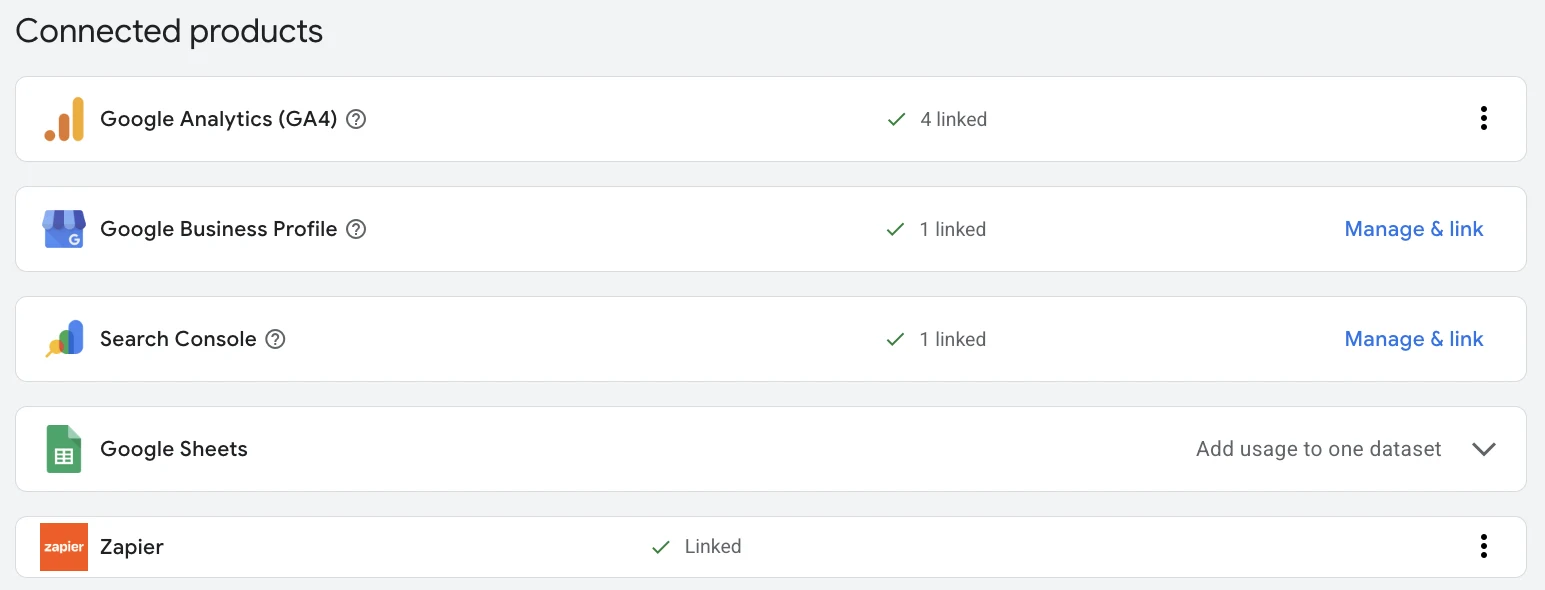
If your intake software doesn't connect directly, a Google Sheet works. Export signed cases on a schedule and let Data Manager pick them up.
Zapier is the other common bridge. According to Google Ads Help, enhanced conversions for leads is supported in Data Manager, the Google Ads API and Zapier. If your intake tool already talks to Zapier, you can push a lead to Google the moment its stage changes to signed.
Accept the customer data terms so hashed emails and phone numbers can be used for matching.
Step 3: Map Your Stages to Conversion Actions
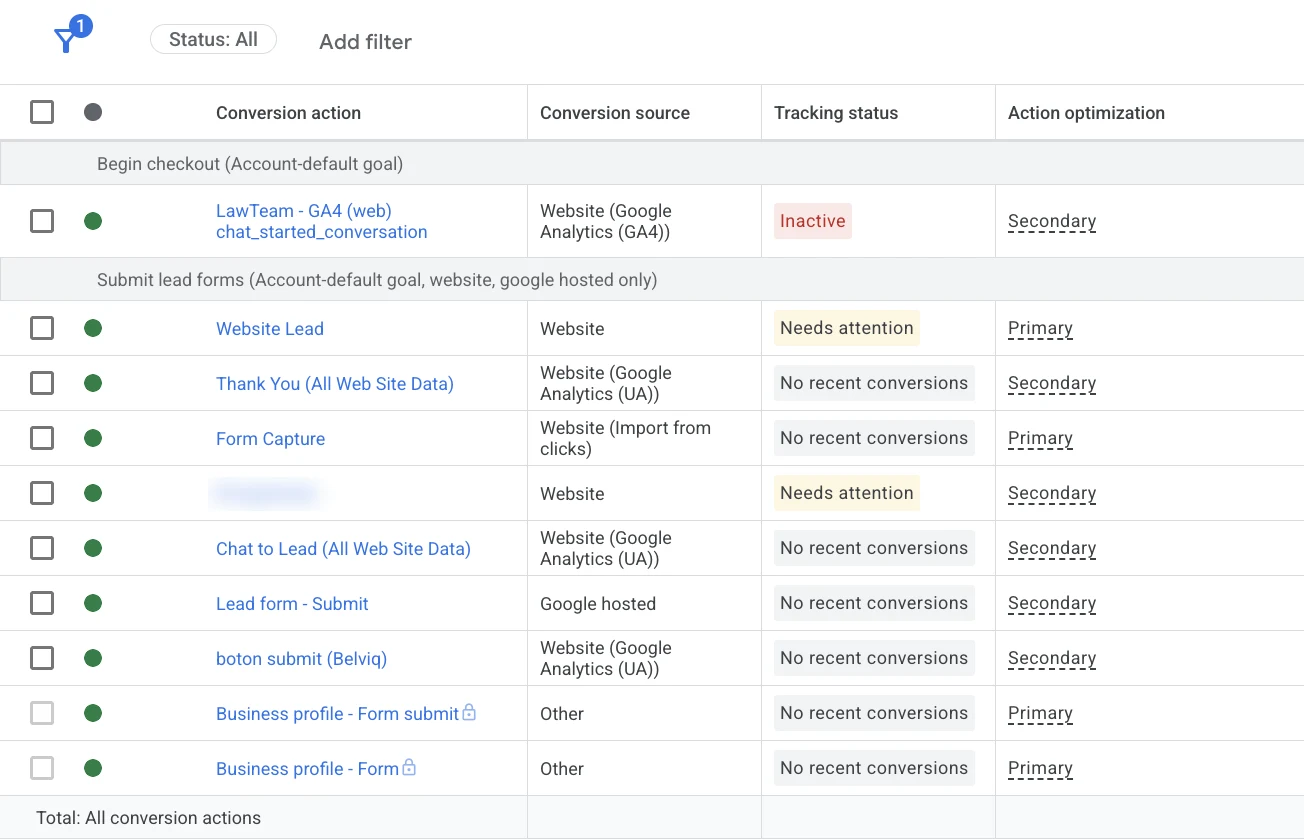
Here's what a lot of law firm accounts look like when we open them. Four different form actions are set to Primary, and Google treats every one of them as a result worth bidding on.
Even the "Form Capture" action, which imports from clicks, sits at the same level as a Business Profile form submit. Google has no way to tell which one means a case.
Create one conversion action per stage you're sending. Name them plainly, like "Qualified lead" and "Signed retainer."
Set the one you want Google to bid on as primary. Demote your old "Calls over 60 seconds" action to secondary so it stops steering the bidding.
Then check the diagnostics report in Google Ads after the first uploads. It shows whether your conversions are matching.
Watch the Upload Windows
This one catches PI firms off guard.
According to Google Ads Help, enhanced conversions for leads won't import a conversion uploaded more than 63 days after the last click. Legacy offline imports allow 90 days.
If your average case signs 70 days after the first click, those cases never make it back. Upload qualified leads fast. Push signed cases as soon as the retainer is back, not in a monthly batch.
What Changes: Cost per Signed Case
| Input | Before the loop | After the loop |
|---|---|---|
| Planning CPC ("car accident lawyer miami") | $268.00 per click | $268.00 per click |
| Landing page conversion rate | 25% | 25% |
| Lead-to-signed rate | 25% | 35% |
| Clicks per signed case | 16 | 11.4 |
| Cost per signed case | $4,288 | $3,063 |
| vs. $3,000 target | $1,288 over | $63 over |
Here's the math we plan PI campaigns with. Assume 25% of clicks become leads and 25% of leads become signed cases.
That means one signed case costs about 16 clicks.
Now plug in a real market. According to Google Keyword Planner, the high end of the top-of-page bid for "car accident lawyer miami" was $268.00 per click in September 2026.
At 25% lead-to-signed, Miami car accident traffic misses the target by almost $1,300 per case. To hit $3,000 at $268.00 per click, you need roughly 36% of your leads to sign.
That is what the feedback loop moves. It doesn't lower your CPC. It raises your lead-to-signed rate by steering spend away from the callers who never sign.
Same clicks, same price per click. About 40% more signed cases from the same budget.
This is the same signed-case framing we use across every PPC campaign for law firms. If you want to understand what to track at each stage, start with our guide to lead tracking for lawyers.
Common Mistakes That Poison the Bidder
| ❌ Mistake | ✅ Fix |
|---|---|
| Leaving "calls over 60 seconds" as a primary conversion | Make it secondary |
| Uploading signed cases once a month | Upload as they happen, inside the 63-day window |
| Dropping the GCLID at the form | Test a lead end to end before launch |
| Bidding on signed cases with five a month | Bid on qualified leads until volume supports it |
| Changing conversion goals every two weeks | Give the bidder time to learn |
Any one of these keeps Google optimizing for the wrong callers. Fix them and your ad spend starts compounding instead of leaking.