
Google’s November 2026 core update finished rolling out on November 24.
One hour later, Google announced the next one.
Read that again. If your rankings moved this month, you have a short window to figure out why before the December 2026 core update scrambles the data again. And that window lands on Thanksgiving week.
Here’s the short version of what happened, what Google says it rewards, how to check your own site, and what to fix if you got hit.
What Was the Google November 2026 Core Update?
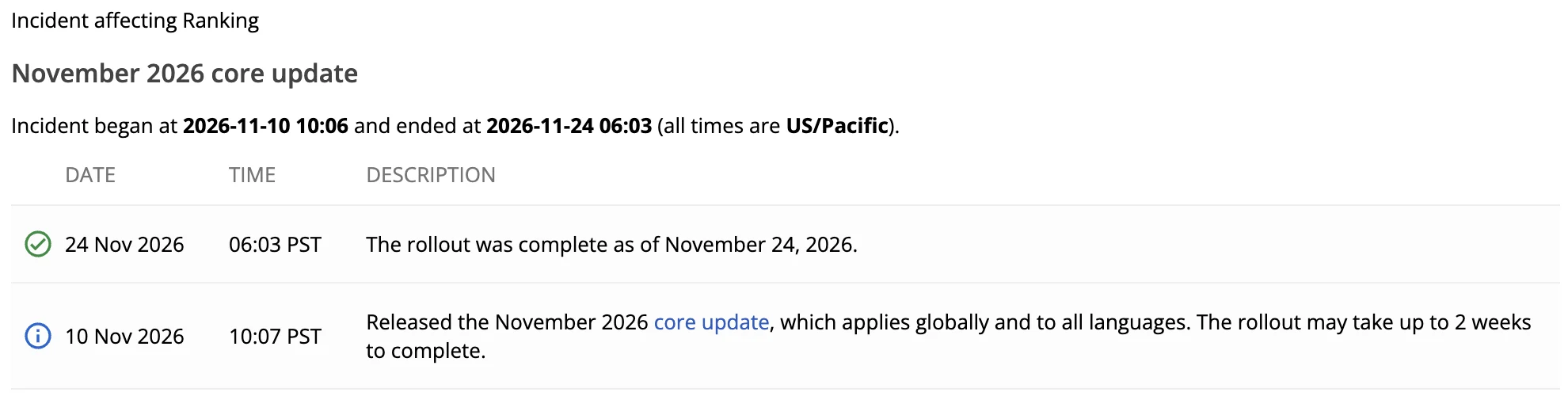
The November 2026 core update was a broad change to Google’s ranking systems that rolled out from November 10 to November 24, 2026. According to the Search Status Dashboard, it applied globally and to all languages.
A core update is a significant, broad change to Google’s search algorithms and systems. According to Google’s core updates documentation, Google makes these changes several times a year, and they don’t target specific sites or individual pages.
That last point matters for you.
A core update is not a penalty. Google’s documentation compares it to updating a list of favorite restaurants: the ones that move down aren’t necessarily “bad,” other options just made the list.
This was the third broad core update of 2026, after March and May, according to Search Engine Roundtable’s core update history.
The Rollout Timeline: November 10 to November 24
- Tue, Nov 10 · 10:06 a.m. PTGoogle releases the updateGlobal, all languages, “up to 2 weeks.”
- Fri–Sat, Nov 13–14First visible impactThree to four days after release.
- Tue, Nov 24 · 6:03 a.m. PTRollout complete13 days, 19 hours, 57 minutes.
- Tue, Nov 24 · 7:03 a.m. PTDecember update pre-announcedOne hour later. Scheduled for December 2026.
Here’s how the two weeks played out:
| Date (2026) | What happened | Source |
|---|---|---|
| Nov 10, 10:06 a.m. PT | Google released the update, saying the rollout may take up to 2 weeks | Search Status Dashboard |
| Nov 13–14 | First noticeable impact: it touched down Friday, and most noticed it Saturday | Search Engine Roundtable |
| Nov 24, 6:03 a.m. PT | Google marked the rollout complete | Search Status Dashboard |
| Nov 24, 7:03 a.m. PT | Google pre-announced the December 2026 core update | Search Status Dashboard |
Notice the lag.
Google flipped the switch on a Tuesday. According to Search Engine Roundtable, the impact first touched down that Friday, and most people noticed it on Saturday.
So if your phones went quiet on November 11, the update probably wasn’t the cause.
What Google Said (and Didn’t Say)
“A regular update designed to better surface relevant, satisfying content.”
Google said almost nothing.
In its launch post, Google called it a regular update designed to better surface relevant, satisfying content for searchers from all types of sites. It named no target.
That means anyone telling you exactly what this update “targeted” is guessing.
What Google has published is guidance on what its systems reward and what its spam policies forbid. That’s two sections down.
How Did November Compare to Previous Core Updates?
Rollout length, last six broad core updates (days)
November’s rollout ran 13 days, 19 hours and 57 minutes, the longest of 2026’s three core updates so far. That’s from 10:06 a.m. PT on November 10 to 6:03 a.m. PT on November 24, per the Search Status Dashboard. March and May each took about 12 days.
Here’s the longer view:
| Core update | Start | End | Approx. length |
|---|---|---|---|
| March 2025 | Mar 13, 2025 | Mar 27, 2025 | 14 days |
| June 2025 | Jun 30, 2025 | Jul 17, 2025 | 17 days |
| December 2025 | Dec 11, 2025 | Dec 29, 2025 | 18 days |
| March 2026 | Mar 27, 2026 | Apr 8, 2026 | 12 days |
| May 2026 | May 21, 2026 | Jun 2, 2026 | 12 days |
| November 2026 | Nov 10, 2026 | Nov 24, 2026 | 14 days |
Dates from Search Engine Roundtable’s core update history.
The pattern: Google ran three broad core updates in 2025 and three so far in 2026, each lasting roughly two weeks. If December lands as scheduled, 2026 gets four.
If your SEO plan treats a core update as a rare event, it’s wrong.
Your site has to be built to hold up through re-ranking, not to recover from it.
What Kind of Content Does Google Say Loses in a Core Update?
Google’s systems prioritize content “created to benefit people,” not content “created to manipulate search engine rankings.”
Google’s guidance is clear: its ranking systems favor content created to help people, and work against content created mainly to rank. That’s from Google’s page on creating helpful, reliable, people-first content, which its core updates documentation points to as the self-assessment after a drop.
Google didn’t tie any of this to November specifically. But it’s the standard Google says core updates measure against.
Google Didn’t Name Winners or Losers
No official winners list. No losers list. Your Search Console is the only data that’s actually about your site.
Google did not publish which sites or industries gained or lost in the November update. It published the dates and a one-line description.
SEO tool vendors publish visibility estimates after every update. Those are estimates from their own keyword samples, not Google data.
The only numbers that tell you what happened to your firm are in your Search Console and your intake records. That’s what the next sections use.
Search Engine-First Content: Google’s Own Warning Signs
❌ Google’s warning signs
- Made primarily to attract visits from search engines
- Mainly summarizing what others say
- Written because a topic is trending, not for your audience
- Extensive automation across many topics
✅ Google’s people-first signs
- Useful to people who come to you directly
- Shows first-hand expertise
- Your site has a clear primary purpose
- The reader doesn’t need to search again
Google lists specific warning signs of search engine-first content, and a lot of law firm blogs hit several of them.
According to Google’s guidance, answering yes to any of these is a warning sign:
- Is the content primarily made to attract visits from search engines?
- Are you mainly summarizing what others have to say without adding much value?
- Are you writing about things simply because they seem trending, not because you’d write about them for your existing audience?
- Are you using extensive automation to produce content on many topics?
Now look at your own blog.
“What is negligence?” “How long does a car accident claim take?” If your version says the same thing as every other firm’s, with no attorney name and no local detail, it fits Google’s description of summarizing without adding value.
If your content marketing is mostly generic legal explainers, treat that as risk, whether or not you dropped this time.
When Volume Becomes Spam: Scaled Content Abuse
Scaled content abuse: “many pages are generated for the primary purpose of manipulating search rankings and not helping users.”
- Using generative AI to make many pages without adding value
- Scraping feeds or other content to generate many pages
- Stitching content from other pages without adding value
Related, under doorway abuse: many pages targeted at specific cities that funnel users to one page.
Scaled content abuse is a Google spam policy violation, and it applies no matter how the pages are made. Google defines it as many pages generated mainly to manipulate rankings, typically large amounts of unoriginal content that provides little to no value, in its spam policies.
This is a separate system from core updates. But Google says sites that violate its spam policies may rank lower or not appear at all.
Google’s listed examples include:
- Using generative AI tools to generate many pages without adding value for users.
- Scraping feeds, search results or other content to generate many pages where little value is provided.
- Stitching or combining content from different web pages without adding value.
Read that second one again if your firm publishes a page for every local crash, rewritten from news reports or a police feed.
The same policy page lists, under doorway abuse, “multiple domain names or pages targeted at specific regions or cities that funnel users to one page.” That’s the 50 near-identical “[City] car accident lawyer” pages.
If you publish pages like these, Google’s spam policy tells you what to do: if you’re hosting such content on your site, exclude it from Search.
Before you do, check your call tracking for any of those pages that produced a lead. Those are worth rebuilding into something original, not hiding.
How to Check If Your Law Firm Was Hit by the November 2026 Core Update
- Confirm completion on the Search Status Dashboard. Done: Nov 24.
- Wait at least one full week. Don’t judge anything before Dec 1.
- Compare a post-update week against the Nov 3–9 baseline.
- Review top pages and queries before and after.
- Classify each drop as small or large.
Wait at least one full week after November 24, then compare a post-update week in Search Console against a week before the rollout began. That’s Google’s own method, from its core updates documentation.
Here’s the process:
- Confirm completion. Done. Google marked it complete on November 24.
- Wait a full week. Don’t judge anything before December 1.
- Compare the right weeks in the Search Console Performance report (dates below).
- Review your top pages and queries. Check how each ranked before and after.
- Classify each drop as small or large (thresholds below).
Google also recommends analyzing search types separately: Web Search, Google Images, Video and the News tab. For most law firms, Web Search is the one that matters.
The Exact Date Ranges to Compare
Use these ranges:
| Window | Dates (2026) | Use it for |
|---|---|---|
| Baseline | Nov 3–9 (Tue–Mon) | The full week before the rollout began |
| Google’s standard post week | Nov 25–Dec 1 | First full week after completion. Includes Thanksgiving, Black Friday and Cyber Monday. |
| Cleaner read | Dec 1–7 (Tue–Mon) | Same weekdays as the baseline, after the holiday. Use it if December’s update hasn’t started yet. |
According to Search Engine Journal, the first full post-update week on this update’s dates falls on Thanksgiving, Black Friday and Cyber Monday.
Why match weekdays? A Tuesday-to-Monday week compared against another Tuesday-to-Monday week compares like with like. Each window then has the same mix of weekdays and weekend days.
Three Data Traps in November’s Numbers
| Trap | Dates (2026) | What it does |
|---|---|---|
| AI report logging error | Nov 9–11 | Lower impression counts in the Generative AI report |
| Click spikes | Around Oct 31–Nov 2 | Sudden click jumps with flat impressions on some sites |
| Thanksgiving week | Nov 26–30 | Holiday falls inside Google’s standard post week |
November’s data has three problems baked in. If you don’t account for them, you’ll misread your results.
| Trap | Dates (2026) | What happened | What to do |
|---|---|---|---|
| Generative AI report logging error | Nov 9–11 | Google’s data anomalies page lists a logging issue that lowered impression counts in the Generative AI performance report. | Use Nov 3–8 as your AI report baseline. Ignore the dip. |
| Click spikes | Around Oct 31–Nov 2 | Some sites saw sudden spikes in Search Console clicks while impressions stayed flat, according to Search Engine Roundtable. The cause wasn’t confirmed. | Keep those dates out of your baseline. Nov 3–9 already does. |
| Thanksgiving week | Nov 26–30 | A holiday can change how many people search, so clicks and impressions can move even when rankings hold. | Judge this week by average position, not clicks. |
The takeaway: average position is your cleanest signal this month. Clicks and impressions are muddied.
Small Drop or Large Drop? Google’s Own Threshold
Google gives two examples in its documentation:
- Small drop (position 2 to 4): No need for drastic action. Google specifically recommends avoiding changes to content that’s already performing well.
- Large drop (position 4 to 29): Do a deeper assessment of your site as a whole against Google’s self-assessment questions.
So don’t overreact to the small ones, and don’t underreact to the big ones.
A two-spot slip on “car accident lawyer [city]” feels like a crisis. By Google’s own example, it isn’t. A practice area page falling from page one to page three is.
Measure the Damage in Signed Cases, Not Rankings
- 60 lost clicksper month
- →
- 6 lost leadsat 10% visit-to-lead
- →
- 1.5 lost casesat 25% lead-to-signed
- →
- ~$4,500/moto replace via paid search
Worked example. Swap in your own numbers.
The only number that matters is signed cases. A ranking drop on a page that never produced a client is noise. A two-spot slip on your highest-converting practice page can cost you real revenue.
Here’s how to translate a ranking loss into dollars. This is a worked example, so plug in your own numbers:
| Step | Example | Your number |
|---|---|---|
| Lost organic clicks per month (from Search Console) | 60 | ___ |
| × Your visit-to-lead rate (from your call tracking and forms) | 10% | ___ |
| = Lost leads per month | 6 | ___ |
| × Lead-to-signed-case rate (WEBRIS planning assumption) | 25% | ___ |
| = Lost signed cases per month | 1.5 | ___ |
| × Cost to replace each signed case with paid search (WEBRIS PI target) | ~$3,000 | ___ |
| = Monthly cost of the drop | ~$4,500 | ___ |
Now run that per page, not per site.
If most of the lost clicks were on blog posts that never produced a lead, the revenue hit may be small. If they were on practice area or location pages that drive calls, that’s where the money went.
Fix the pages that cost you cases first.
If the math says you’re losing signed cases now, don’t wait months for a recovery. Cover the gap with PPC or Local Service Ads while you fix the pages.
Do this week: export page-level data for Nov 3–9 now. Once Dec 1–7 data is in, run this table for your top 10 pages by leads.
What to Fix If Your Rankings Dropped
- Rank pages by signed cases lost, not traffic lost
- Rebuild the practice area pages that drive cases first
- Rebuild or consolidate generic blog content
- Put a named attorney on every legal page
- Skip “quick fix” edits
- Delete content only as a last resort
Start with the pages that cost you signed cases, make them more useful than the pages now outranking them, and skip the quick fixes.
Google’s guidance is clear on three points:
- Avoid “quick fix” changes, like removing a page element because you heard it was bad for SEO.
- Improve your content in meaningful ways that make sense for your users.
- Deleting content is a last resort, only for content that can’t be salvaged.
Here’s how that applies to a law firm site.
Start With Your Practice Area Pages
- 1How you chargeContingency percentage, case costs, and what happens if you lose.
- 2What happens after they callYour real intake and case process, step by step.
- 3Local specificsYour state’s deadline with the statute cited, and the courts you file in.
- 4ProofReal case results with required disclaimers, plus real reviews.
- 5A real attorneyNamed, licensed, and linked to a full bio.
Start with the pages your call tracking shows actually produce signed cases. Audit those before you touch the blog.
For each one that dropped, pull up the pages now ranking above you. Google’s documentation says it plainly: there may be other pages on the web doing a better job of helping the searcher.
Then ask: what does the person searching need that their page gives and yours doesn’t?
For a personal injury page, that usually means:
- How you charge. Contingency percentage, case costs, and what happens if you lose.
- What happens after they call. Your actual intake and case process, step by step.
- Local specifics. Your state’s filing deadline with the statute cited, and the courts you file in.
- Proof. Real case results with any disclaimers your state bar requires, plus real reviews.
- A real attorney. Named, licensed, and linked to a full bio.
If your page could belong to any firm in any state, that’s the problem.
For the full framework, see our personal injury lawyer SEO guide.
Cut or Rebuild Blog Content Written for Traffic
If your blog is hundreds of generic legal explainers, sort the posts by leads produced in the last 12 months. Then make a call on each:
- ✅ Produced leads: Keep it. Improve it.
- ✅ No leads, but answers a real client question: Rebuild it with something only your firm knows. Use your timelines, your local court experience, and the questions your intake team hears.
- ✅ Overlaps another post: Consolidate the two and 301 redirect the weaker one.
- ❌ No leads, no unique value, no real question: This is the last-resort pile.
Google’s documentation makes a sharp point here. If you’re considering deleting entire sections of your site, that’s likely a sign those sections were created for search engines first.
That’s not permission to nuke your blog. It’s a reason to stop publishing more of the same.
Put a Real Attorney Behind Every Page
- 1A real personReal name and real photo. Google calls fake profiles and AI headshots deception.
- 2Bar admissionsWhere and when they were admitted.
- 3Practice focusThe case types they actually handle.
- 4ResultsReal outcomes, with any disclaimers your state bar requires.
- 5Linked articlesEvery page they wrote or reviewed, so bylines lead here.
Legal content is what Google calls YMYL, short for “Your Money or Your Life.” According to Google’s guidance, these are topics that could significantly impact people’s health, financial stability or safety.
Google says its systems give even more weight to strong E-E-A-T (experience, expertise, authoritativeness and trustworthiness) on YMYL topics. Of those four, Google says trust is the most important.
Every legal page on your site should be tied to a named, licensed attorney. Google strongly encourages accurate authorship information, such as bylines, where readers might expect it.
That means:
- A byline on every article and practice page.
- A full bio for each attorney, with bar admissions, practice focus and real results.
- Links from each bio to everything that attorney wrote or reviewed.
Don’t fake it. Google calls made-up author profiles, AI-generated headshots and false credentials a form of deception that makes a page untrustworthy.
What Not to Do After a Core Update
❌ Common post-update mistakes
- Rewrite every page at once
- Mass-edit title tags across the site
- Disavow links in a panic
- Mass-delete the blog
- Buy links to “make up” lost rankings
- Change pages during the December rollout, then try to measure
I know what you’re thinking: “We dropped. We need to do something this week.”
Here’s what not to do:
- ❌ Rewrite every page at once. You won’t know what worked.
- ❌ Mass-edit title tags or remove page sections because a forum said so. That’s the “quick fix” Google tells you to avoid.
- ❌ Panic-disavow links. Google says core updates don’t target specific sites. Nothing about a core update points at your links.
- ❌ Buy links to make up the gap. Buying links for ranking purposes is link spam under Google’s spam policies. Build them the right way.
- ❌ Make big changes mid-December. If you change pages while the December update rolls out, you can’t separate your changes from Google’s.
Plan this week. Ship in priority order.
The December 2026 Core Update Is Already Coming
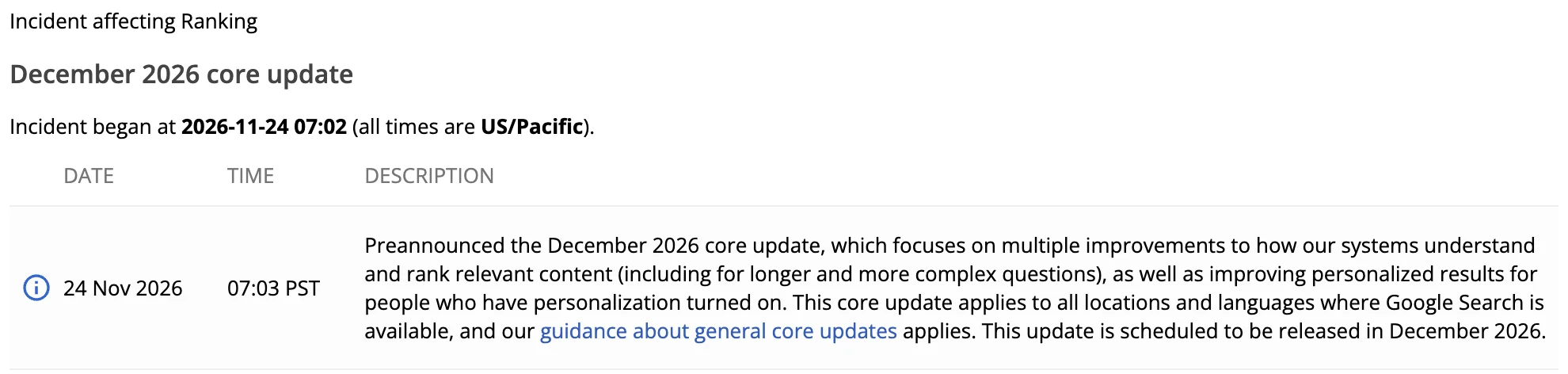
Google pre-announced a December 2026 core update at 7:03 a.m. PT on November 24, one hour after November’s finished. The dashboard entry says it’s scheduled for release in December 2026 and applies to all locations and languages where Google Search is available.
According to Search Engine Roundtable, a Google spokesperson said there’s no release date yet, that Google will announce the day it starts, and that it isn’t imminent.
The dashboard may list the December update as an incident already. Search Engine Roundtable reports that Google confirmed it isn’t live yet.
What Google Says December Will Change
What Google named for December
- How its systems understand and rank relevant content
- Including for longer and more complex questions
- Personalized results for people with personalization turned on
Unlike November, Google said what December focuses on. According to the dashboard entry, the update makes multiple improvements to:
- How Google’s systems understand and rank relevant content.
- That includes longer and more complex questions.
- Personalized results for people who have personalization turned on.
That second point is worth thinking about.
“Can I still sue if I was partly at fault in a rear-end crash in Florida?” is a longer, more complex question. So is “what happens if the at-fault driver has no insurance in Texas?”
I’ll be honest: what follows is my read, not something Google has said. Pages that answer questions like these directly, with state-specific detail and an attorney’s name on them, are the kind of content this update describes. Pages built only around “car accident lawyer [city]” aren’t.
If you’ve been working on GEO for your firm, answering specific questions directly is the same work.
Why Google Pre-Announced It
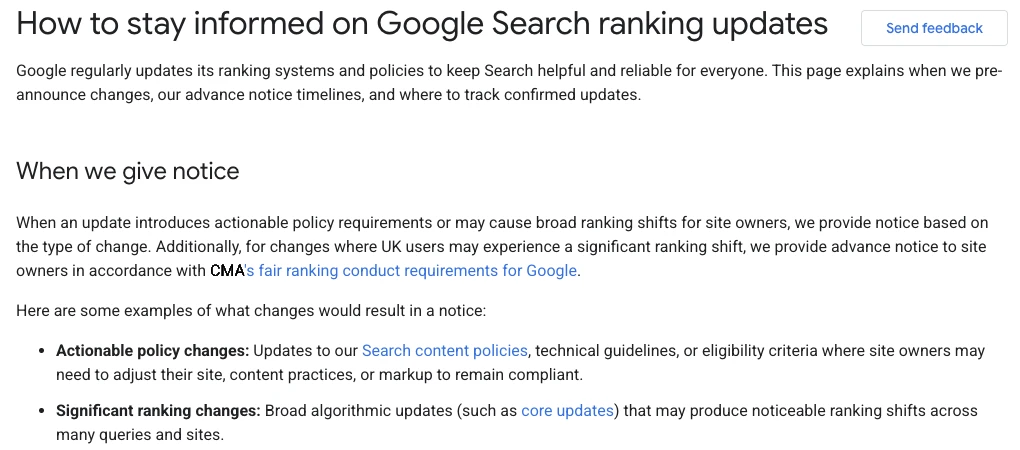
Google pre-announced December because of a new advance notice policy it published the same day. Google’s stay-informed page lists broad algorithmic updates, such as core updates, among the significant ranking changes it gives notice for.
The page also says that when UK users may see a significant ranking shift, Google gives site owners advance notice under the UK Competition and Markets Authority’s fair ranking conduct requirements.
The CMA imposed that fair ranking conduct requirement on Google on June 17, 2026.
For you, the practical upshot: expect advance warning before future core updates. Treat each pre-announcement as a deadline to export your baseline data.
Your Clean Measurement Window May Disappear
- Nov 24November complete
- →
- Nov 26–30Thanksgiving week
- →
- Dec 1–7cleanest read
- →
- December updatestart date unknown
Here’s the problem nobody’s talking about.
Google says to wait a full week after a core update before measuring. That first week is Thanksgiving.
The next clean week starts December 1. And December’s update has no announced start date.
You might get one clean week of data. You might get zero.
So do this now:
- Export your Nov 3–9 baseline today. Pull clicks, impressions and average position by page and by query.
- Export Dec 1–7 the moment it’s available. Do it before December’s update lands, if you can.
- Annotate Search Console with Nov 10, Nov 24 and December’s start date once Google announces it.
- Log every site change you make, with dates. Otherwise you’ll never untangle three overlapping causes.
How to Track AI Overview Visibility Through Both Updates
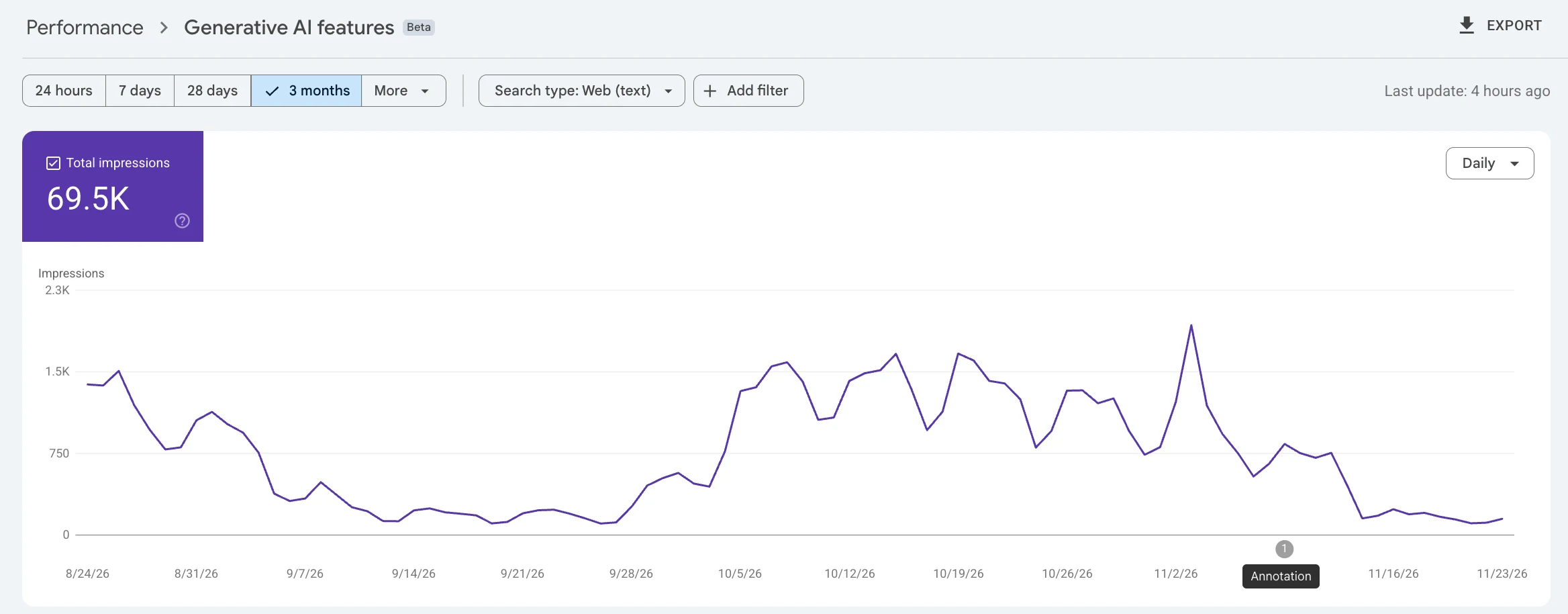
Use the Generative AI performance report in Search Console to track your AI search impressions, and the regular Performance report for web rankings. They’re separate reports, so check both before and after each update.
Track both:
- Regular Performance report: position, clicks and impressions for web results.
- Generative AI performance report (labeled “Generative AI features” under Performance): impressions from Google’s AI search features.
Remember the trap. Google’s data anomalies page lists a logging issue that lowered impression counts in the Generative AI report for November 9 to 11. That dip isn’t a loss of visibility.
For more on getting cited, read how law firms rank in ChatGPT.
Read them together. Set both reports to the same dates, Nov 3–9 against Dec 1–7, and note whether AI impressions moved with your average position or on their own.
Then rule out the Nov 9–11 logging issue before you blame the update for any dip.
Frequently Asked Questions About the November 2026 Core Update
- Not a penalty
- Recovery can take months
- Hold big changes during December’s rollout
- No industry was named
Is the November 2026 core update a penalty?
No manual action. Nothing to appeal. Google re-ranked everyone.
No. Google’s documentation says core updates don’t target specific sites or individual pages. There’s no manual action to fix and nothing to appeal.
Pages that dropped weren’t necessarily “bad.” Other pages made the list.
How long does it take to recover from a core update?
- Dayssome changes
- →
- Several monthssite-wide
- →
- Next core updateif nothing moves
It can take months. Google says some changes take effect in a few days, but it could take several months for its systems to confirm the site as a whole is producing helpful content.
If it’s been a few months with no effect, Google says that could mean waiting for the next core update. Google also notes there’s no guarantee your changes will produce a noticeable impact.
Should I make changes during the December 2026 core update rollout?
Now, before December
- Ship priority fixes
- Log every change with dates
During the December rollout
- Major page rewrites
- Site-wide template changes
We recommend avoiding major changes while it rolls out.
You’ll want to separate December’s effect from your own changes. Make your priority fixes now, log the dates, then let December play out before judging results.
Were law firms specifically targeted?
Core updates are broad. Google says they don’t target specific sites or pages.
There’s no evidence of that. Google says core updates are broad in nature and don’t target specific sites or individual pages, and it named no industry for November.
What applies to law firms is the same standard as everyone else: people-first content, plus extra weight on trust because legal topics are YMYL.