
Your Google Ads account is learning from something every day.
For many firms, that something is a form fill. Or a 61-second phone call from a robocall, a wrong number, or someone who already has a lawyer.
Google gets very good at finding more of whatever you tell it counts.
And since April 2026, Google has turned call recording on by default for many advertisers, then let AI decide which calls were real leads. Many firm owners may not know it's on.
This guide shows you how call tracking works inside Google Ads, what changed this year, how it differs by practice area, and the five steps to make Google optimize for the only number that matters: signed cases.
What Is Call Tracking for a Law Firm?
Call tracking connects every phone call to the ad that produced it, then to whether the caller signed.
- Ad click
- Phone call
- Intake
- Signed case
Call tracking is the system that connects each phone call to the ad, keyword and campaign that produced it. Done right, it also connects that call to what happened next: qualified, declined, or signed.
Here's the short version. There are two layers:
- Attribution: which ad made the phone ring.
- Feedback: telling Google which of those calls became cases, so it can bid for more of them.
Many firms have the first layer. Far fewer have the second.
That second layer is where your cost per signed case gets decided.
If you run Google Ads without it, read our breakdown of PPC for law firms first. Everything below builds on that foundation.
For tracking across every channel, not just Google Ads, see our guide to tracking for lawyers.
Why Calls Carry More Intent Than Form Fills
How mobile searchers use the call button
A caller is usually further along than a form filler. They want to talk to someone now, not wait for a reply.
Google's own research points the same way. According to Google and Ipsos research published in 2013, 70% of mobile searchers reported they click to call a business directly from search results.
The same study found 76% of people searching for local services would use call features to schedule an appointment for professional services. Google's internal data at the time showed calls from ads lasted six minutes on average.
That study is from 2013, so treat it as direction, not a current benchmark. Your own account is the real benchmark: compare the signed rate of calls against forms before you change anything.
Forms still matter. But a form fill is an intent signal, not an outcome.
What a Form Fill Teaches Google vs. What a Signed Case Teaches Google
❌ Optimizing to form fills
- Spam and bots count
- Five-firm shoppers count
- No case or wrong practice counts
- Out-of-state leads count
✅ Optimizing to signed cases
- Only retained clients count
- Higher-value cases weigh more
- Google learns which searches sign
Smart Bidding copies whatever you mark as a conversion. It has no idea what a good case is. It only sees the signal you send.
❌ Optimizing to form fills teaches Google to find:
- People who fill out forms, including spam bots
- Callers shopping five firms at once
- People with no case or the wrong practice area
- People in states you don't practice in
✅ Optimizing to signed cases teaches Google to find:
- People who look like your actual clients
- Higher-value case types, if you pass values
- Searches, times and locations that produce retainers
Read that again. You're not buying clicks. You're training a bidding model.
If junk leads are already a problem, our guide to Google Ads junk leads covers the diagnosis side.
The Cost Per Signed Case Math
| Keyword | Top-of-page bid, high range | Est. cost per signed case |
|---|---|---|
| truck accident lawyer | $1,000+ per click | ~$16,000+ |
| motorcycle accident lawyer | $617.73 per click | ~$9,884 |
| car accident attorney | $533.74 per click | ~$8,540 |
| slip and fall lawyer | $381.40 per click | ~$6,102 |
| personal injury lawyer | $291.18 per click | ~$4,659 |
At PI click prices, every wasted signal costs thousands of dollars per signed case.
Here's the planning math we use. Assume 25% of clicks become leads and 25% of leads sign. That's 16 clicks per signed case.
Our planning target for PI is roughly $3,000 per signed case. Every term above sits over that line at full top-of-page bids.
The only way to close that gap is to stop paying for clicks that look like leads but never sign. That starts with how Google counts a call.
For how these costs compare to buying leads, see our breakdown of personal injury lead costs.
How Does Google Ads Count a Call as a Conversion?
Four ways a call gets into Google Ads
- Calls from ads: call assets, location assets, call ads. Counted by call length.
- Calls to your website number: Google forwarding number after an ad click. Counted by call length.
- Clicks, not calls: taps on your number or call button. The call itself isn't tracked.
- Imported call conversions: you send back the calls that mattered. The only path that knows who signed.
Without AI grading, Google counts a call as a conversion when it lasts longer than a minimum length you set. It doesn't know what was said.
It only learns the outcome if AI grading is on or you import it.
According to Google Ads Help, there are four ways to track calls:
- Calls from ads: calls from call assets, location assets or call ads. Counted when they pass your minimum call length.
- Calls to a number on your website: a Google forwarding number shows on your site after an ad click. Also counted by call length.
- Clicks on call ads and assets: without a forwarding number, Google counts the click and estimates whether a meaningful call happened.
- Imported call conversions: you track calls in another system and send back only the ones that mattered, with values.
Option 4 is the only one that knows whether someone signed.
Calls From Ads vs. Calls From Your Website vs. Clicks on Your Number
| Conversion type | What counts | Knows call length? | Knows if they signed? |
|---|---|---|---|
| Calls from ads | Call from the ad itself | Yes | No |
| Calls to website number | Call after an ad click, via forwarding number | Yes | No |
| Clicks on call ads and assets | The click, with no forwarding number | No (estimated) | No |
| Clicks on your number (mobile site) | The tap only, not the call | No | No |
| Imported call conversions | Whatever you send back | Yes | Yes |
Counting clicks instead of calls is the weakest signal in the account. A tap is not a call, and a call is not a case.
Why the 60-Second Default Trains Google on Junk Calls
↻ Repeats every day the default stays on.
The default is a time threshold, not a quality check. According to Google's Ads API documentation, the default call length is 60 seconds.
Google's own documentation says duration alone doesn't always reflect lead quality, because a long call could still be a wrong number or a robocall.
Think about what clears 60 seconds at a PI firm:
- Property damage only, no injury
- Already represented, wants a second opinion
- Wrong state
- A vendor pitching you
- An existing client checking on their case
Every one of those counts the same as a new truck case. Google then goes and finds more of them.
Want to know how bad it is in your account? Pull 50 calls that Google counted as conversions and listen.
Count how many were potential new cases. Everything else is noise your bidding is learning from.
What Are AI-Qualified Call Leads?
How Google decides whether a call counts
- Recording on: AI reviews the conversation. Only qualified calls count.
- Can't record: the call counts if it passes your duration threshold.
- No forwarding number: Google uses ad interaction data.
AI-qualified call leads are Google's new way of deciding which calls count. Instead of timing the call, Google's AI listens to the recording and looks for intent.
Google published the feature in April 2026. It looks for signals like a caller asking about specific services, scheduling a consultation, or showing readiness to buy.
It works in tiers:
- Recording on: AI grades every call. Only qualified calls count as conversions.
- Recording unavailable: the call counts if it passes your duration threshold.
- No forwarding number: Google falls back to ad interaction data.
Your Call Details report now shows an AI summary and tags like #HighIntent or #ConsultationScheduled.
I'll be honest. This is a real improvement over a 60-second timer.
It still doesn't know who signed. More on that in the steps below.
Google May Be Recording Your Intake Calls Right Now
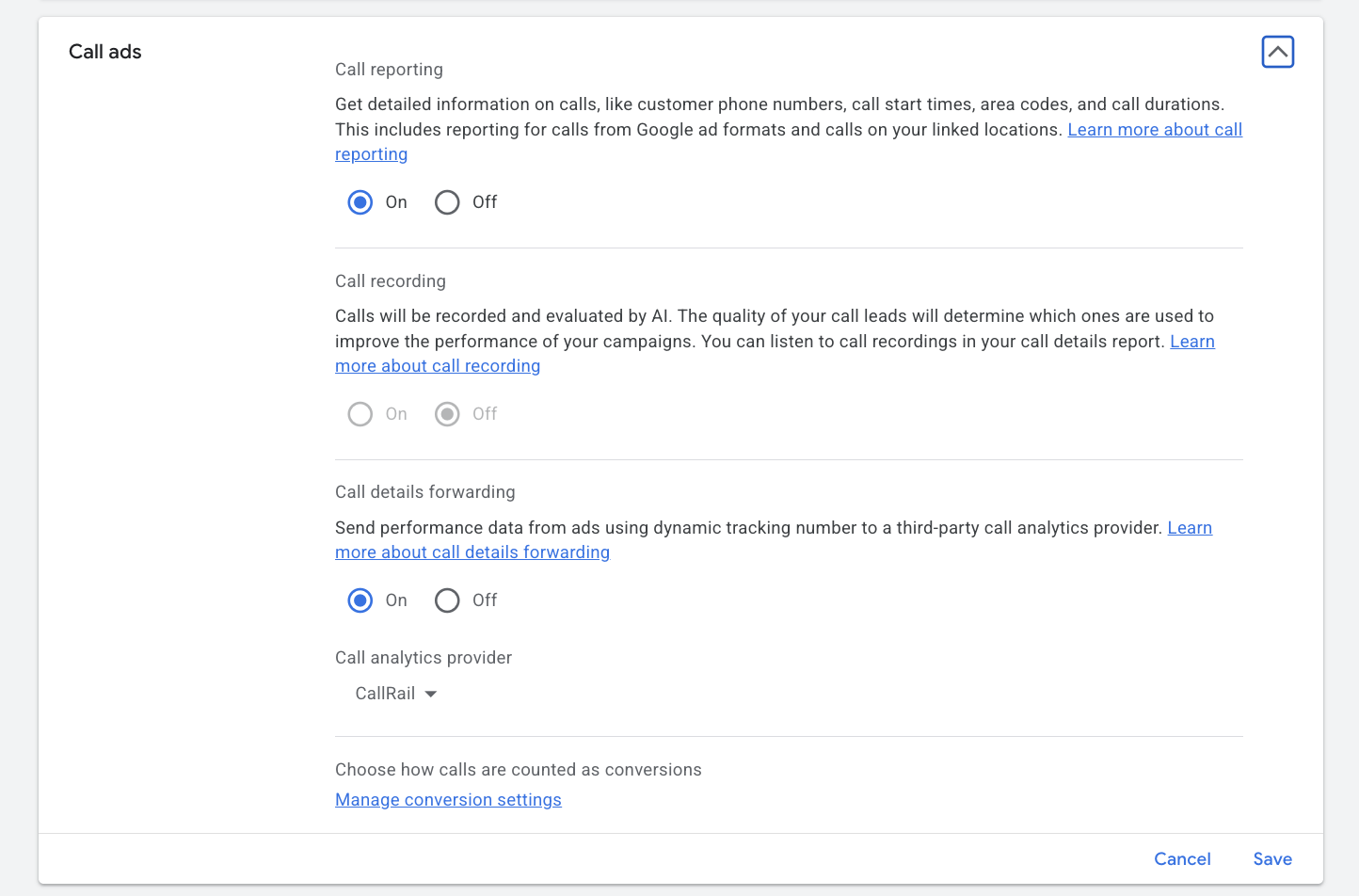
Call recording is now on by default in Google Ads. According to Google's call recording settings page, it stays off only if you turned it off before, or if Google identified your business as healthcare or financial services.
Law firms aren't on that exception list. So unless someone switched it off, your account is likely recording.
What that means in practice:
- Recording covers calls to call ads, call assets, and calls from website visits. Location asset calls aren't recorded yet.
- Both the caller and your number must be in the US or Canada.
- Callers hear a short automated message that the call will be recorded.
- Google uses recordings to grade lead quality, monitor spam and fraud, and improve conversion reporting.
To check it: Admin > Account settings > Call ads > Call recording.
Recording Consent and Prospective-Client Confidentiality
Answer these before you leave Google call recording on
- Does your state require all-party consent to record?
- Does Google's automated notice satisfy your state's rule?
- Could callers disclose confidential facts about their matter?
- What does your state bar's ethics guidance say?
Two questions matter here: consent and confidentiality. You're the lawyer, so you're better placed than any agency to answer them. Just don't let a default setting answer them for you.
Consent. Federal law allows recording with one party's consent. But according to the Reporters Committee for Freedom of the Press state-by-state recording guide, these states require everyone on a phone call to consent, or have laws that may require it:
| State | Rule for phone calls | Statute cited by RCFP |
|---|---|---|
| California | All parties must consent to record a confidential call. On cellphone or cordless calls, all parties must consent regardless of confidentiality. | Cal. Penal Code §§ 632, 632.7 |
| Connecticut | All parties must consent to avoid civil liability. Criminal penalties don't apply if one party consents. | See RCFP state page |
| Delaware | Laws conflict. The state privacy law requires all parties; RCFP advises following the stricter rule. | Del. Code Ann. tit. 11, § 1335(a)(4) |
| Florida | All parties must consent to record any phone call. | See RCFP state page |
| Illinois | All parties must consent when the call is made with a reasonable expectation of privacy. | See RCFP state page |
| Maryland | You must be a party to the call and have the permission of all other parties. | See RCFP state page |
| Massachusetts | All parties must consent. | See RCFP state page |
| Michigan | All parties must consent for non-participants. Courts disagree on whether a participant may record without consent. | See RCFP state page |
| Montana | All parties must consent, except in certain circumstances. | See RCFP state page |
| Nevada | All parties must consent to record a phone call (in-person conversations need only one party). | See RCFP state page |
| New Hampshire | All parties must consent. | See RCFP state page |
| Pennsylvania | All parties must consent. | See RCFP state page |
| Washington | All parties generally must consent. Consent counts as obtained when a reasonably effective recorded announcement tells all parties the call is being recorded. | Wash. Rev. Code Ann. § 9.73.030 |
Source: Reporters Committee for Freedom of the Press, Reporter's Recording Guide, accessed Sep 23, 2026. State pages were last updated at different times. This is a summary, not legal advice.
If a caller is in one of these states, the stricter rule is the safer assumption. RCFP notes that courts have applied the law of the state where the recording device is, or the state where the person being recorded is.
Google plays a recording notice to callers. By using the feature, you also agree to Google's supplemental terms and acknowledge you've given notice to your own staff.
Confidentiality. A caller asking whether you'll take their case is generally a prospective client under ABA Model Rule 1.18. Your state's version of that rule governs what you can do with what they tell you.
Now picture a criminal defense caller describing the night of an arrest. Or a family law caller describing abuse. That conversation is being recorded and analyzed by a third party.
Our recommendation: decide deliberately. If you're unsure, call your state bar's ethics hotline before leaving recording on.
Turning it off doesn't break tracking. Google falls back to call duration.
Should Your Law Firm Use Performance Max for Store Goals?
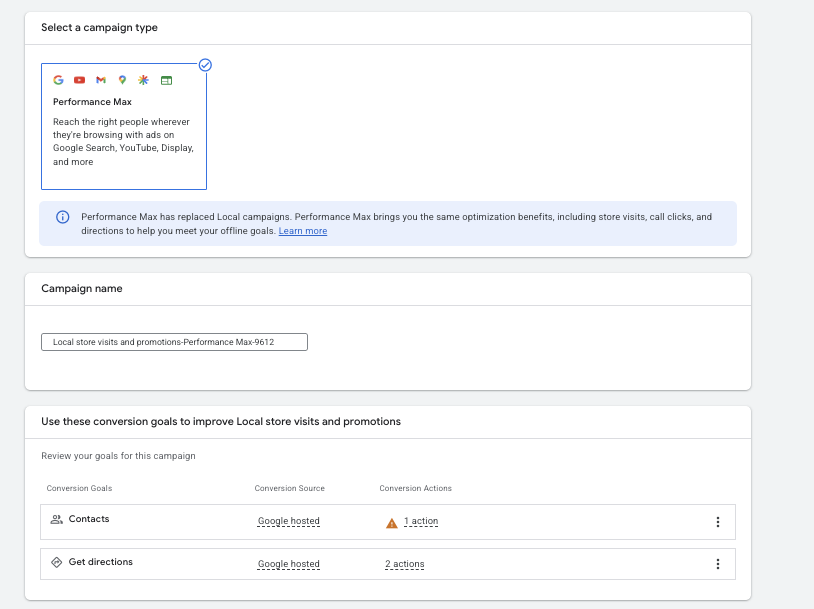
For most law firms, no. It's built for multi-location businesses like retailers and restaurants.
Here's why it's even on the table. Performance Max for store goals optimizes to store visits, store sales and local actions like call clicks and direction clicks.
According to Google's optimization guidance, advertisers who aren't eligible for store visits can optimize to local actions, meaning contacts and direction clicks. So law firms technically qualify.
| Store goal | What it measures | Fit for a law firm |
|---|---|---|
| Store visits | Modeled visits to your location | Poor. Requires store visit eligibility. |
| Store sales | In-store revenue | None. Built for retail. |
| Contacts (Google hosted) | Taps on the call button | Weak. A tap isn't a qualified call. |
| Directions (Google hosted) | Direction requests to your office | Weak. Clients call before they drive. |
The catch: Google recommends at least 5 business locations for campaigns using local actions. Many law firms have only one or a few offices.
What Local Customer Optimization Actually Does
Local Customer Optimization shifts budget toward nearby, in-market searchers
- Google Maps, Waze, local Search
- Nearby, in-market person
- Budget prioritized
- Call or direction click
Local Customer Optimization is a new toggle that pushes your budget toward people nearby who are ready to act. Search Engine Land reported the launch on September 8, 2026.
When it's on, Google prioritizes spend on in-market people near your locations across Google Maps, Waze and local Search. It's only available in Performance Max campaigns optimizing to offline goals.
According to Google Ads Help, the eligible goals are store visits, store sales, contacts (Google hosted) and directions (Google hosted). You can't add an online goal while the toggle is on.
That's the problem. None of those goals is a signed case.
Why Direction Clicks Are a Weak Signal for Law Firms
❌ A direction click tells Google
- Someone looked up your building
- Could be a courier, opposing counsel or a job applicant
✅ A qualified call tells Google
- Someone wants to talk about a legal problem right now
A visit to a law firm usually comes after a call or a booked consult. So a direction click often happens after the lead already came in.
❌ Direction clicks tell Google:
- Someone looked up how to get to your building
- Could be a client, a courier, opposing counsel or a job applicant
✅ Qualified calls tell Google:
- Someone wants to talk about a legal problem right now
A "contact" in this campaign type is a call click, not a qualified call.
The possible exception is a multi-office immigration firm with real walk-in traffic. Even then, test it against a campaign that optimizes to signed matters.
How Call Tracking Differs by Practice Area
| Practice | Fee model | Urgency | Biggest call-tracking trap | Recording note | Calls vs. forms | Top bid, high (per click) |
|---|---|---|---|---|---|---|
| Personal injury | Contingency | High | Long calls that don't qualify | Callers share medical details | Calls dominate | $291.18 |
| Workers' comp | Contingency, state-capped fees | High | Same as PI, lower case value | Injury and medical details | Calls dominate | $111.82 |
| Medical malpractice | Contingency | Medium | Long screening calls that often end in a decline | Heavy medical detail | Calls, then records review | Not pulled |
| SSDI | Contingency, federally capped fees | Medium | High volume, low value per case | Health details | Calls dominate | Not pulled |
| Employment (plaintiff) | Mostly contingency | Medium | High screen-out rate | Workplace and health details | Mixed | Not pulled |
| Criminal / DUI | Flat fee or retainer | Very high, often after hours | Caller is often family, not the client | Highest risk | Calls dominate | $76.07 / $134.13 |
| Family / divorce | Retainer, paid consult | Medium to high | Price shoppers | Caller safety, shared phones | Mixed | $36.73 |
| Immigration | Flat fee, paid consult | Medium | Callers abroad fall outside AI grading | Callers may be wary of a recording notice | Forms and messaging matter more | $20.66 |
| Bankruptcy | Flat fee | Medium | "Can I afford this" calls | May be classed as financial services | Mixed | Not reported |
| Estate planning | Flat fee | Low | Research-phase calls | Low risk | Mixed | $17.26 |
The principle is the same everywhere: optimize for signed cases. What changes is what a good call sounds like and what it's worth.
Three things to act on:
- Criminal defense and family law firms: make a deliberate decision about Google call recording. The confidentiality stakes are highest here.
- Bankruptcy, med mal and SSDI firms: check your account. If Google classed you as financial services or healthcare, recording is off by default and you're on duration-only tracking.
- Immigration firms: don't demote form fills. Import signed matters from every channel instead. Calls from relatives abroad also won't be recorded or AI-graded, since both numbers must be in the US or Canada.
How to Make Google Ads Optimize for Signed Cases
- Ad click
- Call or form + GCLID
- Intake qualifies
- Signed in CRM
- Uploaded with value
- Smart Bidding learns
The goal is simple: Google should only get credit for the calls and forms that became cases. Here's how to set that up in five steps.
Step 1: Set a Call Length Threshold That Fits Your Intake
Where to set your minimum call length
- Goals
- Summary
- Phone call leads
- AI-qualified call leads
- Edit
- Lead qualification (seconds)
Your threshold is the backup when a call can't be graded by AI. Set it based on your own intake data, not the default.
To change it, go to Goals > Summary > Phone call leads > AI-qualified call leads > Edit > Lead qualification, then enter the minimum length in seconds.
Two practice-specific notes:
- Criminal defense: short calls can be real leads. A family member asking "how fast can you get him out?" may hang up in under a minute to wait for a callback.
- Med mal and employment: long calls often aren't. A 12-minute screen can end in a decline.
Pull 50 recorded calls, mark which ones were potential cases, and see where the line actually falls.
Step 2: Capture the GCLID on Every Call and Form
- Ad click carries GCLID
- Stored with the lead in CRM
- Matched back when the case signs
The GCLID is the receipt that ties a signed case back to the exact ad click. GCLID stands for Google Click ID, a unique ID Google attaches to every ad click.
According to Google Ads Help, you save that ID with the lead information you collect, then send it back when the lead converts offline.
For forms, capture it in a hidden field. For calls, your call tracking system has to pass it into your CRM.
Criminal defense tip: the caller is often a parent or spouse, not the client. Make sure intake attaches the GCLID to the matter, not just the caller's name.
Step 3: Import Signed Cases Through Data Manager
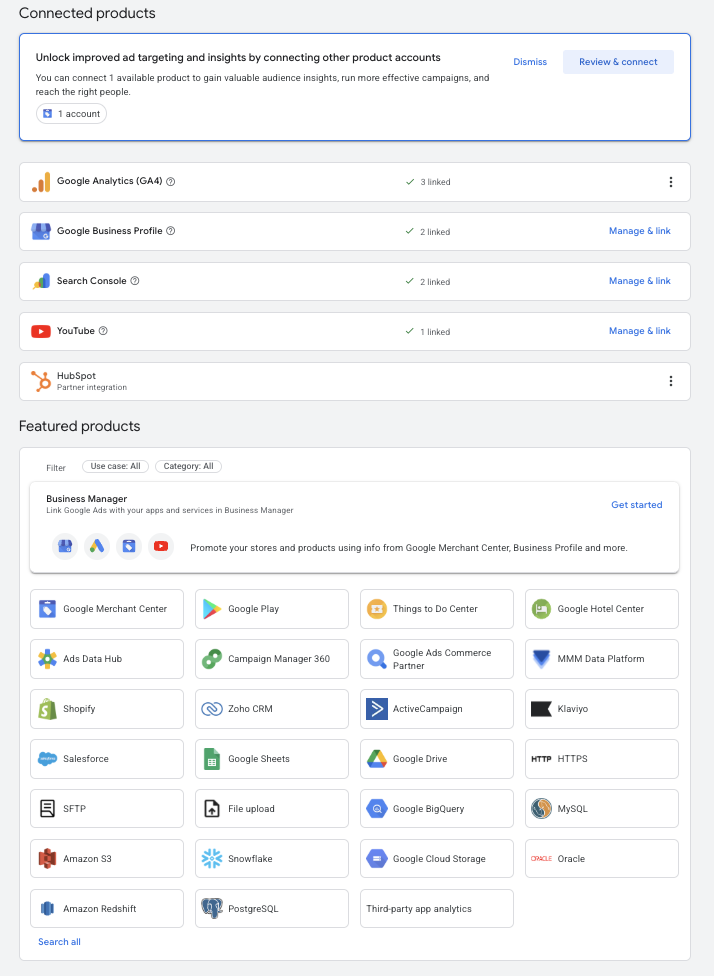
Data Manager is now the way signed cases get back into Google Ads. This changed in 2026, and older setups may have quietly stopped working.
According to Google Ads Help:
- Starting June 15, 2026, offline conversion imports and enhanced conversions for leads moved to the Data Manager API and were blocked in the Google Ads API.
- Enhanced conversions for web and leads are now one on/off setting.
| When | What changed | What to check |
|---|---|---|
| April 2026 | Enhanced conversions for web and leads merged into one on/off setting | The setting is on |
| April 2026 | Google accepts lead data from tags, Data Manager and API without choosing one method | Your CRM connection still maps the right fields |
| June 15, 2026 | Offline conversion uploads moved to the Data Manager API; blocked in the Google Ads API | Signed cases are still arriving under Uploads |
If your firm used a custom upload script before June, check that signed cases are still arriving. Look for recent entries under Goals > Conversions > Uploads.
After creating a new conversion action, Google says to wait 4 to 6 hours before uploading to it.
Step 4: Assign Conversion Values by Case Type
| Practice group | Case type | What to use as the value | Illustrative example |
|---|---|---|---|
| Personal injury | Truck / commercial vehicle | Your average fee on truck cases, last 12 to 24 months | $50,000 |
| Personal injury | Auto, with treatment | Your average fee on auto cases with treatment | $8,000 |
| Personal injury | Premises liability | Your average fee on premises cases | $15,000 |
| Criminal defense | DUI, first offense | Your flat fee for a first DUI | $3,500 |
| Criminal defense | Felony | Your average retainer on felony matters | $10,000 |
| Family law | Contested divorce | Your average retainer on contested divorces | $7,500 |
| Immigration | Paid consultation | Your consultation fee | $150 |
| Immigration | Retained matter | Your average flat fee by matter type | $4,000 |
| Bankruptcy / estate planning | Flat-fee matter | Your flat fee | $2,000 |
Values tell Google a truck case is worth more than a fender bender. Without them, every signed case looks the same to Smart Bidding.
Use your expected fee, not settlement size. You want Google chasing revenue to your firm.
Don't overthink precision. Relative values matter most: in the example above, a truck case is worth about six auto cases, so Google should bid harder for truck searches.
Immigration and family law: if you charge for consultations, send two conversions. A paid consult at a lower value, then the retainer at full value.
Step 5: Move Form Fills and Raw Calls to Secondary Goals
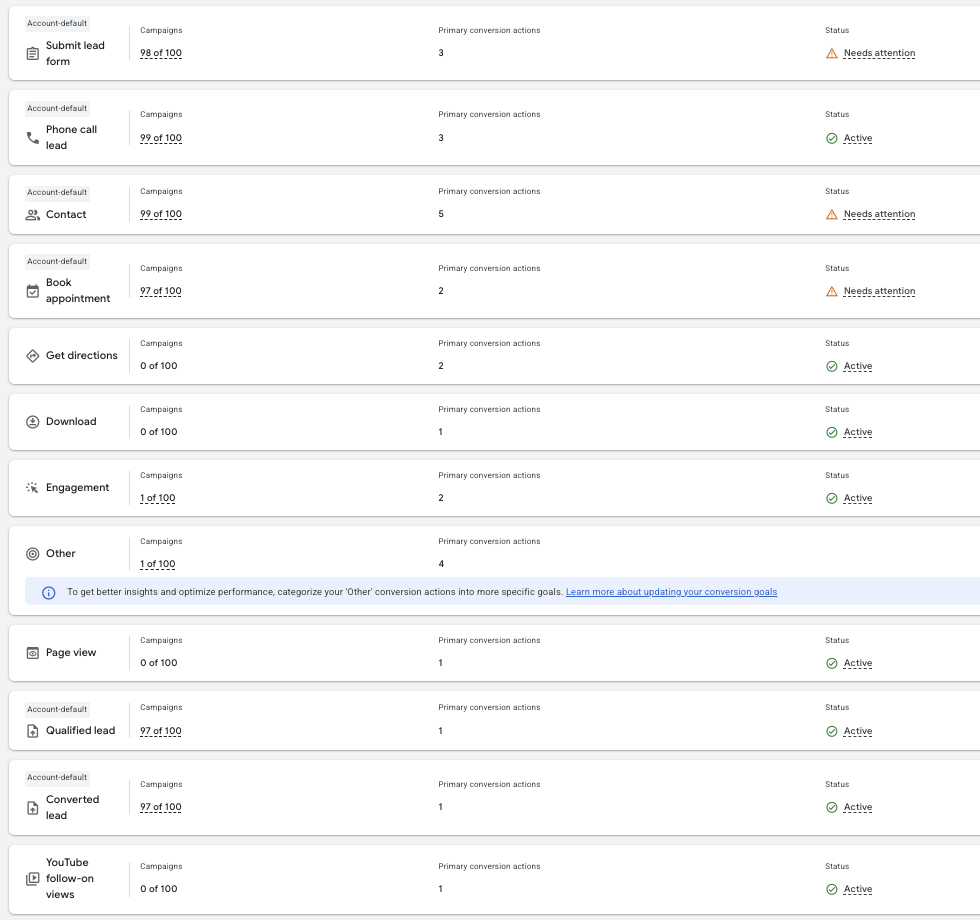
Only signed cases should be a primary goal. Everything else becomes secondary: still reported, not used for bidding.
According to Google Ads Help, the Conversions column is what automated bid strategies use. Actions left out of it still show in All conversions.
✅ Primary (used for bidding)
- Signed cases, imported with values
- AI-qualified calls, only while signed-case volume is low
❌ Secondary (reported only)
- Form fills
- Raw calls over a time threshold
- Clicks on your number
- Direction clicks
To take a goal out of bidding, open it from Goals > Conversions > Summary and switch off "Make this an account-default goal."
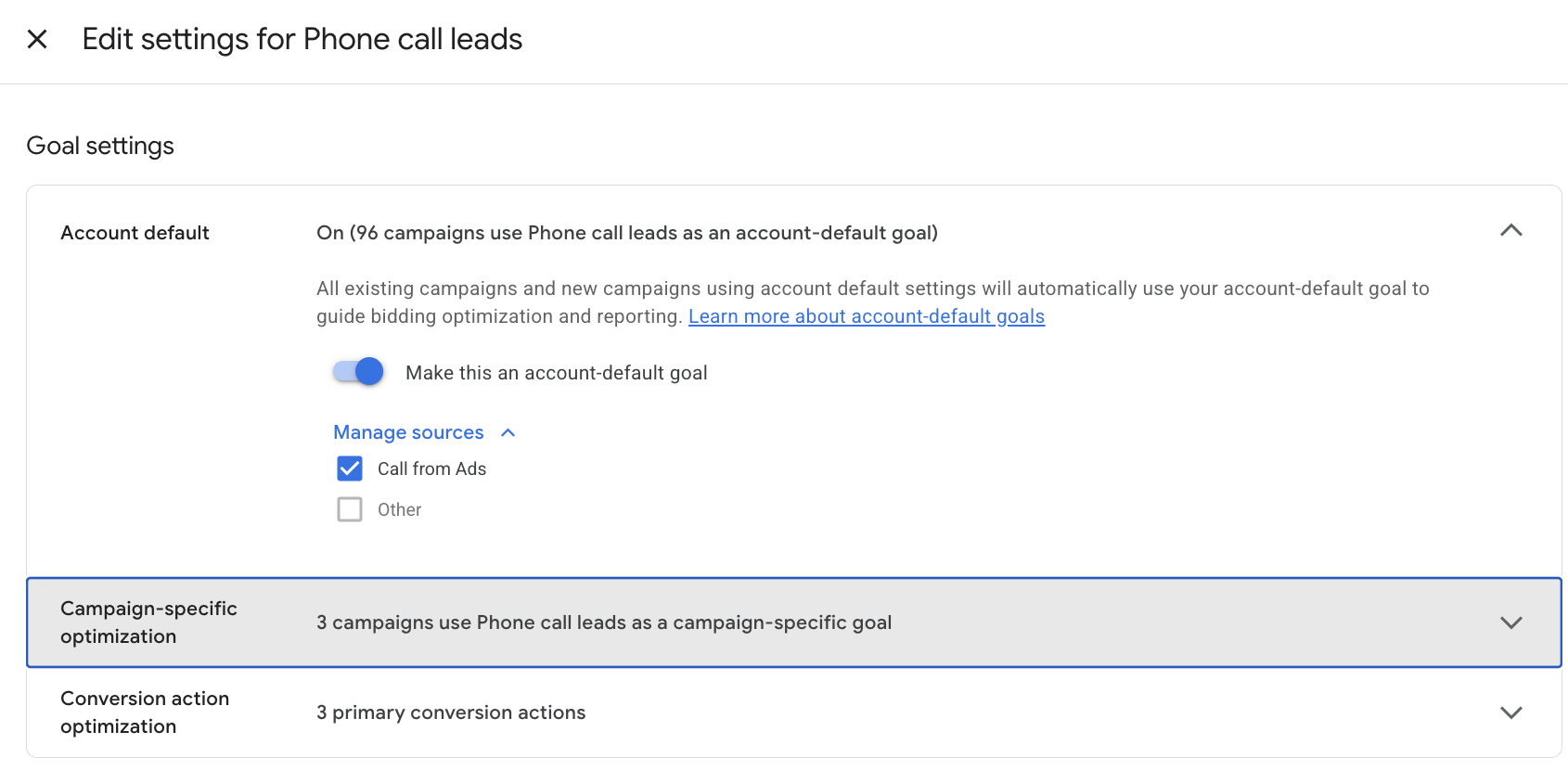
Check the campaign-specific section too. Campaigns with their own goal settings keep using the goal even after you switch off the account default.
I know what you're thinking. "Won't Google run out of data?"
It might at first, especially at low volume. If you sign fewer than a handful of cases a month from ads, keep AI-qualified calls as primary alongside signed cases until volume builds.
Immigration exception: keep qualified form fills in the mix if forms drive a big share of your retained matters.
Do You Need Third-Party Call Tracking Software?
Google forwarding numbers are enough if
- Google Ads is your only paid channel
- You'll import signed cases anyway
You need a separate system if
- You run TV, billboards or other channels
- You want recordings in your CRM
- You need the GCLID passed to intake automatically
If Google Ads is your only paid channel, Google's forwarding numbers can be enough. If you run anything else, you need a separate system.
Google's call reporting only sees calls tied to Google ads. It can't tell you what your billboard, TV spot or referral partners produced.
A separate call tracking system is worth it when:
- You advertise on more than one channel
- You want recordings and caller details inside your CRM
- You need the GCLID passed into intake automatically
- You want to import call outcomes instead of relying on Google's grading
Either way, the software isn't the point. The import of signed cases is.
If you also run Local Services Ads, those calls are tracked separately by Google. Keep them out of this setup.
Your Intake Team Is Now Part of Your Bidding Strategy
| Practice | Intake gap to close | Fix |
|---|---|---|
| Criminal defense | Calls after arrests, which can come at night and on weekends | 24/7 answering, or schedule call assets to your hours |
| Immigration, workers' comp | Callers who don't speak English | Bilingual intake or language routing |
| Personal injury | Callers phoning several firms at once | Answer live; call back missed calls within minutes |
| Family law | Callers who can't talk freely | Offer a safe callback time |
Google can only learn from calls you answer and cases you sign. A missed call is a lost case and a lost training signal.
That makes intake coverage a bidding decision:
- Criminal defense: arrests don't keep business hours, so calls often come at night and on weekends. Either staff those hours or schedule call assets to show only when you can take calls.
- Immigration and workers' comp: answer in the languages your callers speak.
- PI: speed matters. The caller may be calling more than one firm.
If nobody answers, don't pay for the call.
For the rest of the funnel after the call, see our guide to lead generation for lawyers.
Frequently Asked Questions
Quick answers on Google Ads call tracking for law firms
- Is Google recording my law firm's calls?
- What happens if I turn call recording off?
- Does AI call grading work for callers outside the US?
Is Google Recording My Law Firm's Calls?
Recording is on by default unless you turned it off, or Google classed you as healthcare or financial services.
Check: Admin > Account settings > Call ads.
It may be. Call recording is on by default unless you turned it off earlier or Google identified your business as healthcare or financial services.
Bankruptcy, med mal and SSDI firms may fall into those categories. Check under Admin > Account settings > Call ads.
What Happens If I Turn Call Recording Off?
- Recording off
- AI can't grade calls
- Falls back to call duration
Tracking keeps working. According to Google, the system falls back to call duration to measure conversions.
That's why your threshold from Step 1 matters, and why importing signed cases matters even more.
Does AI Call Grading Work for Callers Outside the US?
Only when both the caller's number and yours are in the US or Canada.
Every other call falls back to call duration.
No. Recording, and so AI grading, only works when both the dialing and receiving numbers are in the US or Canada.
Everything else falls back to call duration. For immigration firms, that's a real share of calls.