
Your blog traffic is probably down.
Your rankings might even be up.
And someone has told you SEO is dead, so why keep paying for content?
Here's the short version: AI Overviews are taking clicks from legal questions, not from people looking to hire a lawyer.
That changes what you should build. It doesn't change whether you should build.
I pulled 12 months of Google Search Console data from a California personal injury and mass tort firm, plus Google's own AI-feature report for the same site. The numbers below show which content still works, which doesn't, and where the signed cases are.
The Short Answer: Three Formats, One Website
Every format points back to your website
- Practice area pages win hire-intent searches
- Specific blog posts earn AI citations and pass authority
- Short videos get cited on YouTube and embedded on your pages
Three types of content still work for law firms in 2026:
- ✅ Practice area pages. Many of the searches where people hire a lawyer still show a Local Pack and regular results, and some show no AI Overview at all.
- ✅ Specific, jurisdiction-level blog posts. In the firm data below, these were the pages Google cited most in AI features.
- ✅ Short videos that answer one question. YouTube is the most-cited domain in AI Overviews, according to Ahrefs' Brand Radar data.
What stopped working:
- ❌ Generic “what is negligence” posts. AI Overviews replace these first.
- ❌ Content that lives on its own. A video that never links to your site, or a blog post that never links to a practice page, does nothing for your caseload.
Every format has one job: send authority and people back to the pages that sign cases.
If you're newer to search, our attorney SEO guide covers the fundamentals this post builds on.
What Did AI Overviews Do to Law Firm Clicks?
When an AI Overview appears, Google users click a regular result about half as often.
An AI Overview is the AI-generated summary Google shows above the regular results for some searches. Google began rolling them out to everyone in the US on May 14, 2024, according to Google's announcement of generative AI in Search.
According to Pew Research Center's analysis of Google search behavior, users clicked a traditional result on 8% of visits when an AI summary appeared, compared with 15% when none appeared, based on the browsing of 900 US adults in March 2025.
Read that again. Half the clicks, gone, on the searches that show a summary.
It gets worse for the sources inside the summary:
- Only 1% of visits included a click on a link inside the AI summary itself.
- Users ended their browsing session 26% of the time after a page with an AI summary, versus 16% without one.
- About 18% of the searches in Pew's sample produced an AI summary.
Pew also found that 60% of searches starting with a question word like “what” or “why” produced an AI summary, compared with 8% of one- or two-word searches.
That detail matters for you. “Car accident lawyer” is short. “What to do after a car accident that wasn't my fault” is a question.
If your intake leaned on that informational traffic, watch your personal injury lead generation numbers, not just your traffic.
Why the “78% of Legal Searches” Number Doesn't Hold Up
| Claim | Where it comes from | Sample |
|---|---|---|
| 78% of legal queries show AI Overviews | Repeated on legal marketing blogs | No traceable primary dataset found |
| 23.6% of legal YMYL queries | Ahrefs study | 1.5M legal search results |
| 22.8% of non-local queries | Ahrefs study | 124M search results |
| 7.9% of local queries | Ahrefs study | 22M search results |
| 57.9% of question queries | Ahrefs study | 17M search results |
You've probably seen the claim that 78% of legal searches trigger an AI Overview.
I tried to trace it. I couldn't find a primary dataset behind it, so I'm not using it.
The largest public dataset I found tells a different story. According to Ahrefs' study of 146 million search results, 22.8% of non-local queries triggered an AI Overview in September 2025, compared with 7.9% of local queries.
For legal queries specifically, Ahrefs found AI Overviews on 23.6% of the legal YMYL (Your Money or Your Life) searches in its data. That's nowhere near 78%.
Question-style queries were the outlier, at 57.9%.
The share of legal searches with AI Overviews depends almost entirely on what kind of search it is. A blended “legal” average hides the part you care about.
Which Legal Searches Show AI Overviews, and Which Don't?
| Keyword | US monthly volume | AI Overview? | Local Pack? |
|---|---|---|---|
| car accident lawyer | 382,000 | No | Yes |
| truck accident lawyer | 103,000 | No | Yes |
| motorcycle accident lawyer | 86,000 | No | Yes |
| medical malpractice lawyer | 444,000 | Yes | Yes |
| wrongful termination lawyer | 24,000 | Yes | Yes |
| rideshare accident lawyer | 19,000 | Yes | Yes |
| what to do after a car accident | 7,000 | Yes | No |
| what to do after a car accident not your fault | 3,300 | Yes | No |
| is california a no fault state | 900 | Yes | No |
Informational legal questions almost always show an AI Overview. Hire-intent searches are split, and every one of them still shows a Local Pack.
Here's what the live data for those nine keywords tells you:
- Every informational query had an AI Overview. These are the searches your blog posts target.
- The three vehicle-accident keywords had no AI Overview. Car, truck and motorcycle accident lawyer searches still look like classic local results pages.
- Some hire-intent searches now show both. Medical malpractice, wrongful termination and rideshare searches had an AI Overview stacked on top of a Local Pack.
So “AI Overviews don't touch money keywords” is too simple. They touch some of them, and they touch every informational query.
Local Searches Rarely Trigger AI Overviews
Searches with local intent are the least likely to show an AI Overview.
That 7.9% local trigger rate lines up with the keyword table above. When someone searches for a lawyer, Google still leans on the Local Pack, Google Business Profiles and reviews.
That's why your local SEO for attorneys and your lawyer reviews strategy still carry so much weight.
It's also why your practice area pages matter. They're the organic results sitting right under that Local Pack, where the hire-intent clicks still go.
What One California Firm's Search Console Data Shows
Industry studies only get you so far. So here's real data from one firm.
The firm is a California personal injury and mass tort practice. I'm keeping it anonymous.
The dataset:
- 12 months of Google Search Console performance data (Nov 10, 2025 to Nov 9, 2026): 80,093 clicks and 17.4 million impressions.
- Google's Generative AI performance report for the same site (May 18 to Nov 9, 2026), which shows how often pages appeared in AI Overviews and AI Mode.
One limit up front: this export starts 18 months after AI Overviews launched. I can't show you a clean before-and-after. I can show you which content gets seen now.
For the full picture of how we approach injury firm sites, see personal injury lawyer SEO.
Informational Pages Bring 74% of the Clicks
| Page type | URLs | Share of clicks | Avg. position | CTR |
|---|---|---|---|---|
| Informational (state law explainers, FAQs) | 108 | 74% | 9.6 | 0.57% |
| Mass tort / class action | 50 | 10% | 14.1 | 0.56% |
| Practice area pages | 80 | 7% | 19.5 | 0.13% |
| Homepage, attorney, contact and firm pages | 453* | 6% | 10.9 | 1.96% |
| City pages | 39 | 3% | 23.7 | 0.17% |
| Video pages | 176 | 0.2% | 32.7 | 0.25% |
This firm's traffic engine is its library of California law explainers and FAQs.
Read the third row again.
80 practice area URLs produced 7% of the firm's clicks. Their average position was 19.5. That's page two.
The pages built to sign cases are barely in the game. The pages built to answer questions are carrying the site, and those are exactly the searches AI Overviews target.
Rankings Went Up While Clicks Went Down
Over 12 months, this firm's average position improved and its click-through rate dropped.
- Average position moved from 16.6 (Nov 2025) to about 11 (Oct 2026).
- CTR fell from 0.72% to roughly 0.4%.
- Clicks per day fell 51% from the February peak (307) to October (152).
I'll be honest about what this does and doesn't prove.
It doesn't prove AI Overviews caused the drop. Mass tort interest rises and falls, and average position can shift just because the mix of queries changes, not because pages moved up.
What it does show: a better average ranking no longer guarantees more clicks. If you judge your content only by traffic, you'll misread what's happening.
Google Cited Pages That Ranked on Page Two
| Page | AI-feature impressions | Avg. organic position |
|---|---|---|
| FAQ: what to do after a car accident that's not your fault in California | 40,326 | 13.9 |
| Medical malpractice practice area page | 14,637 | 8.7 |
| Wrongful termination practice area page | 4,114 | 27.0 |
Google's AI features cited some of this firm's pages that ranked poorly in the regular results.
That one car accident FAQ earned 19% of all the site's AI-feature impressions while averaging page-two rankings.
The wrongful termination page appeared in AI features while sitting at position 27, with 68 organic clicks all year.
This matches what larger datasets show. According to Ahrefs' 2026 analysis of 863,000 keywords and 4 million AI Overview citations, only 38% of cited pages also ranked in the top 10 for the same query. Ahrefs' July 2025 version found 76%, though Ahrefs notes its methods improved, so the two numbers aren't directly comparable.
A specific, well-structured page can show up in AI answers even when it's buried in the blue links.
Two more numbers keep this in proportion:
- AI-feature impressions were 2.35% of the firm's total impressions over the same 176 days (207,002 vs 8.79 million).
- Daily AI-feature impressions and daily clicks were essentially uncorrelated (r = 0.08).
So AI visibility is real, but for this firm it's still small, and it isn't sending measurable traffic.
The Firm's Videos Barely Show Up in Google
| Metric | Value |
|---|---|
| Video search appearance: impressions | 36,714 |
| Video search appearance: clicks | 48 |
| Video search appearance: average position | 41.5 |
| Video pages on the site | 176 URLs, 0.2% of clicks |
This firm publishes video, but Google almost never shows it.
Video results earned 48 clicks out of 80,093 in a year. The firm's 176 video pages earned 0.2% of its clicks at an average position of 32.7.
The videos exist. They just aren't pulling any weight in Google. The video section below covers the first things to check.
Content That Still Works #1: Practice Area Pages
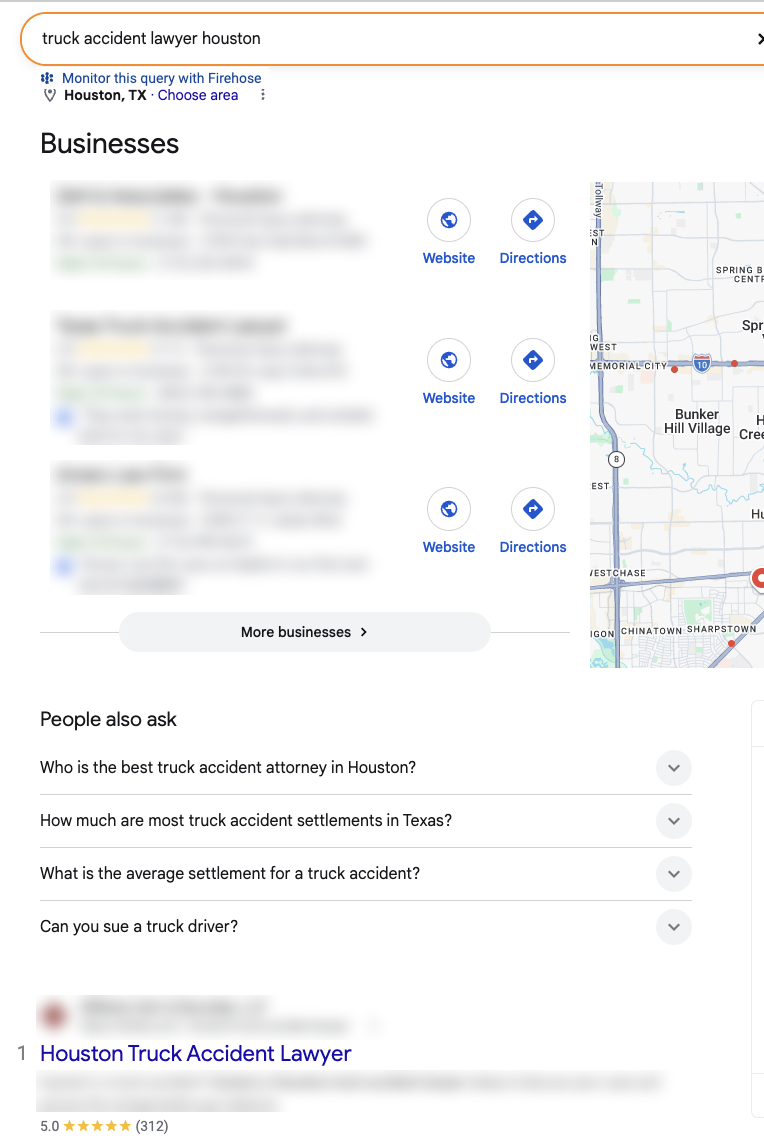
Here's what a hire-intent search looks like right now. For “truck accident lawyer houston,” Google shows a three-firm Local Pack, a People also ask box and organic results. No AI Overview.
Practice area pages are the content most worth building right now.
A practice area page is a page on your site about one type of case you handle, such as truck accidents or birth injuries, written for someone deciding whether to hire you.
Three reasons they matter more now:
- They target the searches AI Overviews leave alone most often. Car, truck and motorcycle accident lawyer searches showed no AI Overview in the data above.
- They're where hire-intent clicks land. Someone searching “truck accident lawyer” wants a lawyer, not a summary.
- They give Google and AI tools something specific to cite about your firm. A generic homepage can't do that for every case type.
For the full build process, see our SEO content strategy for lawyers, which covers how practice area pages fit into a law firm site.
What a Practice Area Page Does for You Now
- Practice area page
- →
- Ranks for hire-intent searches
- →
- Sits under the Local Pack
- →
- Gets cited in AI features
- →
- Hosts your attorney video
- →
- Converts the visitor
- →
- Signed cases
A practice area page now does five jobs at once.
- Ranks for hire-intent searches like “truck accident lawyer [city].”
- Sits right under the Local Pack on hire-intent searches, so it's the organic result people see next.
- Gives AI features a citable source. The firm above had a practice page with 14,637 AI-feature impressions.
- Gives your video a home. The attorney explaining that case type on camera belongs on this page.
- Converts the visitor. It's the page where a call or form fill happens.
Every one of those jobs ends in the same place: signed cases.
What Benefits Can You Expect From Practice Area Pages?
| Benefit | How it happens | What to measure |
|---|---|---|
| Hire-intent rankings | The page targets one case type and one market | Search Console position for “[case type] lawyer [city]” queries |
| Local search visibility | The page ranks in the organic results under the Local Pack | Organic position on “[case type] lawyer [city]” searches |
| AI citations | Specific, structured answers get pulled into AI features | Generative AI report impressions for that URL |
| Calls and forms | The visitor is already looking to hire | Calls and form fills by landing page |
| Signed cases | Leads from high-intent pages | Signed cases by landing page in your CRM |
That's what a strong practice area page can produce, and how to measure it.
I'm not going to promise you a timeline I can't back with data. Rankings depend on your market, your competition and your site's authority.
Why Most Practice Area Pages Never Pay Off
| Practice area page | 12-month impressions | Clicks | Avg. position |
|---|---|---|---|
| Motorcycle accident | 126,125 | 0 | 41.8 |
| Truck accident | 138,574 | 6 | 24.0 |
| Rideshare accident | 182,932 | 15 | 25.5 |
| Medical malpractice | 1,046,586 | 237 | 8.7 |
Most practice area pages fail because they don't rank, not because of AI.
126,000 impressions and zero clicks on the motorcycle accident page. At position 41.8, almost nobody scrolls that far.
And motorcycle accident lawyer searches showed no AI Overview. Nothing AI-related is blocking that page. It just isn't ranking.
The medical malpractice page has the opposite problem. It sits on page one, but nearly all its impressions come from “medical malpractice lawyer,” a search that shows both an AI Overview and a Local Pack. In that layout, position 8.7 earned a 0.02% CTR.
I know what you're thinking: “So practice pages don't work.”
They do. A practice page on page four is a cost. A practice page on page one is an asset.
Building the page is step one. Getting it to rank takes link building, internal links from your blog posts, and a strong local footprint.
What a Practice Area Page Needs in 2026
❌ What doesn't cut it anymore
- Generic copy that could sit on any firm's site
- The same page cloned for 20 cities
- No named attorney or case detail
- No specific state law
✅ What a 2026 page needs
- Your state's actual rules, cited to the statute
- A named attorney with real experience
- Case results, where your bar rules allow
- A short attorney video
- Answers that stand alone
- One clear next step
The bar for a practice area page has gone up.
The biggest shift: your page has to say something specific about your state, your firm and your attorneys. That's what both searchers and AI tools reward.
Google's own guidance points the same way. According to Google's May 2026 guide to optimizing for generative AI features, unique, useful content will likely influence how a site appears in generative AI search more than any other suggestion in the guide.
Content That Still Works #2: Blog Posts AI Can't Replace
Commodity content
Content based on common knowledge that could come from anyone and adds little unique insight. Google’s example: “7 Tips for First-Time Homebuyers.”
Blogging still works, but only for posts an AI summary can't replace.
Commodity content is Google's own term. In its guide to generative AI features, Google describes it as content based on common knowledge that could come from anyone and adds little unique insight. Its example is “7 Tips for First-Time Homebuyers.”
Swap in “5 Tips After a Car Accident” and you've described half the law firm blogs online.
That's the content losing clicks. The firm data shows informational pages getting a 0.57% CTR at an average position of 9.6. Every informational keyword in the SERP table had an AI Overview.
But the same firm's informational pages still earned 74% of its clicks. And they earned 69.5% of its AI-feature impressions.
Don't stop blogging. Stop writing posts anyone could write.
Blog Posts AI Overviews Already Replaced
❌ Stop writing these
- “What is negligence?”
- “What is a personal injury lawyer?”
- “5 tips after a car accident”
- “Why you need a lawyer”
- “What is pain and suffering?”
❌ Why they fail
- Google answers them above your link
- Nothing specific to your state
- Nothing only your firm knows
- No path to a practice page
These are the posts I'd stop writing:
- ❌ Definitions: “What is negligence?” “What is a tort?”
- ❌ National generic advice: “5 things to do after a car accident”
- ❌ Self-promotion dressed as content: “Why you need a personal injury lawyer”
- ❌ Anything a reader would get the same answer to from an AI summary
If someone gets the full answer in the summary, they have no reason to click.
Blog Posts Still Worth Writing
Posts that still earn clicks and citations
- State and county rules, cited to the statute
- Local data from public records
- Your own case data
- Process questions only your firm can answer
- Every post links to a practice area page
These are the posts that still earn clicks and citations:
- ✅ State-specific legal explainers. Filing deadlines, fault rules and reporting requirements for your state, cited to the actual statute. The firm's top AI-cited page was a California-specific car accident FAQ.
- ✅ Local data. Crash data for your county, local court timelines, dangerous intersections, sourced from public records.
- ✅ Your own case data. Average time to settle by case type, what your intake calls ask most. Nobody else has it.
- ✅ Process content tied to your firm. What happens after someone signs with you, step by step.
- ✅ Posts that feed a practice area page. Every post should link to the page where you want the reader to end up.
The test is simple. If an AI summary could fully replace the post, don't write it.
For a full playbook, see our guide to content marketing for law firms.
How to Structure a Blog Post So the Answer Is Easy to Find
Anatomy of a clear section
- Heading: How Long Do You Have to File a Car Accident Claim in California?
- First sentence: the direct answer
- Specific: “California's two-year statute of limitations”
- Statute link right next to the rule
- Link to the matching practice area page
Structure each post so a reader finds the answer fast. Google says you don't need to write in a special way for AI, so this is about readers first.
- Use the question as the heading.
- Answer in the first sentence. Then explain.
- Be specific. Say “California's two-year statute of limitations under Code of Civil Procedure § 335.1,” not “the deadline.” The California Courts self-help guide on filing deadlines is the kind of official source to link.
- Put the citation next to the claim. Link the statute right where you state the rule.
- Link to the practice area page where the reader can hire you.
The firm's most-cited AI page fits this pattern: one specific question, one state, a direct answer.
Content That Still Works #3: Videos That Point Back to Your Site
- YouTube video with link, summary and chapters
- →
- Embedded on the matching practice page or post
- →
- Transcript on the page
- →
- Call or form fill
Short videos work, as long as every video is tied to a page on your website.
Video gives you a second way into AI answers. But a video that only lives on YouTube builds YouTube's audience, not your caseload.
The rule: one video, one question, one matching page on your site.
Why YouTube Shows Up So Often in AI Answers
YouTube is the most-cited domain in Google AI Overviews
Up 34% over six months, according to Ahrefs Brand Radar data.
YouTube is the most-cited domain in Google AI Overviews, according to Ahrefs.
According to Ahrefs' 2026 AI Overview citation study, Ahrefs' Brand Radar data shows YouTube as the most-cited domain in AI Overviews, having grown 34% over the previous six months.
That matters for you because Google owns YouTube, and YouTube videos already rank in regular search.
A two-minute video of your attorney answering “Is California a no-fault state?” gives Google one more source it can cite for that question. Your blog post is another.
What the YouTube Description Study Does and Doesn't Show
A recent experiment suggests better YouTube descriptions may help AI tools find your videos. It's an early signal, not proof.
According to Search Engine Land's coverage of a Peec AI experiment, YouTube videos with updated descriptions saw a 359% increase in daily AI retrievals after changes made in October 2026, compared with 17% for unchanged videos.
The same report says retrievals rose 293% in Google AI Overviews and 129% in Google AI Mode for the updated videos.
Now the caveats:
- It's small. Search Engine Land reports Peec analyzed about 60 videos, updating descriptions and adding manual timestamps on 15.
- It's short. The before-and-after windows covered a few weeks in October and early November.
- Search Engine Land notes the study couldn't isolate the impact of the description updates.
- Peec AI sells AI search analytics, so treat it as vendor research.
Here's how I'd read it: a detailed description is cheap to write and it can't hurt. Don't expect it to fix a weak video.
Which Videos Should a Law Firm Make?
❌ Videos that don't pull their weight
- Brand videos that answer no question
- Long recorded webinars with no chapters
✅ Videos worth making
- One question per video, matching a blog post
- One overview per practice area, attorney on camera
- “What happens after you call” and “after you sign”
- State rules in plain language, under three minutes
Make videos that answer the same questions your best pages answer.
Pull your question list from your best informational pages and your intake calls. In the case study, the firm's top AI-cited page was a single California car accident question. That's a video script.
One compliance note: testimonials and case results in video fall under your state bar's advertising rules. Check them before you publish.
How to Tie Every Video Back to Your Website
Example YouTube description
Is California a no-fault state? A car accident lawyer explains
Full answer and next steps: [link to your car accident practice page]
[One- or two-sentence answer, with the statute it comes from.] Attorney [Name] explains what that means for your claim.
0:00 The short answer
0:25 How fault works in California
1:10 What to do if the other driver is uninsured
1:45 When to call a lawyer
Every video should send people and authority back to one page on your site.
On YouTube:
- Put the link to the matching page in the first lines of the description.
- Write a real description: the question, the short answer, the state, the attorney's name.
- Add timestamps. Google says timestamps in a YouTube description can be used to show key moments in Search, according to Google's video SEO best practices.
On your website:
- Embed the video on the matching practice area page or blog post.
- Put the transcript or a written summary on the page, so the page holds the answer in text too.
Know one limit before you start. According to Google's video SEO best practices, a video is only eligible for video features in Search when it sits on a watch page, a page whose main purpose is showing that single video.
Google's own examples of pages that aren't watch pages include a blog post built around an embedded video. Those pages can still show up as regular text results, just not as video results.
We haven't audited how the case study firm embeds its videos. But if your videos aren't showing up, Search Console's Video indexing report is the first place to look.
So you have two options:
- Embed on the practice page or post to strengthen that page. This is the default.
- Also build a dedicated watch page for your most important videos if you want them to appear as video results.
Either way, the video works for your website, not instead of it.
The same short attorney videos can also be reused as ad creative. See Facebook ads for lawyers.
How the Three Formats Work Together
| Role | Content | Links to |
|---|---|---|
| Hub | Truck accident lawyer page, with attorney overview video embedded | |
| Blog spoke | Truck accident filing deadline in [state] | Hub |
| Blog spoke | Who is liable in a truck crash in [state] | Hub |
| Blog spoke | Truck crash data for [county] | Hub |
| Video spoke | How truck accident claims work (attorney overview) | Hub |
| Video spoke | What to do after a truck crash | Hub |
The three formats work best as one cluster around each practice area page.
This is the pillar-cluster model: one practice area page in the center, supporting content around it, every piece linking back.
The spokes earn informational searches and AI citations. The links tell Google the hub is your main page on the topic.
Site structure and internal linking are covered in more depth in our law firm SEO guide.
The case study firm had a strong library of informational pages, weak practice pages and video Google rarely showed. That's the gap this model closes.
How Do People Find Lawyers Now?
People now use AI to understand their legal problem, then still choose a lawyer on traditional factors.
According to Clio's 2026 Legal Trends Report, released October 26, 2026:
- 24% of US adults, nearly 1 in 4, had used AI to answer a legal question.
- 46% said they would consult AI before contacting a lawyer.
- Only 6% named technology or AI as a deciding factor when choosing a lawyer. Service quality, experience and cost ranked first.
AI is becoming the first step of research, not the final decision. Your blog posts and videos compete at the research stage. Your practice area pages, reviews and Google Business Profile still decide who gets the call.
What Google's AI Features Draw On
What Google says its AI features use
- Pages from its regular search index, ranked by its core systems
- Google Business Profile details
- What’s said about you across blogs, videos and forums
- Images and video that support your pages
Google says its AI features are rooted in its core search ranking and quality systems. That means the inputs are familiar.
According to Google's guide to generative AI features, those features pull pages from the search index, can use Google Business Profile details for local businesses, and can show what's said about a business across blogs, videos and forums.
Other AI tools like ChatGPT work differently, and they don't publish equivalent guidance.
For the ChatGPT side specifically, see how law firms rank in ChatGPT.
Does GEO Need Different Content Than SEO?
“Optimizing for generative AI search is … still SEO.”
Google Search Central, Optimizing your website for generative AI features on Google Search
No. GEO doesn't need a separate content program. It needs better content in the formats above.
GEO (generative engine optimization) is the work of getting your content cited in AI-generated answers from tools like Google AI Overviews, AI Mode and ChatGPT.
Google's position is direct. Its generative AI optimization guide treats it as SEO, with unique, useful content as the biggest factor.
Google is also direct about what you don't need to do. Its guide says you can skip:
- llms.txt files or other special AI markup. Google Search ignores them.
- “Chunking” content into tiny pieces for AI.
- Rewriting content just for AI. Google says its systems understand synonyms and meaning.
- Chasing inauthentic mentions across the web.
So be wary of anyone selling you a separate “GEO” content program. The work is the same: specific, expert content on pages that rank.
More on the tactics in our guide to GEO for lawyers.
What Is One Practice Area Page Worth in Signed Cases?
| Keyword | Est. CPC | Cost of 1,000 paid clicks | Leads (25%) | Signed cases (25%) | Cost per signed case |
|---|---|---|---|---|---|
| truck accident lawyer | $65 per click | $65,000 | 250 | ~62 | $1,040 |
| motorcycle accident lawyer | $70 per click | $70,000 | 250 | ~62 | $1,120 |
[BEFORE PUBLISHING: replace these CPCs with the high end of Google Keyword Planner’s top-of-page bid. Ahrefs’ CPC estimates are unreliable for legal terms. It lists “car accident lawyer” at $0.45 per click.]
A ranking practice area page earns traffic you'd otherwise pay $65 to $70 per click for.
The math uses WEBRIS planning assumptions: 25% of visitors become leads, and 25% of leads become signed cases. Organic visitors may convert differently than paid visitors.
Now apply that to the motorcycle page from the case study.
It had 126,125 impressions and zero clicks. If it earned even a 1% CTR, that's about 1,260 clicks a year. At $70 per click, that's roughly $88,000 of traffic you'd otherwise buy through PPC for law firms.
That's a hypothetical, not a forecast. But it shows why a ranking practice page is worth more than a dozen generic blog posts, and why your blog posts and videos should all point at it.
How Do You Measure Content When Clicks Drop?
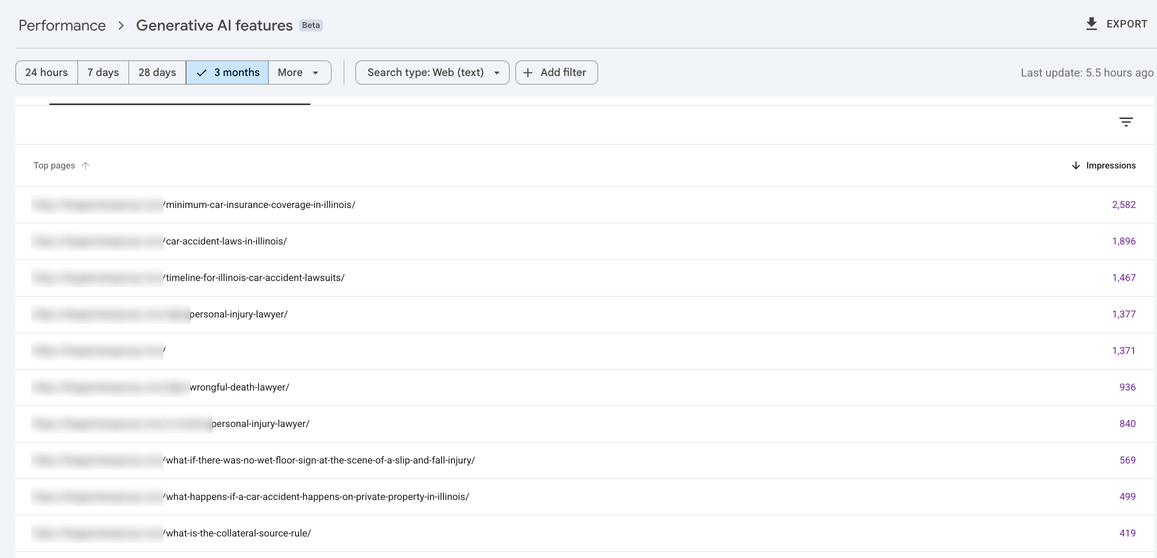
Measure signed cases by landing page first, then AI-feature visibility, then clicks.
Clicks used to be a decent proxy for content value. They aren't anymore.
If your intake can't tie leads back to landing pages yet, fix that first. Our guide to lead generation for lawyers covers the setup.
Here's the measurement stack I'd use:
- Signed cases by landing page. The only number that pays your bills. Track it in your CRM.
- Calls and form fills by landing page. Use call tracking and form source fields.
- Search Console's Generative AI report. Shows which pages appear in AI Overviews and AI Mode.
- Rankings for hire-intent keywords. Especially practice area pages in your market.
- Video data. The “Videos” search appearance and video indexing report in Search Console, plus YouTube referrals to your site.
- Clicks and impressions. Still useful, but read them next to the five above.
The screenshot above is the Generative AI report for a different firm, a personal injury practice in Illinois. Its top three pages in AI features are all Illinois-specific explainers: minimum car insurance coverage, car accident laws and the timeline for a car accident lawsuit.
Right behind them are local practice area pages: two city-level personal injury pages (1,377 and 840 impressions) and a city-level wrongful death page (936).
State-specific explainers and local practice pages, side by side. That's the same two-format pattern as the California firm.
According to Google's documentation on AI features, Google says clicks from pages with AI Overviews are higher quality, with users spending more time on the site. That's Google's claim. Your CRM is where you check it.
What the Generative AI Report Can't Tell You
❌ Not in the export we pulled
- Clicks from AI features
- The queries that triggered them
- Data before the report started
- Conversions or signed cases
- Citations of your YouTube videos
✅ What it does show
- Which pages Google cites
- How often, by day
- By page, country and device
The Generative AI report is useful, but it has real gaps. The export we pulled for the case study firm started on May 18, 2026, and it included impressions only.
So use it to find which pages Google trusts enough to cite. Then check those pages in your CRM.
Your Content Priority List for 2026
| # | Content type | Why | Main metric |
|---|---|---|---|
| 1 | Practice area pages for your top case types | Target hire-intent searches, many with no AI Overview | Signed cases by page |
| 2 | Fix practice pages stuck on pages 2 to 5 | Impressions with no clicks are wasted demand | Position for hire-intent keywords |
| 3 | State-specific blog posts that link to practice pages | Earn AI citations and pass authority | AI-feature impressions, assisted leads |
| 4 | Short attorney videos embedded on matching pages | Second route into AI answers, builds trust on the page | Calls from pages with video, YouTube referrals |
| 5 | Content built on your own data | Information nobody else can publish | Links and citations earned |
| 6 | Generic blog posts | AI Overviews replace them | Stop producing them |
If you're deciding where your next content dollar goes, that's the order.
Here's the short version.
Build fewer pieces. Make each one specific. Point every blog post and video at the pages that sign cases.
For the bigger picture, see our law firm SEO guide and our personal injury SEO services.
