
A 200-page medical record lands on your paralegal’s desk. Someone has to read every page and build a chronology before an attorney can value the case.
Claude can do that first pass. The catch: one wrong plan setting turns that shortcut into a Rule 1.6 problem.
This guide gives you 15 tasks your firm can hand to Claude tomorrow, the exact prompts to use, and the setup that keeps client data where it belongs.
Disclaimer
WEBRIS is a marketing agency, not a law firm. This guide shares how firms use Claude in practice. It isn’t legal or ethics advice, so check your state bar’s rules before using any AI tool with client information.
What Is Claude, and Which Plan Should a Law Firm Use?
| Free, Pro, Max | Team | Enterprise | |
|---|---|---|---|
| Terms that govern your data | Consumer Terms | Commercial Terms | Commercial Terms |
| Model training on your chats | Each user’s choice in Privacy Settings | Consumer setting doesn’t apply | Consumer setting doesn’t apply |
| Who controls the data | Anthropic, under its consumer privacy policy | Your firm (the “Controller”) | Your firm (the “Controller”) |
| HIPAA BAA available | No | No | Yes, HIPAA-ready plan |
| Claude for Word (tracked changes) | Pro and Max | Yes | Yes |
Claude is an AI assistant built by Anthropic that reads, summarizes, drafts, and edits text. You type an instruction, attach documents, and it returns a draft.
The plan you pick matters more than the prompts you write.
According to Anthropic’s August 2025 consumer terms update, users on Free, Pro, and Max plans choose whether their chats train future models. If they allow it, retention extends to five years. If they don’t, Anthropic keeps the standard 30-day retention period.
The same update says those changes don’t apply to Team, Enterprise, or API use.
On Team and Enterprise, Anthropic’s support documentation says the customer is the “Controller” of the data its users submit.
Here’s the short version: if client information will touch Claude, run your firm on Team or Enterprise.
A personal Pro login is fine for marketing copy and generic research. It isn’t where client files go.
Claude Chat vs. Cowork vs. Claude for Legal
- ChatYou ask. Claude answers.
- →
- CoworkYou delegate a job. Claude returns finished work.
- →
- Claude for LegalCowork plus legal platforms and practice-area plug-ins
Claude Chat is the window you type into. Ask a question, attach a file, get an answer.
Claude Cowork is for delegating a multi-step job and reviewing the finished result. Anthropic’s own legal industry guide draws the same line: Chat for in-the-moment questions, Cowork for handing off a project.
Claude for Legal is Cowork set up for law firms.
According to Anthropic’s May 12, 2026 announcement, Anthropic released more than 20 connectors to legal software and 12 practice-area plugins. Connected tools at launch included iManage, NetDocuments, Docusign, Everlaw, Relativity, and Thomson Reuters’ CoCounsel Legal.
Every task below works in plain Chat. You don’t need Claude for Legal to start.
What You Should Never Paste Into Claude
❌ Never on a personal Free, Pro, or Max account
- Client names tied to injuries or case facts
- Medical records, bills, or police reports with identifiers
- Social Security numbers, dates of birth, account numbers
- Settlement amounts, offers, or negotiation strategy
- Anything under a protective order
✅ Safe on any plan
- De-identified fact patterns
- Public statutes, court rules, and published opinions
- Your own blank templates and firm SOPs
- Marketing copy and website content
Some information should never go into an AI tool your firm doesn’t control.
A de-identified fact pattern looks like this: “Client A, 42, rear-ended at a red light, ER visit the same day.” No name, no date of birth, no claim number.
Read that again: the rule isn’t “never use client data.” It’s “never use client data in a tool your firm doesn’t control and hasn’t cleared.”
Protective orders are the exception to everything. Check the order’s language before covered material touches any outside tool, including Team or Enterprise.
Why Consumer and Commercial Terms Matter for Client Data
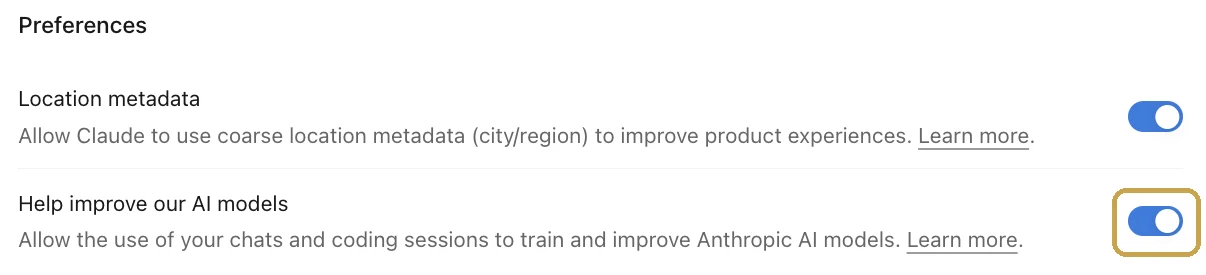
Consumer plans put the training decision in each user’s hands. The setting is called “Help improve our AI models,” under Settings → Privacy.
That means every associate, paralegal, and intake specialist with a personal account is making a data decision for your firm. You probably don’t know how each of them has it set.
Team and Enterprise move that decision to the firm. One admin, one policy, one set of terms.
If you run a 10-person PI shop, this is the single highest-leverage fix in this article. Put everyone on a firm-controlled plan and ban personal accounts for client work.
What ABA Formal Opinion 512 Requires of You
ABA Formal Opinion 512 applies seven existing duties to generative AI.
ABA Formal Opinion 512 is the American Bar Association’s first formal ethics opinion on lawyers’ use of generative AI, issued July 29, 2024.
The opinion doesn’t create new rules. It applies the Model Rules you already follow.
Three parts hit daily use hardest:
- Confidentiality (Rule 1.6). The opinion says a client’s informed consent is required before you input information relating to the representation into a self-learning AI tool. Boilerplate in an engagement letter doesn’t count.
- Fees (Rule 1.5). You can’t bill clients for time spent learning the tool. AI costs are generally overhead unless you disclosed otherwise in advance.
- Supervision (Rules 5.1 and 5.3). You’re responsible for how your staff uses it.
The opinion also says consent isn’t required when you use an AI tool without inputting information relating to the representation. Brainstorming a generic intake script is one example.
Whether a no-training commercial plan changes your consent analysis is a judgment call for you and your state bar. A number of state bars have issued their own AI guidance. Read yours before rolling Claude out firm-wide.
Morning Tasks (1 to 5)
- New records, reports, notes
- →
- Claude summary or list
- →
- Staff review
- →
- Action on the file
Mornings are where your staff drowns in reading.
These five tasks turn reading time into review time.
1. Summarize a New Medical Record
| Date | Provider | Chief complaint | Diagnosis | Treatment | Page |
|---|---|---|---|---|---|
| 10/02 | County General ER | Neck and lower back pain after rear-end collision | S16.1XXA, S39.012A | X-rays, muscle relaxant | p. 3 |
| 10/09 | Primary care | Ongoing neck pain, headaches | Not listed | Physical therapy referral | p. 22 |
| 10/14 to 12/30 | Physical therapy | Neck and back pain | Not listed | 24 visits | pp. 41 to 118 |
| 12/30 to 02/20 | Gap in treatment: 52 days | n/a | |||
| 02/20 | Orthopedist | Persistent lower back pain | Not listed | MRI ordered | p. 131 |
Medical records are one of the heaviest reading jobs in a PI file.
Claude turns a stack of records into a chronology your attorney can actually scan. Ask for page citations every time so the reviewer can check each line against the source.
You are a paralegal at a personal injury firm. Summarize the attached
medical records as a chronological table with these columns:
Date | Provider | Chief complaint | Diagnosis (with ICD code if listed) |
Treatment | Page number in the PDF.

Then list:
1. Every reference to prior injuries or pre-existing conditions.
2. Gaps in treatment longer than 30 days.
3. Any statement by the patient about how the injury happened.

Do not infer anything not in the records. If something is unclear,
write "UNCLEAR, see page X."
The gaps-in-treatment list matters. Adjusters use treatment gaps to cut value, and you want to see them before the adjuster does.
Only run this on a firm-controlled plan. See the HIPAA question in the FAQ.
2. Summarize a Police or Incident Report
What the police report summary should surface
- Date, time, location, weather, road conditions
- Each driver, vehicle, and direction of travel
- Citations issued, and to whom
- Each witness statement in one line
- Every contradiction, with a page cite
Police reports are short. The useful details are buried.
Summarize this police report for an attorney reviewing a new
car accident case. Include:
- Date, time, location, weather, road conditions
- Each driver and vehicle, with direction of travel
- Citations issued and to whom
- Each witness and a one-line summary of their statement
- The officer's stated cause, quoted exactly

Then list every contradiction between drivers, witnesses, and
the officer's diagram. Cite the page for each.
Get the contradictions list on day one. It shapes every call you make on liability.
3. Build Today’s Deadline List From Case Notes
| Matter | What’s due | Source sentence | Days left |
|---|---|---|---|
| Client A v. Driver B | Discovery responses | “Responses due 30 days from service on 11/3” | 7 |
| Client C | Follow up with orthopedist for records | “Call Dr. office again next week” | NEEDS A DATE |
| Client D v. Store E | Mediation statement | “Mediation 12/18, statement due 10 days prior” | 12 |
Claude can organize deadlines. It can’t be your docketing system.
Use it to turn scattered notes into a list, then check every date against your calendaring software.
Below are my case notes from this week. Extract every deadline,
due date, and follow-up into a table:
Matter | Deadline | What's due | Exact source sentence | Days from today.

Today is [DATE]. Sort by days remaining. Flag anything inside 7 days.
If a note mentions a deadline without a date, list it under
"NEEDS A DATE."

[PASTE NOTES]
The “exact source sentence” column is your audit trail. If Claude got a date wrong, you see why in two seconds.
4. Prep for an Intake Call
- What we know: three bullets from the web form
- What’s missing: liability, injuries, treatment, insurance, statute of limitations
- Red flags: prior attorney, long treatment gap, no police report
- Eight questions, in the order to ask them
Your intake team decides whether a lead becomes a signed case.
Walk into the call knowing what’s missing, and you won’t need a second call to fill the gaps.
A potential client submitted the web form below. Prepare me for a
10-minute intake call. Give me:
1. What we already know, in 3 bullet points.
2. What's missing to evaluate the case (liability, injuries,
   treatment, insurance, statute of limitations).
3. Red flags (prior attorney, long treatment gap, no police report).
4. Eight questions to ask, in the order I should ask them.

Keep it plain. I'm reading this right before I dial.

[PASTE FORM SUBMISSION]
If your lead flow is weak, prepping intake won’t fix it. See how personal injury lead generation feeds this step.
5. Score New Intake Notes for Case Fit
Case-fit scorecard (1 to 5 each)
Every unqualified lead your attorney calls back costs time you could spend on a signable case.
Give Claude your firm’s criteria and let it pre-sort.
Score this intake using our case criteria. Rate each 1 to 5 and
explain each score in one sentence:
- Liability clarity
- Injury severity
- Treatment status
- Insurance coverage available
- Time left on statute of limitations in [STATE]

Then give a total and one of: "Call back today," "Call back this
week," or "Refer out." Do not make a final decision. An attorney will.

[PASTE INTAKE NOTES]
The attorney still decides. Claude just puts the best cases on top of the pile.
If too many junk leads reach intake in the first place, the problem is upstream. Read why Google Ads sends junk leads.
Drafting Tasks (6 to 10)
Claude writes first drafts. Lawyers write final drafts.
Every task in this section ends with an attorney reading every word.
6. First Draft of a Demand Letter Narrative
Case facts in
- Rear-ended at red light, 10/2
- ER same day, neck and back pain
- 12 weeks physical therapy
- Missed 3 weeks of work
Claude narrative out
- Facts of the incident, in order
- Injuries and treatment, with dates
- A list of every fact used, for verification
- No demand amount, no case law
The facts and damages narrative is the most time-consuming part of a demand letter to write.
It’s also the easiest part for Claude to draft well, because you give it every fact.
Draft the "Facts of the Incident" and "Injuries and Treatment"
sections of a personal injury demand letter to an insurance adjuster.

Use only the facts below. Do not add facts, case law, or a dollar
amount. Write in a firm, factual tone. Short paragraphs.
After the draft, list every fact you used so I can verify each one.

[PASTE CASE FACTS AND MEDICAL SUMMARY FROM TASK 1]
Leave the demand amount and legal arguments to the attorney. That’s judgment, not drafting.
7. First Draft of Discovery Requests
Five topics for first-draft discovery to the defendant driver
Check every request against your jurisdiction’s rules and limits.
Discovery requests follow patterns. Claude handles patterns well.
Draft first-draft interrogatories and requests for production to
the defendant driver in a rear-end collision case in [STATE].

Focus on: cell phone use, prior accidents, vehicle maintenance,
the trip's purpose (to identify a possible employer), and insurance.

Number them. Keep each request to one subject. Note any request
that may exceed [STATE]'s interrogatory limit so I can cut.
Check every request against your jurisdiction’s rules and limits. Claude doesn’t know your local judge’s standing order.
8. Redline an Agreement in Word
7.1 Indemnification
Client Each party shall indemnify, defend, and hold harmless Firm the other party from any claims arising out of Client’s that party’s breach of this Agreement.
Deleted Inserted Each edit stays tracked until you accept or reject it.
Claude for Word is an add-in that puts Claude inside Microsoft Word.
According to Anthropic’s Claude for Word documentation, in tracked changes mode Claude’s edits land as tracked revisions you accept or reject in Word’s review pane. It can also summarize a counterparty’s redlines.
That’s the workflow lawyers already use. Nothing changes except speed.
Make the indemnification clause in Section 7 mutual.
Show all edits as tracked changes.
Summarize the opposing party's tracked changes. Group them by
severity: (1) changes risk allocation, (2) changes deadlines or money,
(3) cosmetic. Flag anything worth pushing back on.
For PI firms, this is most useful on fee agreements, co-counsel agreements, and settlement releases.
9. Rewrite Legal Language in Plain English
Before
- “Releasor hereby releases, acquits, and forever discharges Releasee from any and all claims, demands, and causes of action, known or unknown…”
After
- “By signing, you give up your right to sue the other driver for anything related to this accident. That includes injuries you don’t know about yet.”
Clients sign what they understand. They call your office about what they don’t.
Rewrite this clause so a client with no legal background understands
it. 8th-grade reading level. Keep every obligation and every
exception. Do not soften anything. After the rewrite, list anything
you could not simplify without changing the meaning.

[PASTE CLAUSE]
Fewer “what does this mean?” calls means more time for cases that pay. Clear communication also shows up in your client reviews.
10. Build a Deposition Outline
- Background · employment, driving history
- The day of the incident · trip purpose, phone use
- The collision · speed, lookout, braking
- Statements afterward · to police, to insurers
- Prior accidents · claims and citations
A deposition outline is a sorting job before it’s a strategy job.
Using the attached documents, draft a deposition outline for the
defendant driver. Organize by topic: background, the day of the
incident, the collision, statements made afterward, prior accidents.

Under each topic list questions, and cite the document and page that
each question is based on. Mark any question where the documents
contradict each other with [CONFLICT].
The attorney adds the strategy. Claude does the cross-referencing.
Client Communication Tasks (11 to 13)
- Case notes
- →
- Claude draft update
- →
- Attorney approval
- →
- Client inbox
Clients who don’t hear from you assume nothing is happening on their case.
These three tasks make regular updates cheap enough that your staff actually sends them.
11. Weekly Case Status Update
Subject: Your case update for this week
What happened: We received your records from County General and sent them to the insurer.
What’s next: We’re waiting on your physical therapy records.
What we need from you: Let us know if you have any new appointments.
Write a short case update email to our client from the notes below.
Three sections: What happened this week, What happens next,
What we need from you. Warm, plain, under 150 words.
Do not predict outcomes, timing of a settlement, or case value.

[PASTE THIS WEEK'S NOTES]
Run it every Friday for every open file. Your staff reviews and sends.
12. Answer “What’s My Case Worth?” Without Promising Outcomes
❌ Risky
- “You’ll probably get six figures.”
✅ Safe
- “Value depends on treatment that’s still ongoing. Here’s what we’re tracking.”
PI clients ask it constantly. An off-the-cuff answer is where staff get into trouble.
A client asked: "[PASTE CLIENT QUESTION]."
Draft a reply that explains what affects case value (liability,
treatment, total medical bills, insurance limits, lost wages) and
where their case stands on each, using the notes below.

Do not give a number or a range. Do not predict an outcome.
End by offering a call with the attorney.

[PASTE CASE NOTES]
The safe answer is honest. It also doesn’t come back to haunt you when the offer lands.
13. Spanish-Language Client Updates
English
- “We received your records and sent them to the insurance company.”
Español
- “Recibimos sus expedientes médicos y los enviamos a la compañía de seguros.”
If you serve Spanish-speaking clients, translation delays every update.
Translate this client update into Spanish for a client from
[COUNTRY/REGION]. Use plain, respectful language (usted).
Keep legal terms accurate and add the English term in parentheses
the first time each appears.

[PASTE UPDATE]
Have a fluent staff member review before sending. A mistranslated deadline is a malpractice problem.
Back-Office Tasks (14 and 15)
- Daily notes and recordings
- →
- Claude
- →
- Time entries and SOPs
These don’t touch clients directly. They still eat hours every week.
14. Turn Notes Into Time Entries
| Date | Matter | Description | Time |
|---|---|---|---|
| 11/24 | Client A | Reviewed 84 pages of ER records from County General | 1.2 |
| 11/24 | Client A | Call with client re: treatment status | 0.3 |
| 11/24 | Client C | Drafted letter to orthopedist requesting records | MISSING TIME |
I know what you’re thinking. “We’re contingency. We don’t bill hourly.”
You still need clean time records. Fee-shifting claims, fee petitions, and disputes after a client fires you all turn on contemporaneous time records.
Turn my notes from today into time entries.
Format: Date | Matter | Description | Time (0.1 hour increments).
Write each description specifically ("Reviewed 84 pages of ER records
from County General"), not vaguely ("File review").

Only use times I wrote down. If a task has no time, list it under
"MISSING TIME" instead of estimating.

[PASTE NOTES]
Never let Claude estimate time. Formal Opinion 512 is clear that hourly billing reflects time actually spent.
15. Turn a Recorded Process Into an SOP
- Record your senior paralegal opening a new file
- Transcribe the recording
- Claude turns it into numbered steps, owners, and software
- Review the “questions” list with the paralegal
- Train the next hire from the SOP
Your best paralegal knows how to open a new file. Nobody else does.
Record her walking through it. Then:
Below is a transcript of our senior paralegal opening a new PI file.
Turn it into a step-by-step SOP:
- Numbered steps, one action per step
- Who owns each step
- Software used at each step
- A checklist at the end

List anything she skipped explaining under "QUESTIONS FOR [NAME]."

[PASTE TRANSCRIPT]
This is the task that compounds. Every SOP you write makes the next hire faster.
How to Write a Claude Prompt for Legal Work
- Role: “You are a paralegal at a PI firm.”
- Facts: the material it can use, and only that material
- Task: one clear job
- Format: table, email, numbered list, word count
- Guardrails: “Do not add facts.” “Do not predict outcomes.”
Every prompt above follows the same five-part pattern.
The guardrails do the most work. Without them, Claude fills gaps with plausible-sounding guesses.
Save your best prompts as a firm library. In Claude, Projects let you store standing instructions so staff don’t retype them.
How to Check Claude’s Output Before It Leaves the Firm
An AI hallucination is output that looks correct but is false, such as a citation to a court decision that doesn’t exist.
This isn’t theoretical.
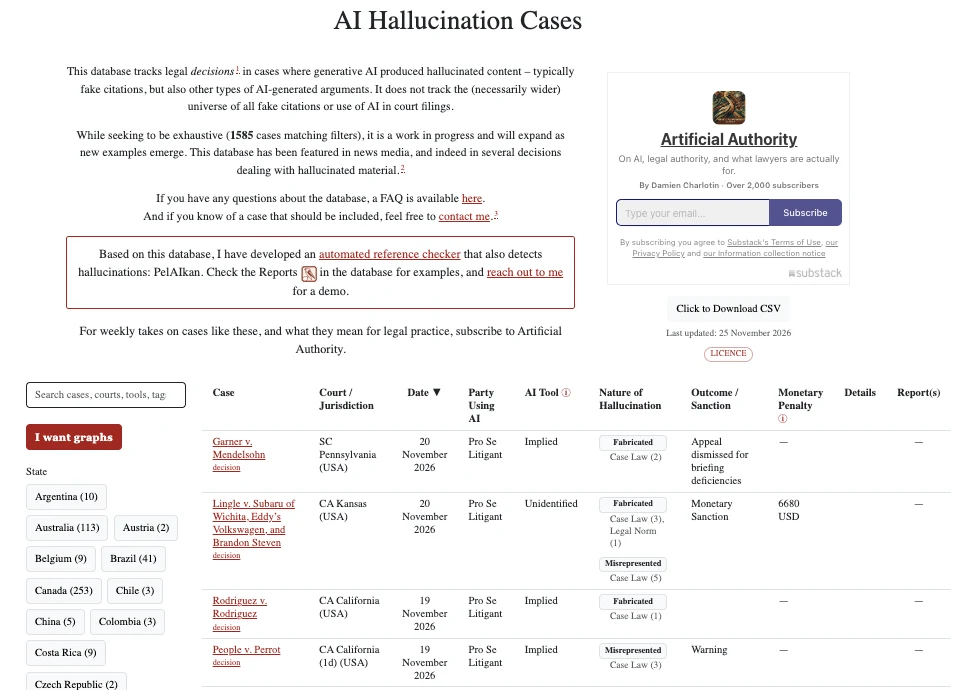
According to Damien Charlotin’s AI Hallucination Cases database, courts had issued 1,585 decisions worldwide addressing AI-hallucinated content as of November 25, 2026.
Lawyers, not just pro se litigants, show up in the newest entries.
Purpose-built legal research tools aren’t immune either. According to a 2025 study in the Journal of Empirical Legal Studies by Varun Magesh and colleagues, the AI research tools from LexisNexis and Thomson Reuters each hallucinated between 17% and 33% of the time.
Your verification checklist
- Every case citation pulled and read in Westlaw or Lexis
- Every quote matched word for word to the source
- Every date checked against the file, not against Claude’s summary
- Every fact in a draft traced to a document
- Every client-facing message read by a human before sending
Don’t use general Claude chat as a case law research tool. Use it to summarize and draft from material you give it.
How Many Firms Already Use AI?
Lawyers using AI, by firm size
Small firms are behind. That’s the opportunity.
According to the ABA’s 2024 Legal Technology Survey Report, 30% of responding lawyers used AI. Adoption hit 46% at firms of 100 or more attorneys, 30% at firms of 10 to 49, and 18% among solos.
Big firms have innovation teams and seven-figure budgets.
You have a per-seat subscription and the 15 prompts above.
Where Claude Fits in Your Signed-Case Engine
- MarketingPPC, LSAs, organic
- →
- IntakeTasks 4 and 5
- →
- Case workTasks 1, 2, 6 to 10
- →
- Client updatesTasks 11 to 13
- →
- Reviews, referrals, signed cases
Claude doesn’t sign cases. Your intake team does.
What Claude does is free up the hours your team spends reading and typing, so they can spend them on the calls that turn into signed cases.
Leads come in from PPC, Local Service Ads, and organic search. Claude speeds up intake prep and case-fit sorting. Faster case work and regular updates give clients fewer reasons to complain and more reasons to leave a good review.
If your firm only uses Claude for case work, you’re missing half of it. See how firms use AI across operations in our guide to AI for law firms. For the marketing side, see how to build a law firm marketing scorecard in Claude that tracks cost per signed case.
And as more clients ask AI assistants for lawyer recommendations, it’s worth knowing how law firms rank in ChatGPT.
Frequently Asked Questions About Claude for Lawyers
HIPAA coverage, billing for AI time, and Claude vs. ChatGPT.
Can I upload medical records to Claude under HIPAA?
| Plan | Covered by Anthropic’s BAA? |
|---|---|
| Free, Pro, Max | No |
| Team | No |
| Enterprise, HIPAA not activated | No |
| HIPAA-ready Enterprise, Chat | Yes |
| HIPAA-ready Enterprise, Cowork | Yes, with HIPAA configuration applied |
Only a HIPAA-ready Enterprise plan offers a Business Associate Agreement.
According to Anthropic’s BAA documentation, a standard Enterprise plan isn’t covered until the organization’s Primary Owner activates HIPAA compliance and accepts the BAA. Anthropic’s HIPAA-ready Enterprise page notes activation is an irreversible organization change.
Whether HIPAA applies to your firm at all depends on your relationships with covered entities. Ask your compliance counsel.
Either way, medical records are client confidences under Rule 1.6. Keep them off personal accounts.
Can I bill clients for time Claude saved?
❌ Not allowed
- Billing 3 hours for a task Claude finished in 20 minutes
- Billing time spent learning the tool
✅ Allowed
- Billing actual time spent
- A reasonable flat or contingency fee, disclosed in advance
No, not if you bill hourly. Formal Opinion 512 says hourly fees must reflect time actually spent, and you can’t bill for learning the tool.
Flat and contingency fees are judged on overall reasonableness under Rule 1.5. Disclose AI-related charges in advance if you plan to pass any through.
Is Claude better than ChatGPT for lawyers?
Pick the tool on plan terms and where your documents live, not on hype.
- Does a business plan give your firm control of the data?
- Does it edit in Word with tracked changes?
- Does it connect to your document management system?
- Is a HIPAA BAA available if you need one?
Both work for the tasks above. The deciding factors are plan terms and where your documents live.
If your firm drafts in Word, check whether the tool edits with tracked changes and connects to your document management system. Claude does both, through Claude for Word and the Claude for Legal connectors to iManage and NetDocuments.
Start With One Task This Week
- Move your team to a firm-controlled plan
- Run task 1 on ten medical record sets
- Time it against your current process
- Repeat for intake prep and case-fit scoring
Pick the task that eats the most hours in your office right now. For most PI firms, that’s medical record summaries.
Move your team to a firm-controlled plan. Run task 1 on ten files. Time it.
Then do the same thing for intake, because faster intake is where the signed cases are.