
Your agency sends you a report every month.
It has clicks, impressions, rankings, maybe a pie chart. It almost never tells you what you paid for each signed case.
That’s the only number that matters. And you can build the report that shows it yourself, in about an hour, with an AI tool you probably already pay for.
Here’s the short version:
- Export 90 days of data from your ad accounts, call tracking and CRM.
- Strip out client names and phone numbers.
- Paste one prompt into Claude or ChatGPT.
- Check the math, then save the setup so every weekly update takes 15 minutes.
This guide walks through every step, gives you the exact prompts, and shows you how to score the part of the process where most firms quietly lose cases: intake.
What Is a Law Firm Marketing Scorecard?
❌ Typical agency report
- Clicks and impressions
- Keyword rankings
- Click-through rate
- Website traffic
- Platform “conversions”
✅ Your scorecard
- Spend by channel
- Signed cases by channel
- Cost per signed case
- Call answer rate
- Lost-lead reasons
A law firm marketing scorecard is a one-page living report, updated every week, that connects what you spend on each marketing channel to the signed cases that channel produced.
It’s not a dashboard with 40 charts. It’s 12 numbers you can read in two minutes.
The difference from an agency report is where the data stops.
An agency report usually stops at the lead. Your scorecard keeps going: lead, qualified lead, consultation, signed retainer.
That last step lives in your CRM, not in Google Ads. Which is exactly why most reports leave it out.
The 12 Numbers Your Scorecard Needs
| # | Metric | Formula | Where it lives |
|---|---|---|---|
| 1 | Spend by channel | Total spend per channel for the week | Ad platforms, plus SEO and agency invoices |
| 2 | Cost per lead | Spend ÷ leads | Ad platforms + call tracking |
| 3 | Cost per signed case | Spend ÷ signed cases | Ad platforms + CRM |
| 4 | Expected fee per signed case | Historical average fee by case type | Case management or accounting |
| 5 | Leads | Calls + forms + chats, each person counted once | Call tracking, CRM |
| 6 | Qualified lead rate | Qualified leads ÷ leads | CRM |
| 7 | Consult rate | Consultations ÷ qualified leads | CRM |
| 8 | Sign rate | Signed cases ÷ consultations | CRM |
| 9 | Answer rate | Answered calls ÷ inbound calls | Call tracking or phone system |
| 10 | Speed to lead | Median minutes from inquiry to first contact | CRM or call tracking timestamps |
| 11 | Organic and maps leads | Leads from organic search and Google Business Profile | GA4, call tracking, GBP |
| 12 | Lost-lead reasons | Unsigned leads counted by reason | CRM disposition field |
Your scorecard needs 12 numbers, grouped into money, funnel, intake and early warning signs. The table above is the full list.
If you want a deeper breakdown of KPIs by channel (SEO, PPC, LSAs), we cover that in our guide to tracking whether your marketing is working. This is the short list you’ll actually build.
Money Metrics: Spend, Cost per Signed Case and Fee per Case
Three formulas that decide your budget
- Cost per lead = Spend ÷ Leads
- Cost per signed case = Spend ÷ Signed cases
- Return per case = Expected fee per case ÷ Cost per signed case
Cost per signed case is spend divided by signed cases, by channel. It’s the number that decides where your budget goes next month.
Cost per lead is useful, but it lies to you. A $90 lead that never signs is more expensive than a $400 lead that does.
For reference, here’s what PI firms we work with have paid per signed case on Meta ads, from our published case studies:
| Firm (case study) | Channel | Cost per signed case |
|---|---|---|
| Steinger, Greene & Feiner | Meta ads, MVA | $2,600 |
| CLS Injury Lawyers | Meta ads, car accident | $2,275 |
| Borunda & Fomby | Meta ads, bilingual | $2,000 |
| Chalik & Chalik | Meta ads, premises liability | $1,800 |
| Phillips & Associates | Meta ads, sexual abuse | $1,750 |
Read that again: these are signed cases, not leads.
The fourth money metric is expected fee per signed case. On contingency, fees land months or years later, so use your historical average by case type.
Divide that by cost per signed case and you know whether a channel is actually making you money. If you need a realistic starting point, see our breakdown of what personal injury leads really cost.
Funnel Metrics: Leads, Qualified Leads, Consults and Signed Cases
Where a channel breaks
- Leads
- Qualified leads
- Consultations
- Signed cases
The funnel metrics tell you where a channel breaks, not just whether it works.
Three rates matter:
- Qualified lead rate: how many leads match your case criteria.
- Consult rate: how many qualified leads book a consultation.
- Sign rate: how many consultations become signed retainers.
If qualified lead rate is low, your ads are reaching the wrong people. That’s a question for whoever runs your ads, and we’ve written about why it happens on Google Ads and on Meta.
If qualified rate is fine but sign rate is low, the problem is usually intake. That one’s on your side of the table, which brings us to the section most scorecards skip.
Early Warning Signs: Calls, Google Business Profile and Rankings
| Early warning sign | What it predicts | Check it |
|---|---|---|
| Calls and website clicks from Google Business Profile | Maps-driven cases | Weekly |
| Organic leads (not traffic) | SEO-driven cases | Weekly |
| Non-branded clicks in Search Console | Whether SEO is working | Weekly |
| Map pack position for your top 3 terms | Local visibility | Monthly |
| Rankings and traffic | Signals only | Monthly |
These numbers move before signed cases do. They tell you something is changing a month or two before it shows up in your caseload.
Keep the list short. Calls from your Google Business Profile predict maps-driven cases, and organic leads predict SEO-driven cases. Our local SEO guide covers how to track map pack position.
Rankings and traffic belong at the bottom. They’re signals, not results.
How to Score Your Intake Process
Every arrow is a place to lose a case
- Inquiry
- Answered
- Qualified
- Consult booked
- Retainer sent
- Retainer signed
Intake is where most marketing money leaks. Your ads can be perfect and you’ll still lose the case if nobody picks up.
This section covers how to measure intake on your scorecard. For the process itself (scripts, forms, questions), use our personal injury intake form template or the family law intake process.
Answer Rate and Missed Calls
Share of law firms that picked up a prospective client’s call
Answer rate is answered calls divided by inbound calls. It’s the first intake number on your scorecard.
According to Clio’s Legal Trends client intake research, secret shoppers reached just 52% of the law firms they phoned in 2024, and only 40% picked up when called.
That 40% is down from 56% in 2019, as reported by the ABA’s Law Practice Magazine.
Email was worse. According to LawSites’ coverage of the 2024 report, only 33% of firms responded to the emailed inquiry.
I’ll be honest: most firm owners assume they’re in the good half. Your call tracking will tell you in about 30 seconds.
Speed to Lead
| First response | Leads | Sign rate |
|---|---|---|
| Under 5 minutes | Your number | Your number |
| 5 to 60 minutes | Your number | Your number |
| Same day | Your number | Your number |
| Next day or later | Your number | Your number |
Speed to lead is the median time from inquiry to first real contact.
Track it in bands, then compare sign rate across the bands. Your own data is the benchmark here.
If your under-5-minute leads sign at double the rate of next-day leads, you’ve just priced the cost of slow follow-up.
After-Hours and Weekend Coverage
| When the lead came in | Leads | Answer rate |
|---|---|---|
| Weekdays, 8 a.m. to 6 p.m. | Your number | Your number |
| Weeknights, 6 p.m. to 10 p.m. | Your number | Your number |
| Overnight, 10 p.m. to 8 a.m. | Your number | Your number |
| Weekends | Your number | Your number |
Car accidents don’t happen during business hours.
Ask the AI to break your leads down by hour and day of week, then overlay answer rate. Most firms find a big chunk of leads land when nobody’s at the desk.
That’s not a marketing problem. It’s a staffing or answering-service problem, and one of the cheapest fixes on the whole scorecard.
Qualified Lead Rate and Disqualification Reasons
| Disqualification reason | What it usually points to |
|---|---|
| Wrong practice area | Your ads are showing for the wrong searches |
| No injury or no damages | Your ads are attracting claims you don’t take |
| Statute of limitations expired | Your ads are reaching people with old incidents |
| Already represented | You’re reaching people too late |
| Outside your service area | Your ads are reaching people outside your area |
| Spam or solicitor | Form or call filtering problem |
Qualified lead rate only helps if you know why leads get disqualified.
Make your intake team pick a reason from a fixed list, like the one above. Free-text notes can’t be counted.
When one channel sends mostly “wrong practice area,” that’s a fix for whoever runs your ads. When it’s “already represented,” you’re arriving late to the market.
Consult-to-Retainer Rate
Consult-to-retainer rate = Signed retainers ÷ Consultations held
Watch it alongside qualified lead rate. If lead quality holds steady and this drops, the problem is inside the consult.
Consult-to-retainer rate is signed retainers divided by consultations held.
If it drops while lead quality holds steady, look at who’s running the consults and how fast the retainer goes out after.
Time From Retainer Sent to Retainer Signed
✅ E-signature
- Sent at the end of the call
- Reminder the same day
- Signed before they hang up or that evening
❌ Come in to sign
- Appointment days out
- Prospect keeps shopping
- Another firm calls first
This is the time between sending the retainer and getting it back signed.
Every day a retainer sits unsigned is a day another firm can call your prospect. Track the median, and track how many retainers are sent but never signed.
Follow-Up Attempts on Unsigned Leads
❌ No process
- One call
- One voicemail
- Marked lost
✅ Logged follow-up
- Calls, texts and email over several days
- Every attempt logged in the CRM
- Lost only after the sequence ends
Track the number of follow-up attempts logged before a lead is marked lost.
If the average is one, you don’t have a follow-up process. You have a voicemail.
A CRM built for PI intake makes this automatic. We compare the options in our guide to CRMs for personal injury firms.
Lost-Lead Reasons
| Lost-lead reason | Where to look first |
|---|---|
| Went with another firm | Speed to lead, consult quality |
| Never reached | Answer rate, after-hours coverage |
| Stopped responding | Follow-up attempts |
| Didn’t qualify | What that channel’s ads are promising |
| Chose not to pursue | Consult and retainer process |
Lost-lead reasons are the most honest number on your scorecard.
Use a fixed list in your CRM, like the one above, and count them by channel every week.
If “never reached” is your top reason, stop optimizing ads. You have an intake problem, and more leads will only make it more expensive.
Where Each Number Lives in Your Firm
Five sources feed one scorecard
- Ad platforms
- Call tracking
- Analytics + Business Profile
- CRM
- Accounting
- Scorecard
Spend comes from the ad platforms. Signed cases only come from the CRM.
Every number on your scorecard comes from one of five places:
- Ad platforms (Google Ads, LSA, Meta): spend, clicks, platform-reported leads.
- Invoices: the cost of SEO and every other channel without an ad account.
- Call tracking: calls by source, answered or missed, timestamps. If you don’t have it, start with our guide to call tracking for law firms.
- Google Analytics (GA4) and Google Business Profile: organic and maps leads.
- Your CRM or intake software: qualified status, consults, signed cases, lost-lead reasons.
- Accounting or case management: fees by case type.
Here’s the uncomfortable part. If your CRM doesn’t record lead source on every signed case, cost per signed case is impossible. Fix that before anything else.
Once source data is flowing, you can also send signed cases back to the ad platforms. We explain how in feeding your CRM into Google Ads.
How to Score SEO and Other Unpaid Channels
❌ How most firms score SEO
- Rankings went up
- Traffic went up
- No cost on the scorecard
- Cases credited to “we think it’s working”
✅ How your scorecard scores it
- Leads from organic search and maps
- Signed cases from those leads
- Full cost from invoices
- Cost per signed case, like any paid channel
SEO goes on the scorecard exactly like Google Ads: spend, leads, signed cases, cost per signed case.
Most firms never score it this way. SEO has no ad account showing spend, so it ends up judged on rankings and traffic instead of cases.
The same goes for your other unpaid channels: Google Business Profile, referrals, reviews and AI search. Here’s how to put a real number on each.
What SEO Actually Costs You
| Cost line | Where to find it |
|---|---|
| SEO agency or consultant retainer | Monthly invoice |
| Content writing and attorney review time | Invoices, or hours × rate |
| Website hosting and development | Invoices |
| SEO tools and call tracking for organic | Subscriptions |
| In-house marketing staff time on SEO | Share of salary |
“Unpaid” means you don’t pay per click. It doesn’t mean free.
Add up the cost lines above for the month, then give the AI the total. It spreads the monthly cost evenly across the weeks, so SEO shows up in the weekly history next to your paid channels.
Now you can compare them honestly. If SEO costs you $8,000 a month and signs 10 cases, that’s $800 per signed case, and it belongs in the same table as your ads. Our guide to SEO for lawyers covers what that budget should be buying.
How to Track Leads That Don’t Come From Ads
| Channel | How the lead gets tagged | Export from |
|---|---|---|
| Organic search | Tracking number that shows on your site for organic visitors, plus form source | Call tracking, GA4 |
| Google Business Profile | Its own tracking number on the profile, and tagged website link | Call tracking, GBP insights |
| Referrals | Referring attorney or client entered at intake | CRM |
| AI search (ChatGPT and others) | Referral source in GA4, plus “how did you hear about us” | GA4, CRM |
| Reviews and directories | Separate tracking number per listing | Call tracking |
Ad platforms count their own leads. Unpaid channels don’t, so you have to tag every lead at the door.
For calls, that means separate tracking numbers: one that shows on your website for organic visitors, one on your Google Business Profile, one per directory listing. Our call tracking guide explains how the numbers swap.
For forms and chats, GA4 records where the visitor came from. Referrals have no tracking number at all, so intake has to enter the source by hand, every time.
Ask Every Caller “How Did You Hear About Us?”
✅ Tracking tells you
- The last thing they clicked
- Which number they dialed
- Exact and automatic
✅ The caller tells you
- What actually made them call
- The TV ad, the friend, the ChatGPT answer
- Catches what tracking misses
Tracking records the last click. People remember the reason.
Someone sees your billboard, asks ChatGPT about you, then Googles your name and calls. Tracking credits organic search. The caller would tell you the billboard.
Make “how did you hear about us?” a required intake field with a fixed list of answers. Then tell the AI to compare it with the tracked source:
Compare the tracked lead source with the "how did you hear about us" answer for every lead in the last 13 weeks.
Show a table of tracked source vs. self-reported source, with counts.
Tell me which channels tracking is under-crediting or over-crediting.
Branded vs. Non-Branded Search
| Branded search | Non-branded search | |
|---|---|---|
| Example | “Smith Injury Law” | “car accident lawyer near me” |
| What drives it | TV, billboards, referrals, reputation | SEO and maps rankings |
| Credit it to | Brand, not SEO | SEO |
| Where to see it | Google Search Console, Queries report | |
Not every Google search is an SEO win.
When someone searches your firm’s name, your SEO didn’t find them. Your TV ad, a referral or your reputation did. Only non-branded searches tell you whether SEO is working.
Export the Queries report from Google Search Console and ask the AI to split branded from non-branded clicks. Track non-branded clicks as an early warning sign for SEO.
Why SEO Needs a Longer Window
| Channel | Watch weekly | Judge it on |
|---|---|---|
| Google Ads, LSA, Meta | Leads, answer rate | 4- and 13-week cost per signed case |
| SEO | Non-branded clicks, organic leads | 6-month cost per signed case |
| Google Business Profile | Calls, map pack position | 13-week cost per signed case |
| Referrals | Referrals received | Signed cases per referral source, yearly |
Turn off an ad and the leads stop that day. SEO doesn’t work that way.
New content and links take months to move rankings, so judge SEO on a 6-month window, not 4 weeks. Week to week, watch the early warning signs: non-branded clicks and organic leads.
If those are climbing and cost per signed case is falling over two quarters, SEO is working. If they’re flat for six months, ask hard questions. We compare the two channels directly in SEO vs. Facebook ads for lawyers.
AI Search: The Newest Unpaid Channel
Give AI search its own row on the scorecard
- Visits referred from ChatGPT, Perplexity, Gemini and similar tools (GA4)
- Leads from those visits
- Callers who say “ChatGPT told me about you”
- Signed cases from all of the above
People now ask ChatGPT to recommend a lawyer. When it sends someone to your site, GA4 shows the visit as a referral from that tool.
Give AI search its own row instead of burying it in “Other.” Many people won’t click through at all; they’ll just search your name or call, so the “how did you hear about us” answer matters even more here.
If you want that row to grow, our guides on GEO for lawyers and how law firms rank in ChatGPT cover what gets a firm recommended.
Is It Safe to Put Firm Data Into ChatGPT or Claude?
Before you upload anything
- Use a business plan, or turn model training off on a personal plan
- Strip names, phone numbers, emails and case facts from every export
- Upload aggregate numbers, not client files
- Check your state bar’s guidance on AI tools
- Never paste intake notes, call transcripts or medical details as-is
Yes, if you upload marketing numbers and not client information.
The ABA’s first formal opinion on generative AI, Formal Opinion 512 (July 29, 2024), flags confidentiality as a core risk. Its reasoning: self-learning tools can lead directly or indirectly to disclosure of information relating to a representation.
Here’s how that applies to your scorecard:
- Spend, lead counts and sign rates are not client information. Aggregate numbers are fine.
- Your CRM export is. It usually contains names, phone numbers, injury details and notes.
- So you strip the export first (Step 2 below), then upload only the columns the scorecard needs.
ABA opinions aren’t binding, and state bars issue their own guidance. Check yours before you start. This section is general information, not an ethics opinion.
Which Plan and Privacy Setting to Use
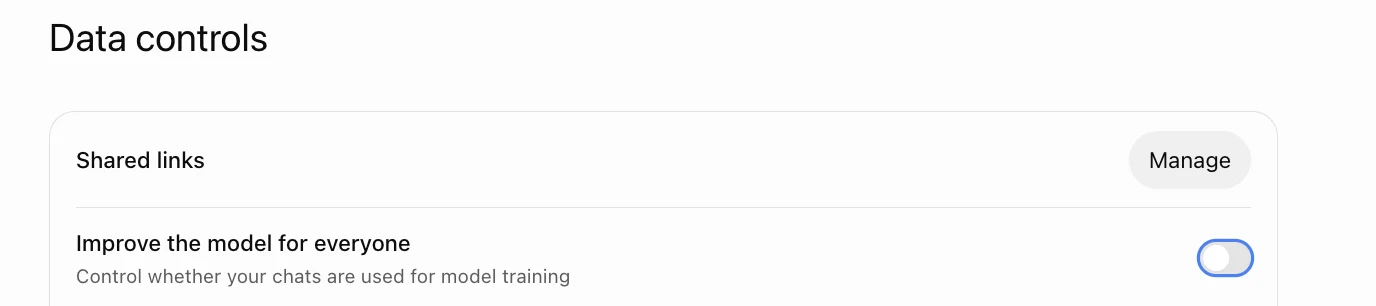
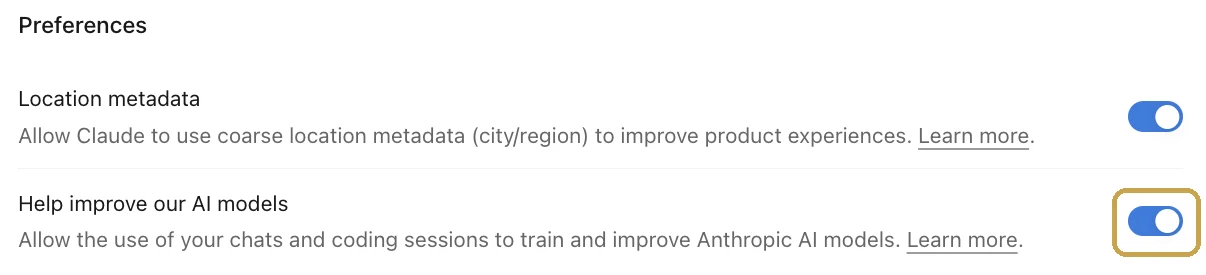
The safest option is a business plan. The next best is a personal plan with model training turned off.
Claude. Under Anthropic’s Aug 28, 2025 consumer terms update, Free, Pro and Max users choose whether chats are used for training. Opt out and the 30-day retention period continues; opt in and retention extends to five years.
Anthropic’s privacy center covers its commercial products (Team, Enterprise, API) separately. Those are not used for training by default.
ChatGPT. According to OpenAI’s data controls page, data sharing is on by default for personal Free, Plus and Pro workspaces. You turn it off under Settings → Data controls → Improve the model for everyone.
OpenAI also states that by default it does not use content from ChatGPT Business, Enterprise or Edu workspaces to train its models.
One catch most people miss. OpenAI notes that if you give thumbs-up or thumbs-down feedback after opting out, the whole conversation tied to that feedback may be used for training. Don’t rate your scorecard chats.
Claude vs. ChatGPT for Building a Scorecard
| What you need | Claude | ChatGPT |
|---|---|---|
| Saved workspace with standing instructions | Projects | Projects |
| Real calculations on CSV exports | Runs code on uploaded files | Runs code on uploaded files |
| One-page visual scorecard | Artifacts | Canvas |
| No training by default on business plans | Team, Enterprise, API | Business, Enterprise, Edu |
| Consumer training setting | “Help improve our AI models” | “Improve the model for everyone” |
| Live ad and analytics data | Connectors (varies by plan) | Plugins (varies by plan) |
Use the one your firm already pays for. Both can do this job.
The difference that matters more than the tool: make it do the math with code, not in its head. The prompts below force that.
For other ways firms are putting these tools to work, see 7 ways law firms should be leveraging AI.
How to Build Your Scorecard, Step by Step
The first build takes about an hour
- Export 90 days of data from each source
- Strip client names and phone numbers
- Set up a Project with standing instructions
- Paste the build prompt
- Check the math
- Turn it into a one-page visual
Six steps. Most of the hour goes to exporting data, not to the AI.
Step 1: Export 90 Days of Data From Each Source
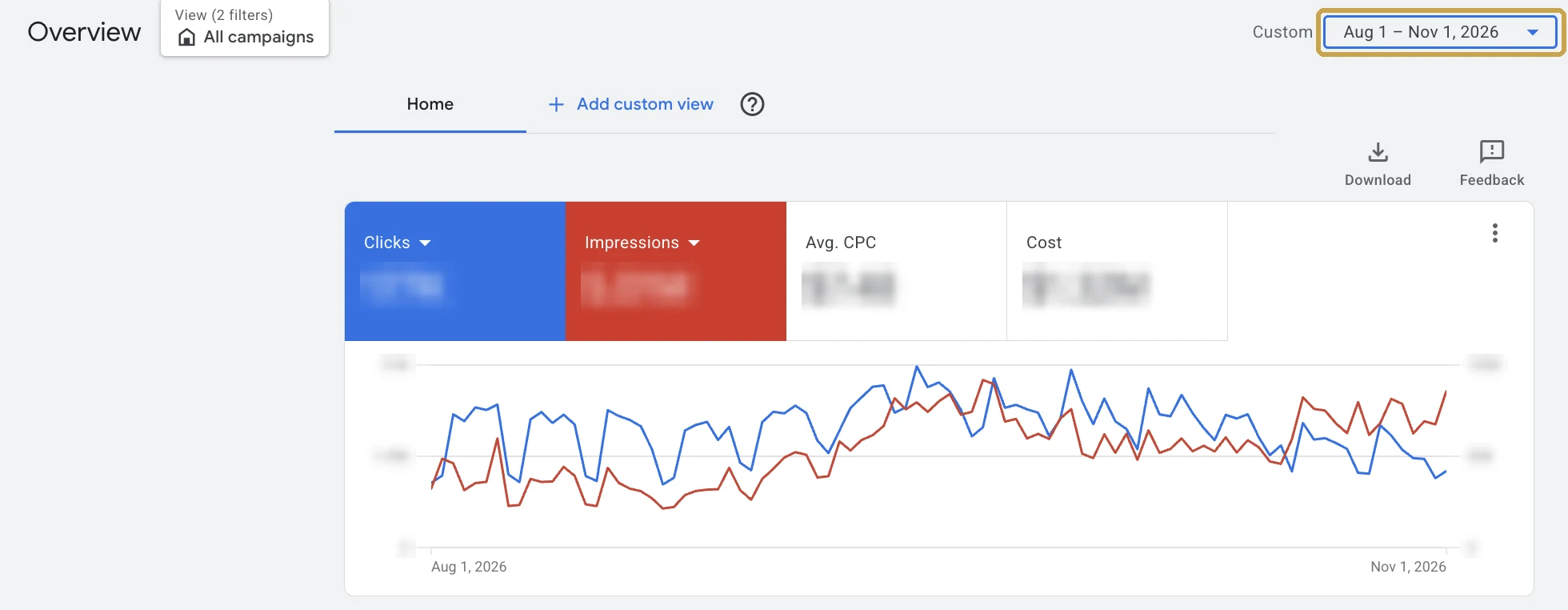
For the first build, export the last 90 days from each source, broken out by week:
- Google Ads: campaign report with cost, clicks and conversions.
- Local Services Ads: lead report with lead type and charge status.
- Meta Ads Manager: campaign report with amount spent and leads.
- Call tracking: call log with source, date, time, duration and answered or missed.
- CRM or intake software: one row per lead with source, “how did you hear about us,” date, status and disposition.
- GA4: leads (form fills and chats) by source, including AI tools.
- Google Search Console: the Queries report, for branded vs. non-branded clicks.
- Google Business Profile: calls and website clicks.
- Invoices for anything without an ad account: SEO, content, website, tools.
Set the date range before you export, like the custom range highlighted above. Every file has to cover the same 90 days or the math won’t line up.
You don’t have to pull these yourself. Your intake manager or office administrator can export the CRM and call log. Whoever runs your ads, in-house or agency, can send the ad platform exports.
Ask for each one as a CSV, a plain spreadsheet file that Excel and Google Sheets both open. If someone can’t produce the file you asked for, that tells you something too.
Ninety days gives the AI 13 weeks of history to start from. After that, each weekly update only needs the last 4 weeks.
Save every file as CSV with a clear name, like google-ads-aug-oct.csv or crm-leads-aug-oct.csv.
Step 2: Strip Client Names and Phone Numbers From the CRM Export
❌ Delete these columns
- Name
- Phone number
- Address
- Intake notes, injury details, case facts
- Any free-text field
✅ Keep only these
- Lead ID or row number
- Source or channel
- Date and time of inquiry
- Date and time of first contact
- Status (qualified, consult, signed, lost)
- Lost-lead reason and case type
Open the CRM export in Excel or Google Sheets before it goes anywhere near an AI tool.
Delete every column on the left. Keep only the columns on the right.
Do the same for your call tracking export. Phone numbers come out.
Step 3: Set Up a Project With Standing Instructions
Create a Project called “Marketing Scorecard.” Paste this into the project’s instructions:
You are helping a personal injury law firm build and maintain a weekly marketing scorecard.

Rules:
- The goal metric is cost per signed case by channel. Everything else supports it.
- Always do calculations with code on the uploaded files. Never estimate numbers in your head.
- Show the formula and the inputs for every number you report.
- If data is missing or a file doesn't have a column you need, say so. Do not guess or fill gaps.
- Treat these as the channel names: Google Ads, Local Services Ads, Meta Ads, Organic Search, Google Business Profile, AI Search, Referral, Other.
- Unpaid channels still have costs. When I give you a monthly cost for a channel (like an SEO retainer), spread it evenly across that month's weeks.
- A "lead" is a unique person, not a unique call. Deduplicate repeat callers by Lead ID or by matching date and source.
- Keep the full history in scorecard-history.csv: one row per channel per week, weeks starting Monday. Credit each signed case to the week the lead first came in.
- Every update must end with an updated scorecard-history.csv for me to download.
- Use plain language. The reader is a busy firm owner, not a marketer.
These instructions carry over to every chat in the project. You write them once.
Step 4: Paste the Build Prompt
What the build prompt asks for
- All 12 metrics, by channel, for each of the last 13 weeks
- A summary table with 4-week and 13-week averages
- The 3 biggest problems, each tied to a number
- A list of anything it couldn’t calculate, plus the history file
Upload your cleaned files to a new chat inside the project, then paste this:
I've uploaded 90 days of marketing and intake data for my law firm:
[list your files here]

Build my weekly marketing scorecard. For each of the last 13 weeks, and for each channel, calculate:

1. Spend
2. Leads (deduplicated)
3. Cost per lead
4. Qualified lead rate
5. Consult rate
6. Sign rate
7. Signed cases
8. Cost per signed case
9. Call answer rate
10. Median speed to lead (minutes)
11. Organic and Google Business Profile leads
12. Lost-lead reasons (count by reason)

Then:
- Show a summary table with channels as rows and these metrics as columns.
- Show 4-week and 13-week averages for cost per signed case and signed cases.
- List the 3 biggest problems you see, each tied to a specific number.
- List any data you couldn't calculate and what's missing.
- Create scorecard-history.csv (one row per channel per week, all 12 metrics) for me to download.

My monthly costs for unpaid channels: [e.g., SEO $8,000, website $500]. Include them as spend.

Use code for every calculation. Show your formulas.
If your firm tracks fees by case type, add one line: “My average fee per signed case is $[X] for [case type]. Add return per case by channel.”
Step 5: Check the AI’s Math Before You Trust It
| Spot check | How to verify it yourself | If it’s off, ask |
|---|---|---|
| Total spend | Add up invoices or platform totals | “Show me the rows you used for spend.” |
| Total signed cases | Count them in your CRM | “List the Lead IDs you counted as signed.” |
| Cost per signed case, biggest channel | Divide the two numbers above | “Show the formula and inputs for this channel.” |
Never send a scorecard to your partners without checking it.
Run the three spot checks above by hand. If one is off, the follow-up question usually reveals a date-range mismatch or double-counted leads.
This takes five minutes and it’s not optional. AI tools can make arithmetic and grouping errors, especially when files disagree.
Step 6: Turn It Into a One-Page Visual Scorecard
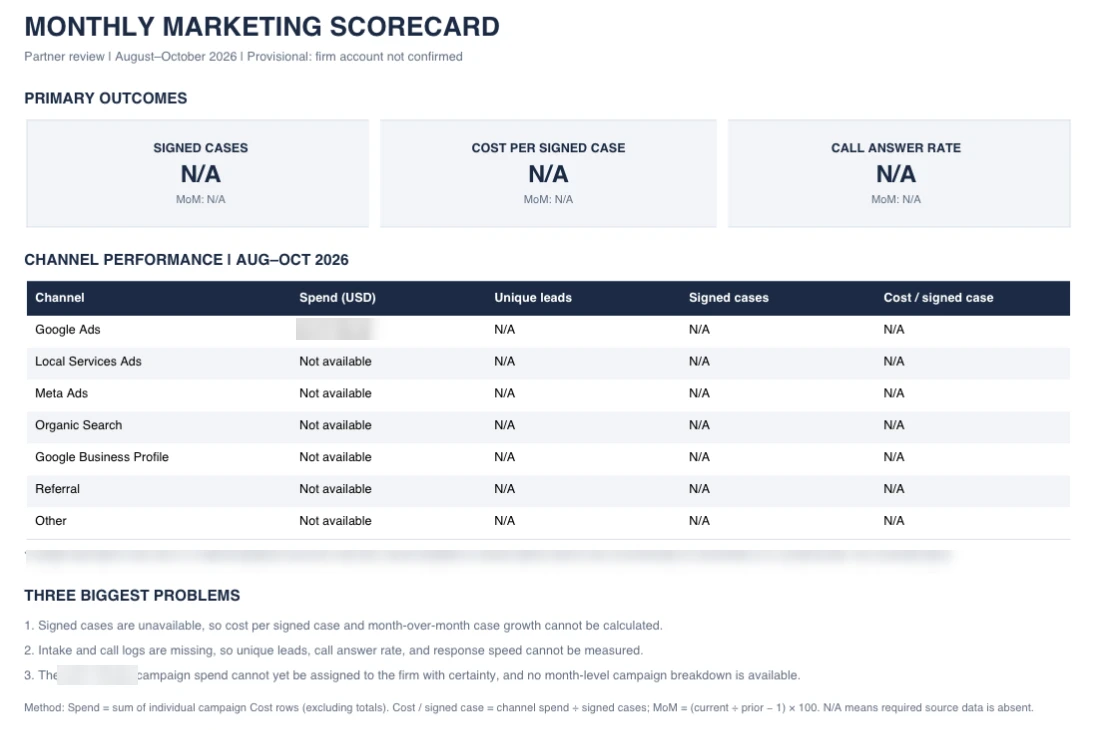
Once the numbers check out, paste this:
Turn this into a one-page visual scorecard I can share with my partners.

Layout:
- Top row: signed cases, cost per signed case, call answer rate, each for the last 4 weeks vs. the 13-week average.
- Middle: channel table with spend, leads, signed cases, cost per signed case.
- Bottom: the 3 biggest problems, one sentence each.

Keep it clean and readable. No decorative charts.
Look at the example above. It was built with only the Google Ads export uploaded, so almost every number reads N/A.
That’s the project instructions doing their job. No CRM means no signed cases, so the AI says so instead of inventing them. Its “three biggest problems” are the missing files.
Upload all five sources and those N/As fill in.
Then download the history file and add it to your project’s files. That file is what turns a one-time report into a living scorecard.
How to Keep Your Scorecard Updated Every Week
| When | Who | What | Time |
|---|---|---|---|
| Every morning | Intake manager | Yesterday’s missed calls and unreturned leads | 5 min |
| Every week | Office administrator or you | Add the week to the scorecard | 15 min |
| Every month | Managing partner | Partner summary and agency check-in | 15 min |
| Every 90 days | Partners | Budget decisions by channel | 1 hour |
You build the scorecard once. After that, it’s a living document: you add a week to it every week, and it keeps the full history.
That’s the difference between a scorecard and a report. A report tells you what happened last month. A living scorecard shows you the trend while you can still do something about it.
The table above is the whole rhythm. The weekly update is the only part that uses AI.
Keep a Running History File
The history file is the scorecard’s memory
- History file
- This week’s exports
- AI update
- New scorecard + new history file
Don’t rely on the AI to remember your numbers between chats. Give the scorecard a memory it can’t lose: a spreadsheet file called scorecard-history.csv.
It has one row per channel per week, with all 12 metrics. The first build creates it from your 90 days of data.
Every week, the AI adds the new week and hands back an updated file. Download it, and replace the old copy in your project’s files (ChatGPT lists them under Sources).
Keep a copy in your firm’s own drive too. The history file is yours, not the AI tool’s, and it’s the record you’ll want if you ever change agencies.
The Weekly Update Prompt
Three prompts to save in your project
- Weekly update: add the week, refresh the trends, flag changes
- Intake leak: find where calls die and what it cost
- Monthly partner summary: five sentences for the partners
Each week, upload the history file and the latest exports, then paste this:
I've uploaded scorecard-history.csv and the latest exports covering the last 4 weeks: [list files].

1. Recalculate the last 4 weeks from the new exports and replace those weeks in the history. Leave older weeks unchanged.
2. Rebuild the one-page scorecard using the same layout as before.
3. Show this week next to the 4-week average and the 13-week average.
4. Flag:
   - Any channel where 4-week cost per signed case rose more than 20%.
   - Any drop in answer rate or rise in median speed to lead.
   - Any change in the top lost-lead reason.
5. Give me the updated scorecard-history.csv to download.

Use code for every calculation and show formulas.
The intake leak prompt (run it whenever answer rate drops):
Using the call log and CRM data, show me:
- Leads and answer rate by hour of day and day of week.
- Sign rate by speed-to-lead band (under 5 min, 5-60 min, same day, next day+).
- Lost-lead reasons by channel.
Tell me the single biggest intake leak and how many signed cases it likely cost us in the last 4 weeks, showing your assumptions.
The monthly partner summary prompt:
Using scorecard-history.csv, write a 5-sentence summary of the last 4 weeks for my partners.
Lead with signed cases and cost per signed case. Name one thing that improved, one that got worse, and one decision we need to make.
Why Weekly Cost per Signed Case Jumps Around
❌ Reacting to one week
- Cutting a channel after a bad week
- Only exporting the last 7 days
- Counting a case in the week it signed
✅ Reading the trend
- 4-week and 13-week averages
- Re-exporting the last 4 weeks every time
- Crediting each case to the week the lead came in
A lead that calls on Friday might not sign for two weeks. So one week’s signed cases will always look low, then catch up.
That’s why the weekly prompt re-exports and recalculates the last 4 weeks every time. Late signings get credited back to the week the lead came in.
Watch intake numbers week to week. Judge channels on the 4-week and 13-week averages, and make budget calls on the 90-day trend.
What to Check Every Day
The 5-minute morning check (no AI needed)
- Missed calls from yesterday that haven’t been called back
- New leads with no first contact logged
- Retainers sent but not signed for more than 2 days
- Leads marked lost without a reason
The daily check doesn’t touch the AI at all. Your intake manager runs it from call tracking and the CRM, every morning.
This is where cases are saved, not measured. A missed call returned by 9 a.m. is a lead. The same call returned next week is a statistic on your scorecard.
If you want to automate the exports themselves, we show how we did it for one firm in 5 ways we automated a law firm’s marketing.
Connecting Google Ads and GA4 Directly (Optional)
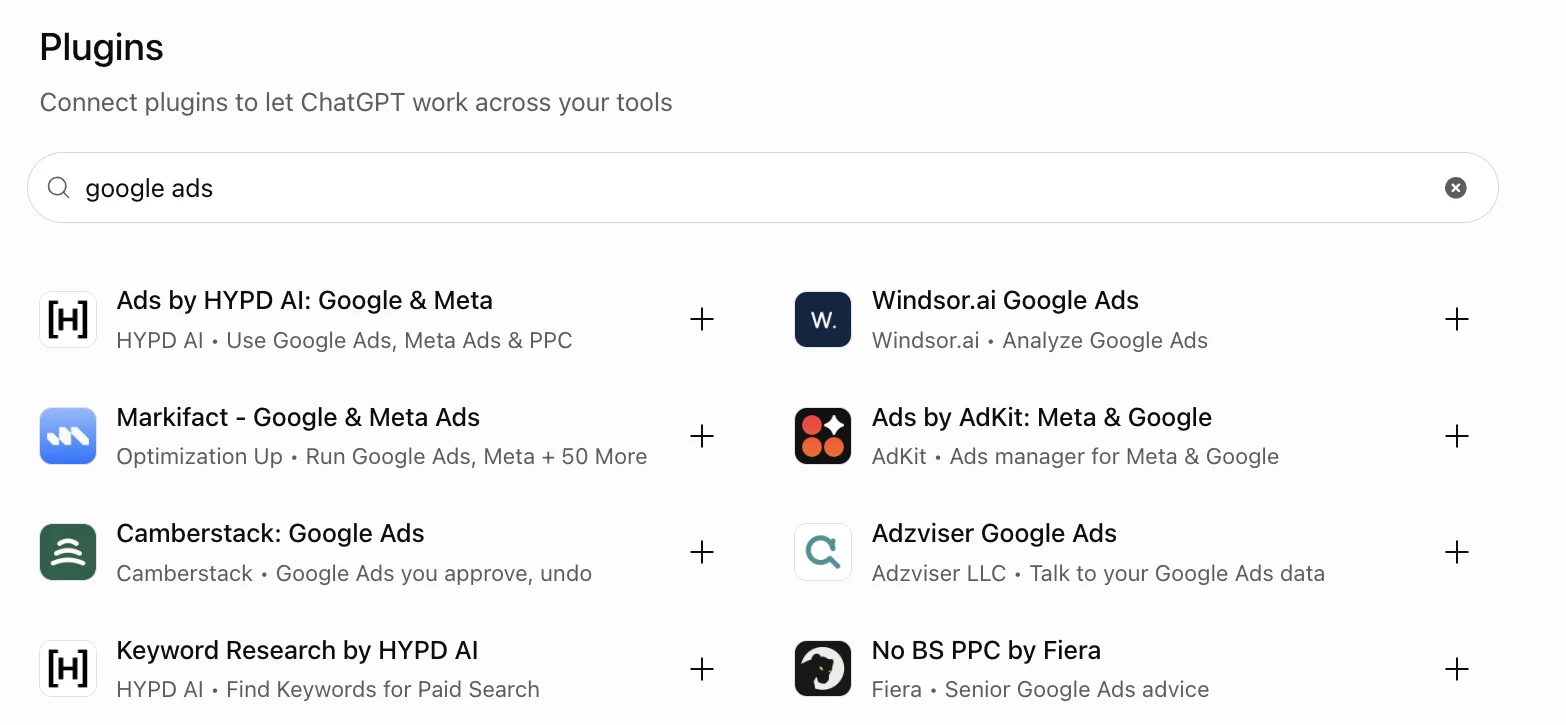
Both Claude and ChatGPT can plug directly into outside tools like Google Ads. Claude calls these add-ons connectors; ChatGPT calls them plugins.
That means you can skip CSV exports for some sources and pull live numbers instead. It’s also the path to a scorecard you can refresh any day, not just weekly.
Three warnings before you do:
- Your CRM is still the source of truth for signed cases. Most connectors only reach the ad platforms.
- A connector to your CRM gives the AI access to client records. Treat that as a confidentiality decision, not a convenience setting.
- Most are built by outside companies, not by Google, OpenAI or Anthropic. Search “google ads” and you’ll get a list like the one above. Connecting one gives that company access to your ad account, so read its privacy terms first.
For most firms, CSV exports are simpler and safer. Start there.
How to Read Your Scorecard: A Worked PI Example
| Firm A | Firm B | |
|---|---|---|
| Monthly spend | $30,000 | $30,000 |
| Inbound calls | 200 | 200 |
| Answer rate | 40% | 90% |
| Answered calls | 80 | 180 |
| Signed cases (25% of answered) | 20 | 45 |
| Cost per signed case | $1,500 | $667 |
Here’s why intake belongs on the same page as your ad spend.
Two firms. Same market, same $30,000 monthly spend, same 200 inbound calls.
The only difference is answer rate. Firm A answers 40%, the Clio benchmark, and Firm B answers 90%.
Example assumptions: every unanswered call is treated as lost (worst case), and 25% of answered calls become signed cases, a planning assumption for lead-to-signed rate.
Same ads, same budget. Firm B pays less than half per case because someone picks up the phone.
In real life some missed callers call back, so the gap is smaller. But the direction never changes.
Set your own line from your case values. If you know what a typical case is worth to your firm, you know the most you can afford to pay per signed case.
If a channel runs well above that line, check intake before you cut the channel.
5 Red Flags Your Scorecard Will Catch
| ❌ Red flag | ✅ What to do |
|---|---|
| Leads up, signed cases flat | Check intake and lead quality, not volume |
| “Never reached” is the top lost-lead reason | Fix answer rate and after-hours coverage first |
| Cheap cost per lead, terrible sign rate | Ask whoever runs your ads why they’re reaching the wrong people |
| Cost per signed case up 3 months running | Ask your agency what changed and for a fix with a deadline |
| No one can tie a signed case to its source | Make lead source a required field in your CRM |
These patterns show up again and again. The table above pairs each one with its fix.
Notice who owns each fix. The first two are yours: they’re intake problems dressed up as marketing problems. The last three are questions to put to whoever runs your marketing.
I know what you’re thinking: “My agency should be catching this.” They should. Now you’ll know if they are.
Mistakes That Make AI Scorecards Wrong
| ❌ Mistake | ✅ Fix |
|---|---|
| Letting the AI do mental math | Project instructions force code. Keep that line in. |
| Mismatched date ranges | Export the exact same 90 days from every source |
| Counting calls as leads | One person who calls three times is one lead |
| Trusting platform “conversions” as cases | Signed cases only come from your CRM |
| Mixing practice areas | Split PI from family law or criminal defense |
Most bad scorecards come from one of the five mistakes above.
The fourth catches the most firms. Google and Meta count form fills and calls as conversions. Only your CRM knows who signed.
FAQ
Cost per signed case = Total channel spend ÷ Signed cases from that channel
The one number every answer below comes back to.
Do I Need a CRM to Build This Scorecard?
| Date | Source | Qualified | Consult | Signed | Lost reason |
|---|---|---|---|---|---|
| One row per lead | Channel | Y / N | Y / N | Y / N | From your fixed list |
No, but you need a lead log. A spreadsheet with the six columns above is enough to start.
Without it, you can calculate cost per lead but not cost per signed case.
How Often Should I Update the Scorecard?
| What | How often |
|---|---|
| Missed calls and unreturned leads | Daily |
| Full scorecard update | Weekly |
| Partner summary | Monthly |
| Budget decisions by channel | On the 90-day trend |
Weekly for the full scorecard, daily for missed calls and unreturned leads.
Make budget decisions on the 90-day trend, never on one week.
Can I Use Gemini Instead?
Any assistant works if it can do two things
- Run calculations with code on uploaded files
- Keep standing instructions across chats
Yes. The same method works in any assistant that can run calculations on uploaded files and keep standing instructions, and the prompts carry over.
Apply the same privacy checks to whatever tool you use.
